Free AI Forex Chart Analysis 2026: Grade Any Forex Setup From a Screenshot
Screenshot any forex chart from MetaTrader, TradingView, or your broker platform. SnapPChart grades the setup, gives you entry, stop loss, and profit targets for EUR/USD, GBP/JPY, XAU/USD, and every pair you trade. Grade every setup before you risk a dollar.
Drag and drop your chart screenshot
or click to browse. PNG, JPG, or WebP.
Your first analysis is free. No credit card.
Make sure both the time axis (X) and price axis (Y) are visible in your screenshot for accurate results.
Quick answer
Can AI analyze a forex chart?
Yes. Upload a screenshot of any forex pair from MetaTrader, TradingView, or your broker and SnapPChart gives the setup a letter grade, reads the direction (buy or sell), and makes one call: take it, wait for a pullback, or skip it. Take and wait calls come with an entry, a stop loss, and targets in pips.
It reads the chart you upload, so it works on majors, crosses, and gold on any timeframe you can screenshot, from 1-minute scalps to daily swings. It does not pull live quotes, read the economic calendar, or connect to your broker, so check the current price and any scheduled news before you act on the levels. 2 lifetime free chart reads. Full analysis on the first, grade and general analysis on the second. No card required.
Supported Forex Pairs & Commodities
SnapPChart analyzes any forex pair or commodity you can screenshot. Here are the most popular pairs traders upload. Trading gold? See the dedicated XAUUSD chart analysis page for gold setup grading.
Major Pairs
- EUR/USDEuro / US Dollar
- GBP/USDBritish Pound / US Dollar
- USD/JPYUS Dollar / Japanese Yen
- USD/CHFUS Dollar / Swiss Franc
- AUD/USDAustralian Dollar / US Dollar
- USD/CADUS Dollar / Canadian Dollar
Cross Pairs
- GBP/JPYBritish Pound / Japanese Yen
- EUR/GBPEuro / British Pound
- EUR/JPYEuro / Japanese Yen
- AUD/JPYAustralian Dollar / Japanese Yen
- GBP/AUDBritish Pound / Australian Dollar
- EUR/AUDEuro / Australian Dollar
Commodities
- XAU/USDGold / US Dollar
- XAG/USDSilver / US Dollar
- WTI/USDCrude Oil / US Dollar
- XAU/EURGold / Euro
How AI Forex Chart Analysis Works
From forex chart screenshot to actionable trade plan in three steps
Screenshot Your Forex Chart
Open any forex chart on MetaTrader, TradingView, cTrader, or your broker platform. Take a screenshot of the pair and timeframe you want analyzed.
AI Analyzes the Chart
Our AI reads candlestick patterns, key support and resistance levels, indicator signals, and session context to build a complete picture of the trade setup.
Get Your Forex Trade Plan
Receive a trade grade, specific entry price, stop loss in pips, multiple take-profit targets, and risk/reward ratio for the pair. B is the top grade on forex and gold.
Walkthrough: Grading a Live XAUUSD Setup
Here's what happens when you upload a gold chart to SnapPChart
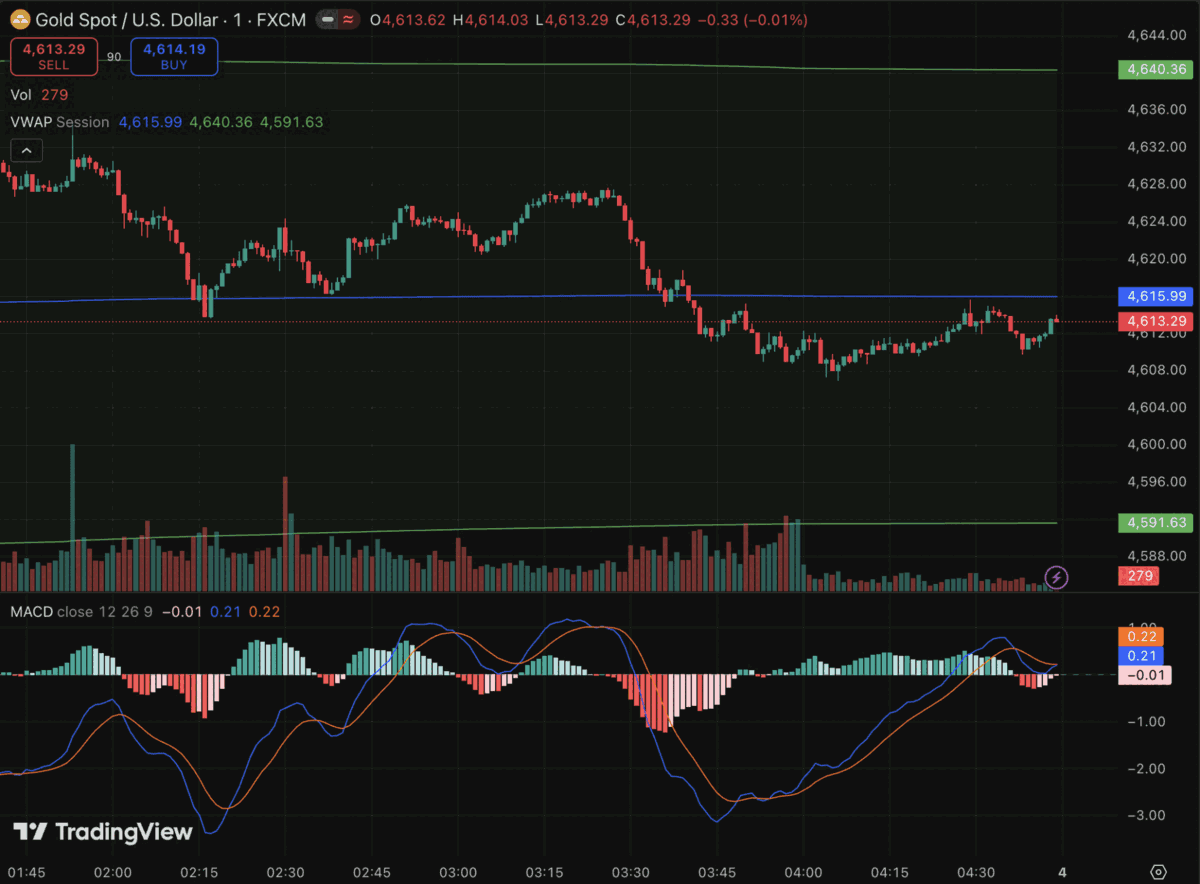
Sample XAUUSD chart, the same format you'd screenshot from MetaTrader or TradingView
This is a 1-minute XAU/USD chart from FXCM with session VWAP, volume, and MACD left on it. SnapPChart reads the image itself: the timeframe, the indicators you chose to show, and the levels the candles keep reacting to. You do not type out what the chart shows and you do not connect a data feed.
On this capture gold sells off from 4,628 through session VWAP at 4,615.99 and bottoms at 4,608 on expanding red volume. Price has based between 4,608 and 4,616 since, without closing back above VWAP, and the MACD has crossed under its signal line. Concern: the base has not produced a reclaim, so a long here buys into the supply that drove the breakdown.
Spread cost is folded into that judgement. Gold spreads widen off-hours, so the distance to the stop has to be wide enough that the spread does not eat the reward. On currency pairs the plan has to clear 2.5:1 before it is issued, rather than the 2:1 used on stocks, which is what separates a real setup from a tight scalp that only looks good before costs.
The same read applies to EUR/USD, GBP/USD, and USD/JPY: structure, the levels price is reacting to, the indicators on your chart, and the reward measured against a structural stop. Session quality counts toward the grade, read off the timestamps on your chart rather than a live clock. It does not pull the economic calendar and it cannot see your broker's actual quote, so a data release or a widened spread stays your call. One screenshot, one structured grade.
Setup state
Wait for reclaim
Direction
Long
Decision level
4,615.99 (VWAP)
Invalidation
4,608.00 (base low)
Last close
4,613.29
Grade ceiling
B
B is the highest grade SnapPChart issues on forex and gold, whatever the setup scores. The momentum scoring behind the grade was built on stock dynamics, so we hold back the A range on asset classes where it has not earned it yet.
What the AI Analyzes on Your Forex Chart
SnapPChart applies forex-specific analysis to every currency pair and commodity chart you upload
Session Context Awareness
The AI considers whether the chart falls within the London, New York, or Asian session. Session overlap periods like London-New York tend to produce the strongest moves, and the analysis factors this into its confidence grade and target projections.
Pip-Based Targets
All entry, stop loss, and take-profit levels are expressed in both price and pips. The AI calculates risk/reward ratios in pip terms so you can quickly assess whether the setup meets your minimum R:R threshold before entering.
Spread Considerations
Forex spreads vary by pair and session. The AI flags when a setup has tight targets relative to typical spread costs, helping you avoid trades where the spread eats into your potential profit.
Key Level Identification
The AI identifies major support and resistance zones, round number levels, previous session highs and lows, and areas of price consolidation that act as magnets or barriers for price action.
Multi-Pair Pattern Recognition
Whether you trade EUR/USD flags, GBP/JPY breakouts, or XAU/USD trend continuations, the AI recognizes chart patterns across all forex pairs and commodities including bull flags, head and shoulders, triangles, and double tops.
Risk Management Guidance
Every forex analysis includes position sizing recommendations based on your account size, a clearly defined stop loss level, and trailing stop guidance so you can manage the trade from entry to exit.
Learn more about the technical analysis behind forex trading
Forex news
Recent forex & FX commodity headlines
The latest stories on EUR/USD, GBP/USD, USD/JPY, XAU/USD, and the other pairs SnapPChart traders are analysing. Refreshed every 30 minutes.
USDJPY Still Lacks Direction Signal but Slightly Biased Higher
USDJPY Still Lacks Direction Signal but Slightly Biased Higher Action Forex
US Dollar Price Forecast: DXY Tests 101.76, Can EUR/USD and GBP/USD Extend Gains?
Fed pause bets pressure DXY toward 101.76, while EUR/USD targets 1.1272 and GBP/USD eyes 1.3284 amid rising ECB and BoE tightening expectations.
EUR/CHF Technical Outlook: Expert Forex Analysis for the Euro-Swiss Pair
EUR/CHF Technical Outlook: Expert Forex Analysis for the Euro-Swiss Pair Action Forex
Gold Bears Approach Major Support, USD/CHF Eyes Reversal
Gold Bears Approach Major Support, USD/CHF Eyes Reversal FOREX.com
USD/JPY falters, EUR/USD awaits French bond verdict
USD/JPY falters, EUR/USD awaits French bond verdict Forex Factory
USD/CHF Daily Outlook
USD/CHF Daily Outlook Action Forex
SnapPChart vs ChatGPT vs Claude for Forex Analysis
General AI tools can describe a chart. SnapPChart grades the setup and gives you numbers you can actually trade from.
| Dimension | SnapPChart | ChatGPT | Claude |
|---|---|---|---|
| Output format | Structured grade + entry / stop / targets with pip math | Prose commentary — you do the math yourself | Prose commentary — you do the math yourself |
| Session context | London / NY / Asia session baked into every grade | Only if you prompt for it | Only if you prompt for it |
| Forex-specific analysis | Spread cost check, pip-based R:R, pair-specific confluence | Treats forex charts the same as stock charts | Treats forex charts the same as stock charts |
| Free tier | 2 free analyses, no credit card | Requires ChatGPT Plus ($20/mo) for vision | Requires Claude Pro ($20/mo) for vision uploads |
| Result speed | Graded output in seconds, no prompt engineering | Varies; needs a well-crafted prompt to get useful output | Varies; needs a well-crafted prompt to get useful output |
ChatGPT vision requires Plus ($20/mo). Claude vision requires Pro ($20/mo). SnapPChart starts free.
Frequently Asked Questions
Everything you need to know about AI forex chart analysis
Can AI tell me whether to buy or sell a forex pair from a chart screenshot?
Yes. Upload a screenshot of the pair from MetaTrader 4, MetaTrader 5, TradingView, or your broker, and SnapPChart reads the direction, buy (long) or sell (short), then makes one of three calls: take the trade, wait for a pullback, or skip it. Take and wait calls come with an entry, a stop loss, and targets in pips. 2 lifetime free chart reads. Full analysis on the first, grade and general analysis on the second. No card required.
What's the best forex chart analysis AI in 2026?
SnapPChart is purpose-built for forex chart screenshots. It returns structured output — grade, entry, stop, and pip targets — not raw prose. It also reads session context (London/NY/Asia) and checks spread impact automatically, which general AI tools like ChatGPT or Claude don't do unless you prompt them explicitly. For traders who want a consistent grading workflow rather than a chat interface, SnapPChart is the faster, more repeatable option.
How does AI forex analysis compare to ChatGPT or Claude in 2026?
ChatGPT and Claude can describe what they see on a chart, but they return prose, not structured trade plans. You still need to interpret the entry level, calculate pip distance, and decide on position size yourself. SnapPChart skips all of that. You get a letter grade, a specific entry, a stop loss in pips, two profit targets, and an R:R ratio in one output. It's a different use case: grading setups before you enter, not chatting about markets.
Can AI grade XAUUSD setups specifically?
Yes. XAUUSD (gold) is one of the most-uploaded pairs on SnapPChart. The AI applies the same session-aware, pip-based analysis it uses for currency pairs. Gold setups are graded against key support/resistance, pattern recognition (flags, triangles, trend continuations), and session context. London open and NY open are the highest-volume windows for XAUUSD, and the AI factors this into its confidence grade.
What's the highest grade a forex chart can get?
B. SnapPChart caps forex, gold, and every other non-stock instrument at a B grade. The momentum scoring behind the grade was built and tested on stock dynamics, so we deliberately hold back the A range on asset classes where it has not earned it yet. In practice B is the setup worth taking and C or F is the one to skip. You still get the full entry, stop, pip targets, and R:R on every grade.
Does SnapPChart work for prop firm forex challenges?
Yes. Many prop firm traders use SnapPChart to grade setups before entry so they only take B-grade setups during their challenge. B is the top grade on forex and gold, so that is the bar to clear. Grading every setup reduces overtrading and C-grade entries, which are the most common reasons traders fail funded account evaluations.
Read the prop firm grading guideWhat forex pairs can SnapPChart analyze?
SnapPChart can analyze any forex pair or commodity you can screenshot. This includes all major pairs (EUR/USD, GBP/USD, USD/JPY, USD/CHF, AUD/USD, USD/CAD), cross pairs (GBP/JPY, EUR/GBP, EUR/JPY, AUD/JPY), and forex-platform commodities like XAU/USD (gold), XAG/USD (silver), and crude oil. If you can see it on a chart, SnapPChart can analyze it.
Which forex charting platforms work with SnapPChart?
SnapPChart works with screenshots from any forex charting platform. MetaTrader 4 and MetaTrader 5 are the most popular, but you can also upload charts from TradingView, cTrader, NinjaTrader, ThinkOrSwim, or your broker's web-based charts. The AI reads the visual chart data regardless of which platform generated it.
Does the AI understand forex-specific indicators like pivot points and Fibonacci levels?
Yes. The AI recognizes standard forex indicators including pivot points, Fibonacci retracement and extension levels, Bollinger Bands, MACD, RSI, moving averages, and VWAP. For the best results, make sure these indicators are visible on your chart when you take the screenshot so the AI has more data points to work with.
How does AI forex analysis differ from stock chart analysis?
When SnapPChart detects a forex pair or commodity, it automatically switches to a forex-specific analysis mode. This means targets are expressed in pips, session context (London, New York, Asian) is considered, spread impact is evaluated, and the analysis accounts for the 24-hour nature of the forex market rather than fixed stock market hours.
Can I use SnapPChart for forex scalping on lower timeframes?
Yes. SnapPChart analyzes charts on any timeframe from 1-minute scalping charts to weekly swing trade setups. For scalping, upload your 1-minute or 5-minute chart with your preferred indicators visible. The AI will identify short-term patterns and provide tight entry/exit levels appropriate for the timeframe shown.
Is the first forex chart analysis free?
Yes. Your first forex chart can be analyzed free, and every new account starts with 2 free chart reads. Upload EUR/USD, GBP/JPY, XAU/USD, or another chart to see the setup grade and core read. Pro gives complete entries, stops, targets, and risk notes on every forex setup.
Upload Your Forex Chart Free
Stop taking C-grade setups. Get an AI-powered grade for any forex pair or commodity before you risk money on the trade.
Analyze Your Forex Chart