XAUUSD analysis AI: grade the gold setup from a screenshot before volatility takes over.
Upload a gold chart screenshot and get a setup grade for XAU/USD, gold futures, GLD, or related metals setups. Your first grade is free; paid plans add the entry, stop loss, targets, and risk notes.
Drag and drop your chart screenshot
or click to browse. PNG, JPG, or WebP.
Your first grade is free, no card: a summarized analysis of your chart and a graded second opinion on whether to take it, wait or pass.
Make sure both the time axis (X) and price axis (Y) are visible in your screenshot for accurate results.
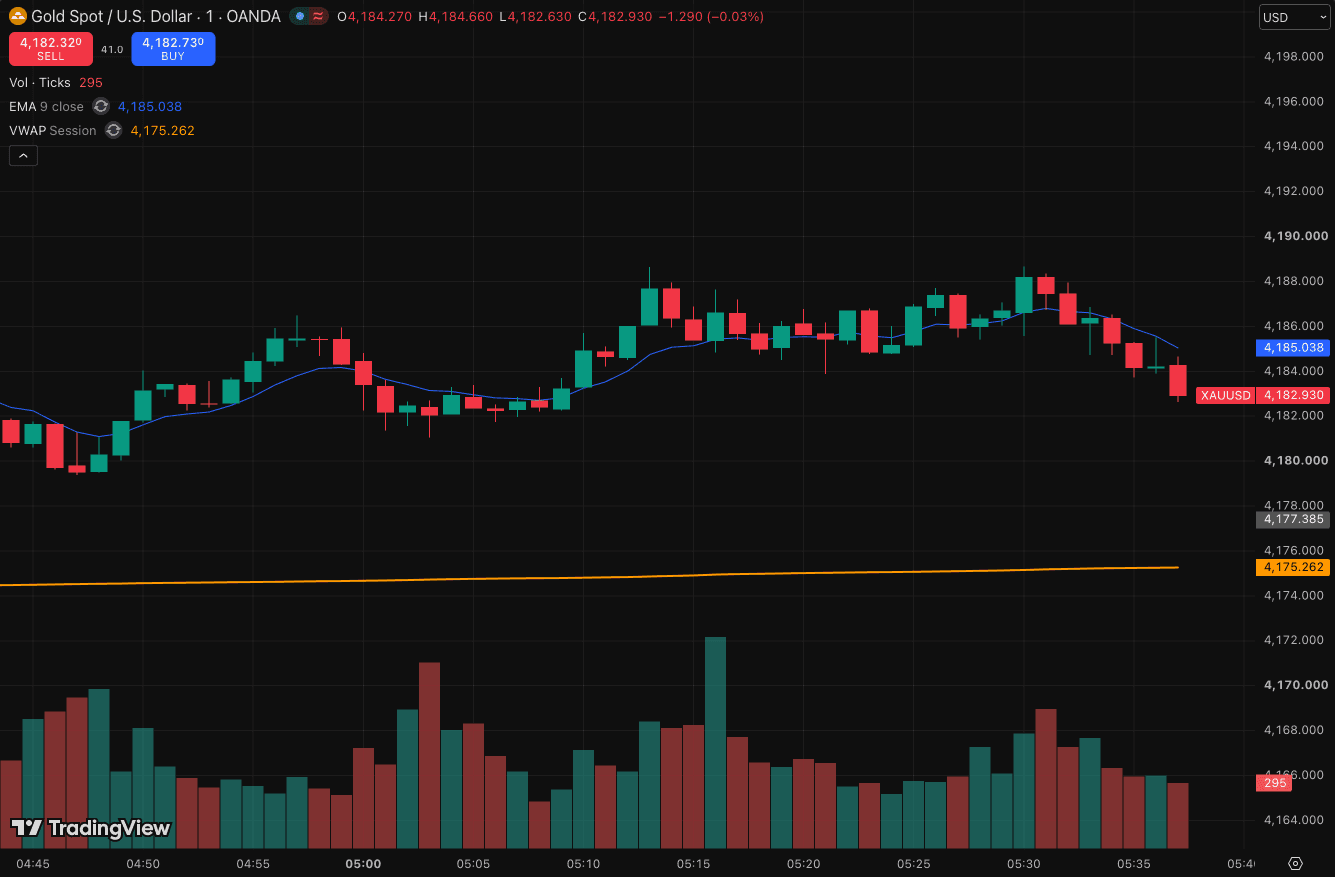
XAUUSD double-topped at 4188.6 and slipped under the 9 EMA, with highs stepping down into 4182.9.
XAU/USD
Spot gold against the US dollar
GC
Gold futures charts
GLD
Gold ETF setups
XAG/USD
Silver when traded alongside gold
Quick answer
Can AI analyze a gold chart?
Yes. SnapPChart grades your XAUUSD chart from an MT4, MT5, or TradingView screenshot. The AI reads candles, trend, support and resistance, momentum, and risk/reward, then returns a setup grade and one call: take it, wait for a pullback, or skip it. It works on spot gold, gold futures, or a gold ETF, because the read follows the visible price scale rather than the ticker.
Gold behaves differently from a typical forex pair or stock, and the read accounts for that. It moves hardest around the London and New York overlap and around CPI, FOMC, and NFP releases, it respects round-number levels more consistently than most instruments, and it produces sharper wick-driven fakeouts on lower timeframes. The grade flags when a chart looks news-driven or extended rather than structurally clean, which matters more on gold than on a slower pair. New accounts get one free grade. You get a summarized analysis of your chart and a graded second opinion on whether to take it, wait or pass. No card needed to try it.
What the AI returns from a gold chart screenshot
Use the output as a repeatable pre-trade checkpoint, not a prediction.
A+ to F Setup Grade
See whether the setup has enough pattern clarity, momentum, volume, and reward to justify the risk.
Entry, Stop, Targets
Get a structured trade plan with entry zone, invalidation level, targets, and risk/reward.
Screenshot-Based Read
Use charts from TradingView, Webull, ThinkOrSwim, MetaTrader, Robinhood, or any broker.
Risk Notes First
The analysis flags extension, messy chop, weak retests, thin reward, and conflicting indicators.
When to use it
Grade XAUUSD before the move gets emotional
Gold can move fast around London, New York, CPI, FOMC, and dollar-driven volatility. SnapPChart gives you a consistent checkpoint before you chase a candle or widen a stop.
- Check an XAUUSD breakout before entering during New York session
- Grade a gold pullback into VWAP, EMA, or prior resistance
- Compare a spot gold chart against gold futures or GLD
- Filter out messy chop before a news-heavy session
- Run AI gold chart analysis on a XAU/USD screenshot before the London open
- Grade the gold setup around CPI, FOMC, or NFP instead of guessing the reaction
- Check whether a break above a round number is clean or already extended
- Re-grade XAUUSD after the Asian range to see whether the structure still holds
- Grade XAU/USD and silver in the same sitting and take only the cleaner chart
Live XAUUSD news
Latest gold market headlines
Recent XAUUSD and gold stories from Yahoo Finance and Google News. Use the news read alongside your chart grade before sizing into a position.
Why gold plunged to its lowest price in a year despite renewed Iran jitters
Safe-haven gold fell to its lowest price in a year, despite jitters around the potential for fresh Middle East attacks following the U.S. midterm elections on Tuesday
Gold Price Just Hit a Yearly Low. What Are Analysts Saying?
Spot gold price fell below $3,900 per ounce, its lowest level of 2026 and roughly 30% below its January peak.
Gold Just Hit a New Low. Here's Where Traders Are Finding Safety Instead.
Gold futures hit a new 52-week low.
Gold plunges, but UBS isn't budging on its price target
A bold forecast faces its toughest test yet.
Gold, Silver In Spotlight After GLD Hits 52-Week Low, SLV Sinks To 11-Month Low – Peter Brandt Sees Signs Of A Potential Bottom
Spot gold was down 3% while spot silver dropped below $50 an ounce for the first time since November 2025.
BC-Gold Futures
NEW YORK (AP) — Prices as of 10:00:00 AM Friday, October 30.Contract Open High Low Last Change Today's Volume Thursday's Volume Nov 26 4010.
Head to head
SnapPChart vs a general AI chat assistant for gold chart analysis
General AI tools can describe a gold chart, but they do not return pip-denominated levels, session context, or a consistent bear case. SnapPChart grades every XAUUSD setup to the same standard so you can compare setups across sessions.
| Feature | SnapPChart | General AI chat assistant |
|---|---|---|
| Reads gold / XAUUSD chart screenshots | Yes, every upload | Inconsistent |
| London / NY session context | When visible on chart | Rarely surfaced |
| Pip-friendly levels (entry, stop, targets) | Yes, on paid plans | Varies by prompt |
| Setup grade (A+ to F) | Yes | No |
| Flags news-driven chop / extension | Every bear case | Inconsistent |
| Same methodology across sessions | Fixed | Varies by prompt |
| Grade history to review | Yes, on paid plans | No |
Keep learning the gold setup
Gold-specific guides and the futures version of this page, so you know what the grade is checking before you lean on it.
What do traders ask about XAUUSD AI Analysis?
How SnapPChart reads gold chart screenshots.
Can AI grade an XAUUSD (gold) chart screenshot?
Yes. Upload a gold chart screenshot from MetaTrader, TradingView, cTrader, or your broker, and SnapPChart returns a setup grade. Paid plans add the entry, stop loss, targets in pips, and risk notes. The AI reads candles, structure, key levels, indicators, and volume from the image itself.
Does the AI consider London, New York, and Asian sessions for gold?
Yes. When session context is visible on the chart, SnapPChart factors session timing into the grade. Gold typically has its cleanest moves during the London-New York overlap and around the New York open, and the analysis weighs that context for breakouts and pullbacks.
How does SnapPChart handle gold volatility around CPI, FOMC, and NFP?
The AI grades the chart as it currently looks but flags chop and news-driven extension in the bear case when those patterns are visible. The intended workflow is to use the grade as a pre-trade gate: if the structure is unclear or the chart looks news-pumped, the grade reflects that.
Does it work for gold futures (GC, MGC) and the GLD ETF?
Yes. SnapPChart reads the chart image, not the symbol, so spot XAU/USD, gold futures (GC, MGC), and the GLD ETF all work. The analysis adapts to the visible price scale and timeframe.
Are the entry, stop, and targets in pips or in dollars?
For XAU/USD on a forex platform, entry, stop, and targets are returned in pip-friendly terms with the underlying prices. For gold futures or GLD, the levels are returned in the asset's native price units. Risk/reward is calculated either way.
Can the AI compare a spot gold chart to gold futures?
You can upload both charts in separate analyses and compare the grades side by side. A clean setup on both spot and futures is a stronger confluence signal than one on a single chart in isolation.
Is there a free trial to test the gold grader?
Yes. New accounts get one free grade. You get a summarized analysis of your chart and a graded second opinion on whether to take it, wait or pass. No card needed to try it. Test it on a real XAUUSD setup to see how it grades.
Is there a free XAUUSD analysis AI tool?
Yes, for one grade. SnapPChart grades your first XAUUSD chart free: you see a summarized analysis and a graded second opinion on your gold chart. The entry, stop loss, and targets come with a paid plan, and no card is needed to try it. There is no free-forever tier: the one free grade is there so you can judge the read on your own chart before paying.
Is SnapPChart a free XAUUSD AI signal?
No, and it is worth knowing that before you upload. SnapPChart is not a gold signal feed: it does not push buy or sell alerts, watch the market for you, or predict where XAU/USD goes next. It grades the gold chart screenshot you upload, returning a setup grade, the reasoning behind it, the bear case, and an entry, stop loss, and targets when the setup qualifies. The read comes only from what is visible in your screenshot. It does not see the live gold price, the dollar index (DXY), the news calendar, or other pairs, so check those yourself. The gold headlines on this page are a separate news feed that the grade does not read. New accounts get one free grade, which shows a summarized analysis and a graded second opinion; the entry, stop loss, and targets come with a paid plan.
How is AI gold chart analysis different from a gold signal service?
A signal service tells you what to trade. AI gold chart analysis grades the chart you are already looking at, so the decision stays yours. You upload your own XAU/USD screenshot and get a grade, the levels, and the bear case for that specific setup, rather than a tip on someone else's chart with no context for your timeframe or risk.
Upload your XAUUSD chart free.
Get an AI trade grade for any XAU/USD, gold futures, or GLD chart. Paid plans add the entry, stop, targets, and risk notes.
Analyze a Gold Chart Free