AI chart analysis for any stock, forex, or crypto screenshot.
SnapPChart is an AI stock chart analysis tool that reads any stock, forex, crypto, futures, or ETF chart screenshot from TradingView, Webull, Robinhood, MetaTrader, or any broker. Upload the screenshot and the AI returns a setup grade, entry, stop loss, targets, and plain-English risk notes before you risk the trade.
Drag and drop your chart screenshot
or click to browse. PNG, JPG, or WebP.
Your first analysis is free. No credit card.
Make sure both the time axis (X) and price axis (Y) are visible in your screenshot for accurate results.
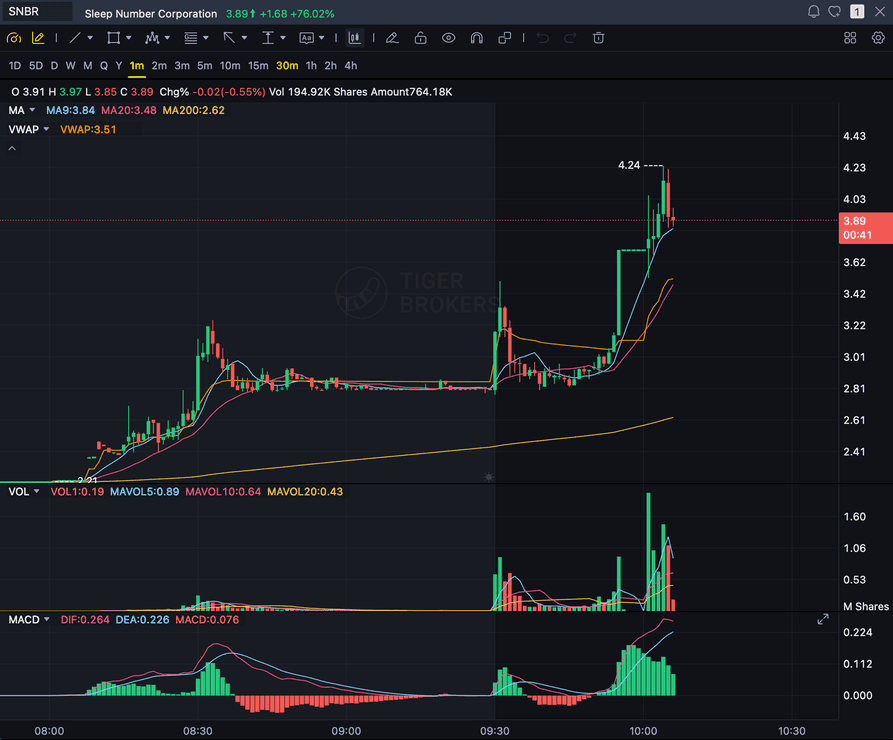
Grade
B+
Entry
$3.87
Stop
$3.75
Target
$4.24
Format example (stock chart)
SNBR 1m bull flag pullback: strong opening momentum, lighter-volume consolidation, and a late breakout attempt near 3.89. Forex, crypto and futures screenshots get the same structure: a grade, entry, structural stop and targets.
STOCKS
Momentum, breakout, pullback, and reversal setups
FOREX
Major pairs, crosses, XAUUSD, and session context
CRYPTO
Bitcoin, Ethereum, and high-beta altcoin charts
FUTURES
Index, commodity, and intraday futures screenshots
Quick answer
What is AI chart analysis from a screenshot?
AI chart analysis is software that reads a trading chart screenshot (stock, forex, gold, crypto, or futures) and turns it into a structured, repeatable trade review. SnapPChart reads the candles, trend, support and resistance, volume, indicators, and risk/reward directly from the image, then returns an A-F setup grade, the likely pattern, an entry zone, a stop loss, targets, and the main reasons the trade could fail.
It reads the direction off the chart, long or short, and makes one of three calls: take the trade, wait for a pullback, or skip it. The same read works on forex, crypto, futures, and ETF charts. It is most useful after you already found a possible setup in TradingView, Webull, Robinhood, MetaTrader, or a broker platform and want to confirm the chart is clean enough before entering. The point is not a second opinion for its own sake, it is the same read every time, so an A setup and a C setup are graded on identical criteria and your own bias does not get to move the grade.
What the AI Returns From a Screenshot
Use the output as a repeatable pre-trade checkpoint, not a prediction.
A-F Setup Grade
See whether the setup has enough pattern clarity, momentum, volume, and reward to justify the risk.
Entry, Stop, Targets
Get a structured trade plan with entry zone, invalidation level, targets, and risk/reward.
Screenshot-Based Read
Use charts from TradingView, Webull, ThinkOrSwim, MetaTrader, Robinhood, or any broker.
Risk Notes First
The analysis flags extension, messy chop, weak retests, thin reward, and conflicting indicators.
Workflow
How do you get from a screenshot to a trade plan?
SnapPChart is designed for the decision point after you find a setup and before you enter it. Screenshot the chart, upload it, review the grade, then decide whether the risk is worth it.
- Upload a TradingView, Webull, Robinhood, MetaTrader, or broker screenshot
- Check candlestick structure, trend, indicators, volume, and key levels
- Check if a breakout is already too extended
- Grade a pullback into VWAP, EMA, or prior resistance
- Review the entry, stop, targets, and bear case before sizing
- Keep the same process across stocks, forex, crypto, futures, and ETFs
Screenshot workflow
Built for trading chart screenshots, not generic image captions.
Traders usually ask for the best AI to analyze candlestick chart screenshots or a TradingView screenshot. This is the page for that job: upload the chart image, get a structured trade review, then decide whether the setup is worth risking money on. For breakout setups, the AI breakout detection guide shows how volume, level quality, and context separate clean breaks from fakeouts. Trading gold? The XAUUSD chart analysis page grades the same screenshot with gold-specific session and level context. Trading coins instead? The crypto chart analysis AI page adds 24/7 chase-risk and thin-liquidity context to the same grade, and the meme coin chart analysis page grades DOGE, SHIB, PEPE, and WIF charts on structure alone. Trading ES or NQ? The futures chart analysis page covers the contract charts and the micros, and the index chart analysis page covers NAS100, US30, and the DAX as CFDs. Reviewing a trade you already closed? The AI trade analyzer re-grades the setup off the same screenshot, win or lose.
Use the chart you already trust
Take a screenshot from TradingView, Webull, Robinhood, MetaTrader, ThinkOrSwim, Interactive Brokers, or any broker chart. SnapPChart reads the screenshot instead of asking you to rebuild the chart.
Check the visible technicals
The AI reviews candles, trend, volume, support and resistance, VWAP, moving averages, MACD, and pattern structure when those signals are visible in the image.
Turn the screenshot into a decision
You get the same output on every upload: setup grade, pattern read, entry zone, stop loss, targets, risk/reward, and the main reason to skip the trade.
Under the hood
How AI chart analysis works on a stock chart
No black box and no live feed. The same four stages run on every screenshot, in the same order, whether it is a 5-minute SPY chart at the open or a daily AAPL chart you pulled up after the close. Here is what each stage does, with the kind of note it writes on a typical intraday pullback.
| Stage | What the AI does | Illustrative read: SPY 5-minute pullback |
|---|---|---|
| 1. Read the chart | Pulls the ticker, timeframe, trend structure, EMA and VWAP position, MACD, volume, and support and resistance out of the pixels. | Higher highs and higher lows since the open. Price pulling back toward a rising 9 EMA, still above VWAP, on lighter volume than the push up. |
| 2. Check the signals | Scores those facts against a fixed list of setup signals and no-go conditions. Nothing gets skipped because the chart looks good. | An orderly pullback holding the 9 EMA counts for the setup. A pullback that loses VWAP on heavy volume would count against it. |
| 3. Make the call | Picks a direction, long or short, then one call: take the trade, wait for a pullback, or skip it. | Long. If price were already stretched far above the 9 EMA, the call would be wait for a pullback instead of take it. |
| 4. Build the plan | Entry, a stop at the level that proves the idea wrong, one or two targets, the risk/reward, and the bear case. | Entry near the 9 EMA, stop under the pullback low, first target at the high of day. Bear case: a close back under VWAP. |
The example column shows the format of a read, not a real trade or a result. On a daily chart the steps are identical; VWAP drops out because it resets each session, and the moving averages and prior swing levels do more of the work.
Trading individual stocks only? The AI stock chart analyzer page goes deeper on stock setups, and stocks get the full A+ to F grade range. For the long version with diagrams, read how AI chart analysis works, step by step.
Scope and limits
What chart AI reads off a screenshot, and what it cannot see
Chart AI works from pixels. That sounds obvious, but it is the thing that decides what a grade can and cannot account for. Everything in the left column is read out of the image you upload. Everything in the right column is outside the frame, so no chart AI can factor it in, and you still have to.
| What chart AI reads from the image | What chart AI is blind to |
|---|---|
| Candle bodies, wicks, and the pattern they form | Live price after the moment you captured the screenshot |
| Trend direction and structure across the visible range | Order flow, level 2, and the tape |
| Support and resistance the price has actually respected | Earnings dates, macro releases, and headline risk |
| Moving averages (the 9 and 20 EMA carry the most weight), VWAP, and MACD when they are plotted | Indicators you left switched off, and oscillators like RSI that the grade does not score |
| Volume bars and where they spike relative to the range | Volume on timeframes outside the frame you uploaded |
| Risk and reward measured against the visible price scale | Your account size, open positions, and personal risk rules |
That right-hand column is the honest limit of any AI chart analyzer, this one included. The grade is a read on the structure in front of it, not a forecast of the next candle. Treat a strong grade as permission to take the setup you already found, not as a reason to take one you had not considered.
Two habits get you a better read. Leave the price scale visible so the AI chart analyzer can measure levels instead of estimating them, and include enough bars to the left that the trend has context. A chart AI read on twenty candles with the axis cropped off is a guess with a letter attached to it. If you want the reasoning behind the grade itself, the AI versus manual chart analysis breakdown walks through where the two disagree and which one you should trust when they do.
Tool landscape
Which stock chart analysis tool fits which job
If you are searching for the best AI for analyzing trading chart screenshots, separate the tools by workflow. Most trading chart analysis software is built to scan for candidates or to draw on charts. SnapPChart is built for the last step before entry, grading the chart you are already considering.
Read the full AI chart analysis guideScreenshot graders
Best when you already found a setup and need the chart read back with a grade, entry, stop, targets, and risk notes.
Compare AI chart toolsScalp setup graders
Best when you're scalping 1-5 minute charts and need a grade, entry, stop, and targets before the next candle prints.
See scalp-specific gradingSwing setup graders
Best when you're holding for days and grading a daily or 4-hour chart: the trend structure, the pullback into a moving average, and target room before you size in.
See AI swing setup gradingMarket scanners
Best when you need candidates. They help find stocks in play, but you still need to decide whether the chart is worth trading.
See AI scanner workflowCharting platforms
Best for drawing, alerts, watchlists, and manual analysis. Pair them with a screenshot grader when you want a second opinion.
Compare charting workflowsMarket headlines
What is moving the charts traders are grading today
Recent stories across the stocks, forex, crypto, and futures markets SnapPChart traders are uploading. A grade reads the chart in front of it, so check the news yourself before you size in.
2 Cryptocurrencies Poised to Surge 100% in the Coming Years That Savvy Investors Are Already Buying
It can make sense to check out what big investors are doing with their money.
Could $1,000 Invested in Bitcoin Help You Retire a Millionaire?
At one time, Bitcoin had 1,000x upside potential. But is that still the case?
5%, Really? The Stock Market’s Sudden High-Yielders.
5%, Really? The Stock Market’s Sudden High-Yielders. Barron's
How NEAR Intents Used Coded Language to Let the Hacker Know He’d Been Fingered
After a $3.8 million exploit, NEAR Intents told the suspect, “We have identified you, sir.” Alex Shevchenko walks through how the funds came back.
Amphenol (APH) Names A New Division Chief, Is The Stock Still Undervalued?
Amphenol (APH) Names A New Division Chief, Is The Stock Still Undervalued? Simply Wall Street
Bitcoin Tests Average Buyer’s Break-Even As ETF Outflows Clash With Wall Street Buying
Darkfost said the market was oscillating around the $80,500 line in a pattern resembling late 2025 and early 2026, with the level holding as support for now.
Compare SnapPChart
How SnapPChart stacks up against the tools you already use
SnapPChart grades the chart you found. See where it fits next to the scanners, screeners, charting platforms, and general AI you might already pay for.
Head to head
SnapPChart vs a general AI chat assistant for chart screenshots
Most traders land here after pasting a chart into a general AI tool and getting a vague description. Here is how a purpose-built screenshot grader compares for the last decision before you risk money.
| Feature | SnapPChart | General AI chat assistant |
|---|---|---|
| Reads any chart screenshot | Every upload | Inconsistent |
| Setup grade (A+ to F) | Yes | No |
| Entry, stop, and targets | Every upload | Varies by prompt |
| Same criteria every time | Fixed methodology | Varies by prompt |
| Multi-target exit plan (T1 / T2) | Yes | Rarely consistent |
| Risk/reward + invalidation | Yes | Inconsistent |
| Speed to a decision | Seconds | Prompting required |
| Grade history to review | Yes | No |
Keep Learning the Setup
Use these guides to understand how SnapPChart grades the trade instead of taking the output blindly.
What do traders ask about AI Chart Analysis?
Everything you need to know about screenshot-based chart grading.
Which AI is best for analyzing stock charts in 2026?
For analyzing a stock chart screenshot in 2026, the best AI is one that returns a structured, repeatable trade review instead of a loose description: a setup grade, the pattern, support and resistance, an entry, a stop, targets, and the bear case. SnapPChart is built around that screenshot-to-trade-plan workflow and grades every chart on the same A-F criteria, so a strong setup and a weak one are judged the same way. General AI chat assistants can describe a chart, but they reply in prose that shifts between uploads, which makes the read hard to compare day to day. The honest limit on any of them: a screenshot tool scores the structure in the image, it does not see live price, news, or order flow.
What is the best trading chart analysis AI for screenshots?
The best AI for trading chart screenshots is the one that gives a repeatable trade review, not a vague chart description. Look for a setup grade, pattern read, key levels, entry, stop loss, targets, risk/reward, and a clear bear case. SnapPChart is built around that screenshot-to-trade-plan workflow.
What is chart AI and how does it work?
Chart AI is artificial intelligence that reads a trading chart image and returns a structured trade plan. SnapPChart uses a multimodal vision model to interpret candles, trend, key levels, indicators, and volume from the screenshot itself, then outputs a setup grade, entry, stop, targets, and bear case. You are not handing the call to a model, you are stress-testing your own read against a fixed checklist before you put money behind it.
Can I use chart AI as a second opinion on my own analysis?
That is the most common use. Traders form a hypothesis on TradingView or their broker, screenshot the chart, and upload it to check whether the grade and bear case agree before they size the position. Disagreement is itself signal, usually the AI catches a confluence problem the trader was talking themselves out of.
Can AI tell me whether to take a trade from a chart screenshot?
AI does not place the trade for you, but it gives you the structured read to make the call yourself. Upload the screenshot and SnapPChart returns a setup grade, an entry zone, a stop, targets, the risk/reward, and an explicit bear case. A high grade with clean risk/reward means the chart earned the trade; a low grade with thin reward means wait for a better one. You stay the decision-maker, the AI just makes sure you saw the case against the trade before you risked money on it.
Can AI calculate risk-reward from a chart screenshot?
Yes. Upload the screenshot and SnapPChart reads the levels off the chart, places an entry, a stop at the level that invalidates the setup, and one or two targets, then returns the risk-to-reward ratio for that plan. You do not type in any prices. The ratio is only as good as the chart you upload, so keep the price scale and the key levels visible. It measures the plan on the screen; it does not promise the target gets hit.
Can AI analyze candlestick chart screenshots?
Yes. SnapPChart can analyze candlestick chart screenshots when the candles, timeframe, price scale, and indicators are visible. It reads the image for structure, momentum, support and resistance, volume, and common patterns like flags, breakouts, pullbacks, reversals, and weak retests.
Can I upload a TradingView screenshot for AI analysis?
Yes. Open the chart in TradingView, take a screenshot, and upload it to SnapPChart. You keep TradingView for charting, alerts, and live data, then use SnapPChart as the AI second opinion before you decide whether to take the setup.
Can AI really analyze stock and forex charts?
Yes. SnapPChart uses a multimodal vision model to interpret the chart image: candlesticks, support and resistance, indicator alignment, volume, trend, and visible risk/reward.
What charts can I upload?
You can upload stocks, forex pairs, crypto, futures, ETFs, and commodities from TradingView, ThinkOrSwim, Webull, Robinhood, MetaTrader, Interactive Brokers, or any charting app.
How accurate is the analysis?
SnapPChart gives a probabilistic setup grade, not a guarantee. The grade reflects how clearly the visible technical signals align and where the risk breaks down.
Can it analyze gold (XAUUSD) charts?
Yes, and gold is the single most analyzed instrument on SnapPChart. The read accounts for how differently gold behaves from a typical stock or forex pair: it moves hardest around the London and New York overlap and around CPI, FOMC, and NFP releases, it respects round-number levels more consistently than most instruments, and it produces sharper wick-driven fakeouts on lower timeframes. The grade flags when a gold chart looks news-driven or extended rather than structurally clean. It works on spot XAU/USD, gold futures, or a gold ETF, because the analysis follows the visible price scale. There is a dedicated walkthrough on the gold chart analysis page.
Is AI chart analysis free to try?
Yes. New users get two lifetime chart analyses. Start from the upload section on the homepage; no credit card is required to try it.
Can AI tell me whether to go long, short, or skip a trade from a chart screenshot?
Yes. SnapPChart reads the direction off the chart, long or short, and makes one of three calls: take the trade, wait for a pullback, or skip it. Take and wait calls come with an entry, a structural stop, targets, and the risk/reward. A skip names what is missing, such as thin reward or messy structure. The grade shows how strong the case is.
If I upload a chart screenshot, will it tell me the entry, stop loss, and target?
Yes. Every analysis returns an entry zone, a stop loss with the reason it sits at that level, a first and second target with a scaling-out plan, and the reward measured against the risk. It also returns the bear case, so you see what would invalidate the trade before you size it. The numbers are read off the screenshot you uploaded, so a chart with the price axis cropped off produces a weaker read than a clean one.
Does the AI read support and resistance levels off a chart screenshot?
Yes. Support and resistance are part of what the AI extracts from the image, alongside trend structure, candles, volume, and any indicators visible in the screenshot. Those levels are what the entry, stop, and targets are anchored to. It reads only what is in the picture, so levels that sit off-screen or on a timeframe you did not upload are not part of the grade.
How does AI chart analysis work, step by step?
SnapPChart runs every screenshot through the same four stages. First it reads facts off the image: the ticker and timeframe, the trend structure, where price sits against the 9 and 20 EMA and VWAP, what MACD and volume are doing, and the support and resistance levels. Second, it checks those facts against a fixed list of setup signals and no-go conditions. Third, it makes the call. It reads the direction off the chart, long or short, and makes one of three calls: take the trade, wait for a pullback, or skip it. Last, if the chart supports a trade, it builds the plan: entry, structural stop, targets, risk/reward, and the bear case. The checklist does not change between uploads, which is why a grade from today is comparable to one from last month.
Can an AI chart analyzer predict where the price goes next?
No, and be careful with any tool that says it can. An AI chart analyzer reads the structure that is already on the chart and grades how clean the setup is right now: trend, location against the moving averages and VWAP, momentum, volume, and whether the reward is worth the stop. That is a quality read, not a forecast. A clean A setup can still stop out and a C setup can still run. What the grade gives you is the same criteria on every chart, so over a few weeks you can check whether the trades you take are the ones that actually score well.
Can I use AI chart analysis on US stocks like AAPL, NVDA, or SPY?
Yes. Screenshot the chart from TradingView, ThinkOrSwim, Webull, Robinhood, or your broker and upload it. A 5-minute chart during the session and a daily chart both work, as long as the ticker, the timeframe badge, and the price axis are in the frame. VWAP resets every session, so it carries the most weight on intraday charts; on a daily chart the read leans on the EMAs, the trend structure, and the levels price has respected. Individual stocks are graded on the full A+ to F scale, while forex, crypto, index, and futures grades are capped at B. There is also a stock-only walkthrough on the AI stock chart analyzer page.
Is AI stock chart analysis useful for students learning to read charts?
It can be, as long as you use it to check your own read instead of replacing it. Mark the chart up yourself first: the trend, the key levels, where you would get in, and where you would be wrong. Then upload the screenshot and compare. The analysis spells out why the setup scored the way it did, things like price sitting under a falling 20 EMA, volume drying up on a breakout, or a target too close to justify the stop, so the gaps in your read show up in plain English. It is not a course, and it only knows what is on the chart. 2 lifetime free chart reads. Full analysis on the first, grade and general analysis on the second. No card required. That is enough to see whether the feedback helps.
Upload your next chart before you enter.
Get an AI setup grade, trade plan, and risk notes in seconds. No credit card required to start.
Grade a Chart Free