Chart AI that reads any trading screenshot and gives you a trade plan in seconds.
Chart AI reads a stock, forex, crypto, futures, or TradingView screenshot and returns the setup grade, entry, stop, targets, and risk notes a trader needs before entering.
STOCKS
Momentum, breakout, pullback, and reversal setups
FOREX
Major pairs, crosses, XAUUSD, and session context
CRYPTO
Bitcoin, Ethereum, and high-beta altcoin charts
FUTURES
Index, commodity, and intraday futures screenshots
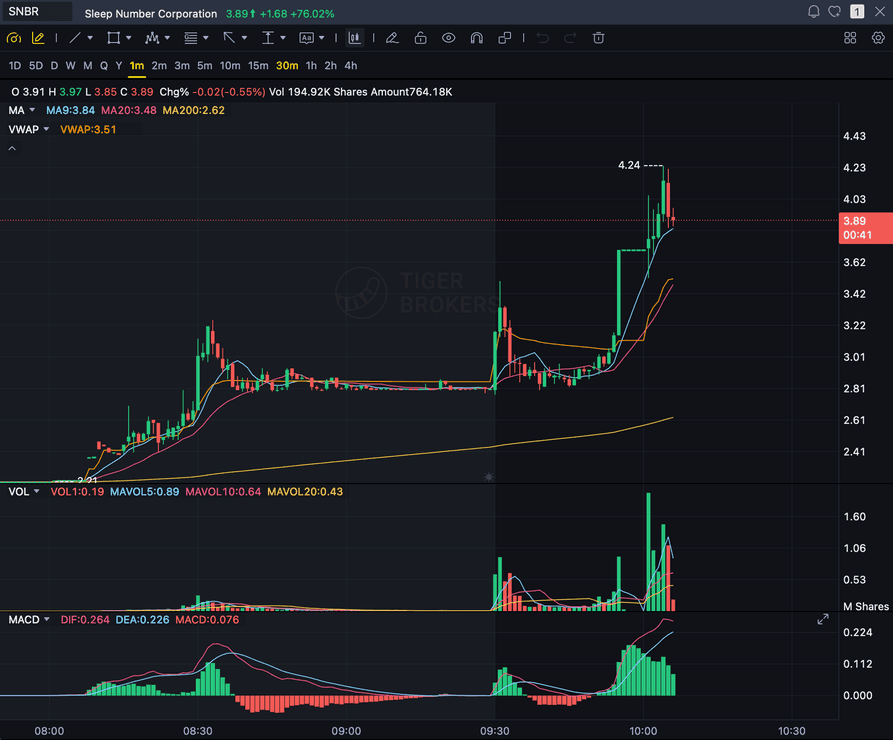
Grade
B+
Entry
$3.87
Stop
$3.75
Target
$4.24
Sample readout
SNBR 1m bull flag pullback: strong opening momentum, lighter-volume consolidation, and a late breakout attempt with the 3.89 price marker near the current candle.
Quick answer
What is Chart AI?
Chart AI is artificial intelligence that reads a trading chart image and returns a structured trade plan. SnapPChart uses it to turn a screenshot into a setup grade, thesis, entry, stop loss, targets, and risk notes. Traders use it after spotting a possible setup in their charting platform and before deciding whether the reward is worth the risk. You are not handing the call to a model, you are stress-testing your own read against a fixed checklist before you put money behind it.
What the AI Returns From a Screenshot
Use the output as a repeatable pre-trade checkpoint, not a prediction.
A-F Setup Grade
See whether the setup has enough pattern clarity, momentum, volume, and reward to justify the risk.
Entry, Stop, Targets
Get a structured trade plan with entry zone, invalidation level, targets, and risk/reward.
Screenshot-Based Read
Use charts from TradingView, Webull, ThinkOrSwim, MetaTrader, Robinhood, or any broker.
Risk Notes First
The analysis flags extension, messy chop, weak retests, thin reward, and conflicting indicators.
Workflow
Use Chart AI as your second opinion
You keep your existing charting platform. SnapPChart reads the screenshot and helps you decide whether the setup is clean enough to trade.
- Screenshot any chart from your current platform
- Let AI read candles, indicators, volume, and levels
- Review the setup grade and trade plan
- Skip charts where the signals conflict or the reward is too thin
Head to head
SnapPChart vs a general AI chat assistant for chart screenshots
Most traders land here after pasting a chart into a general AI tool and getting a vague description. Here is how a purpose-built screenshot grader compares for the last decision before you risk money.
| Feature | SnapPChart | General AI chat assistant |
|---|---|---|
| Reads any chart screenshot | Every upload | Inconsistent |
| Setup grade (A+ to F) | Yes | No |
| Entry, stop, and targets | Every upload | Varies by prompt |
| Same criteria every time | Fixed methodology | Varies by prompt |
| Multi-target exit plan (T1 / T2) | Yes | Rarely consistent |
| Risk/reward + invalidation | Yes | Inconsistent |
| Speed to a decision | Seconds | Prompting required |
| Grade history to review | Yes | No |
Keep Learning the Setup
If you mean screenshot-based chart grading, start with the primary AI chart analysis workflow and compare the broader tool landscape.
Chart AI FAQ
What Chart AI can read and how to use it responsibly.
What is chart AI and how does it work?
Chart AI is artificial intelligence that reads a trading chart image and returns a structured trade plan. SnapPChart uses a multimodal vision model to interpret candles, trend, key levels, indicators, and volume from the screenshot itself, then outputs a setup grade, entry, stop, targets, and bear case.
What can chart AI read from a screenshot?
When they are visible on the chart, it reads candlestick patterns, trend direction, support and resistance, moving averages (9, 20, 200 EMA), VWAP, MACD, RSI, volume, Bollinger Bands, Fibonacci levels, pivot points, breakout structure, and basic candle patterns like doji, hammer, and engulfing.
Can chart AI replace a human trader?
No. Chart AI is a decision-support layer, not an autonomous trader. SnapPChart does not place trades, does not connect to a broker, and does not guarantee outcomes. It is built to make a discretionary trader's process more repeatable, not to remove the trader from the loop.
Does chart AI work across stocks, forex, crypto, and futures?
Yes. The same chart AI grades stock, forex, crypto, futures, ETF, and index screenshots. The forex and gold landing pages tune the output further with pip-denominated targets and session context.
How accurate is chart AI on a real setup?
Chart AI returns a probabilistic setup grade based on the visible signals, not a guarantee. A and B+ grades reflect strong confluence; C, D, and F grades reflect mixed or weak signals. The intended use is as a pre-trade gate, not as a prediction of the next move.
Can I use chart AI as a second opinion on my own analysis?
That is the most common use. Traders form a hypothesis on TradingView or their broker, screenshot the chart, and upload to SnapPChart to check whether the AI grade and bear case agree before they size the position. Disagreement is itself signal — usually the AI catches a confluence problem the trader was talking themselves out of.
Is there a free trial for chart AI?
Yes. New users get 2 lifetime chart analyses to try chart AI on real setups, no credit card required. The first analysis is full depth; the second is gated so you can see exactly what the paid product adds.
Explore more AI chart analysis pages
Grade setups across more markets, platforms, and strategies with the same AI workflow.
Let AI read your next chart.
Start from the homepage upload section and get a trade grade before entering.
Upload a Chart Free