Screenshot your Interactive Brokers chart, get a graded trade plan back.
SnapPChart reads an Interactive Brokers chart screenshot the way you do, the candles, the levels, and whatever indicators you have on the chart, then returns a setup grade, entry, stop, targets, and the main reason it could fail. No plugin, no account connection, not the IBKR API or TWS API, no order routing. It reads the picture you upload, so the same grade works whether you chart in TWS, TradingView, or anywhere else.
Drag and drop your chart screenshot
or click to browse. PNG, JPG, or WebP.
Your first analysis is free. No credit card.
Make sure both the time axis (X) and price axis (Y) are visible in your screenshot for accurate results.
Grade
B+
Entry
$3.87
Stop
$3.75
Target
$4.24
Sample readout
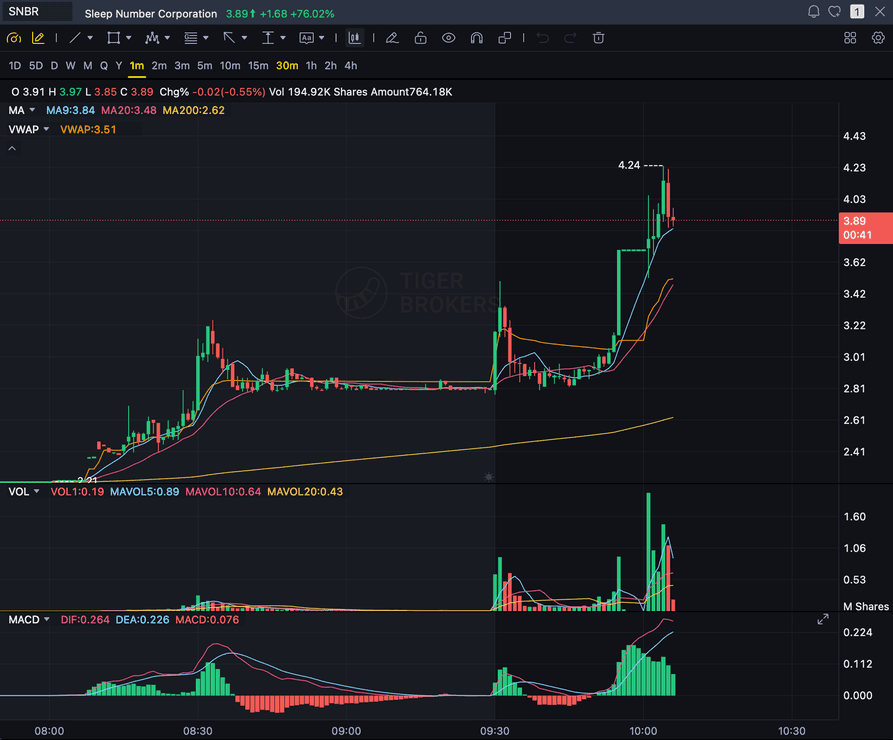
SNBR 1m bull flag pullback: strong opening momentum, lighter-volume consolidation, and a late breakout attempt with the 3.89 price marker near the current candle.
STOCKS
Momentum, breakout, pullback, and reversal setups
FOREX
Major pairs, crosses, XAUUSD, and session context
CRYPTO
Bitcoin, Ethereum, and high-beta altcoin charts
FUTURES
Index, commodity, and intraday futures screenshots
Quick answer
How do you analyze an Interactive Brokers chart with AI?
You screenshot the chart in Interactive Brokers and upload the image. SnapPChart reads the screenshot directly, the candles, trend, support and resistance, volume, and any indicators you have drawn on, then grades the setup A+ to F with an entry, a stop, targets, and a bear case. It is the fastest honest answer to "which AI can analyze an Interactive Brokers screenshot": you do not connect your account, install a plugin, or wire up the IBKR API, because the analyzer reads the picture, not a data feed. It does not route or place orders, read your live IBKR feed or market data subscription, use the IBKR API or the TWS API, or scan the market for you. That is also the point of working from a screenshot: it is platform-agnostic. The same upload works from Trader Workstation (TWS), IBKR Desktop, IBKR Mobile, or the web Client Portal, and the same grade works if you chart the same stock, option, future, or forex pair in TradingView or any broker instead, because the grading checklist runs on the image, not the platform.
What the AI Returns From a Screenshot
Use the output as a repeatable pre-trade checkpoint, not a prediction.
A-F Setup Grade
See whether the setup has enough pattern clarity, momentum, volume, and reward to justify the risk.
Entry, Stop, Targets
Get a structured trade plan with entry zone, invalidation level, targets, and risk/reward.
Screenshot-Based Read
Use charts from TradingView, Webull, ThinkOrSwim, MetaTrader, Robinhood, or any broker.
Risk Notes First
The analysis flags extension, messy chop, weak retests, thin reward, and conflicting indicators.
Workflow
How do you turn a Interactive Brokers screenshot into a graded setup?
You do not rebuild the chart, link your account, or connect anything. Screenshot it in Interactive Brokers, drop the image in, and read the grade.
- Screenshot any symbol on any timeframe in Interactive Brokers (TWS, IBKR Desktop, IBKR Mobile, or the Client Portal)
- Upload the image, with no plugin, no API, and no account connection
- The analyzer reads candles, levels, volume, and the indicators visible on your chart
- Read the A+ to F grade, entry, stop, targets, and the bear case
- Pass on the C and F setups, then screenshot the next chart
Head to head
SnapPChart vs a general AI chat assistant for chart screenshots
Most traders land here after pasting a chart into a general AI tool and getting a vague description. Here is how a purpose-built screenshot grader compares for the last decision before you risk money.
| Feature | SnapPChart | General AI chat assistant |
|---|---|---|
| Reads any chart screenshot | Every upload | Inconsistent |
| Setup grade (A+ to F) | Yes | No |
| Entry, stop, and targets | Every upload | Varies by prompt |
| Same criteria every time | Fixed methodology | Varies by prompt |
| Multi-target exit plan (T1 / T2) | Yes | Rarely consistent |
| Risk/reward + invalidation | Yes | Inconsistent |
| Speed to a decision | Seconds | Prompting required |
| Grade history to review | Yes | No |
Keep Learning the Setup
Use these guides to understand how SnapPChart grades the trade instead of taking the output blindly.
What do traders ask about Interactive Brokers Chart Analysis?
How the AI reads an Interactive Brokers screenshot and what it returns.
How do I analyze an Interactive Brokers chart with AI?
Screenshot the chart in Interactive Brokers, then upload the image to SnapPChart. A multimodal vision model reads the candles, trend, support and resistance, and any visible indicators directly from the picture, then returns a setup grade, entry, stop, targets, and the main reason the trade could fail. You do not type out what the chart shows or connect your Interactive Brokers account.
Is SnapPChart an Interactive Brokers plugin or API tool?
No. There is nothing to install, no account to link, and no IBKR API, TWS API, or Client Portal API to connect. SnapPChart reads the screenshot you upload, so it works with Interactive Brokers without being part of it. That is on purpose: reading the image instead of a data feed is what lets the same tool grade a chart from TWS, TradingView, a broker, or any other charting app.
What does it return from one Interactive Brokers screenshot?
Every upload returns the same fields: an A+ to F setup grade, the likely pattern, an entry zone, a structural stop, multi-target exits (T1 partial and T2 full), risk/reward, and the bear case. Same structure every time, so you can compare one Interactive Brokers screenshot to the next instead of relying on how you feel about the trade.
Does it read the indicators on my Interactive Brokers chart?
It reads the indicators that are visible in the screenshot. If you have VWAP, moving averages, MACD, RSI, or volume drawn on the chart, the analyzer factors what it can see into the grade. It cannot read an indicator you have hidden or a setting that is not shown, because it only has the picture. Show the levels you care about before you screenshot.
Is Interactive Brokers chart analysis free to try?
Yes. New users get 2 lifetime chart analyses, no credit card required. The first analysis shows the full depth so you can see exactly what the AI returns from an Interactive Brokers screenshot; the second is gated to show what the paid product adds.
Does it place trades or predict where price goes next?
No. It is a pre-trade decision layer, not an autonomous trader and not a price predictor. It grades the setup in the screenshot so your process stays repeatable. It does not route orders, read your live IBKR feed, use the IBKR or TWS API, scan the market, or call the next candle. You stay the decision-maker.
Grade your next Interactive Brokers chart.
Screenshot a chart in Interactive Brokers, upload it from the homepage, and get a graded trade plan in seconds. No plugin and no credit card required.
Analyze an Interactive Brokers Chart Free