Scalp trading AI that grades every setup before the window closes.
Scalp trading AI built for the 1-minute and 5-minute chart. Upload the screenshot and get a fast read on pattern quality, VWAP context, volume, entry, stop, targets, and whether the scalp is already too extended.
Drag and drop your chart screenshot
or click to browse. PNG, JPG, or WebP.
Your first analysis is free. No credit card.
Make sure both the time axis (X) and price axis (Y) are visible in your screenshot for accurate results.
Grade
B+
Entry
$3.87
Stop
$3.75
Target
$4.24
Format example (stock chart)
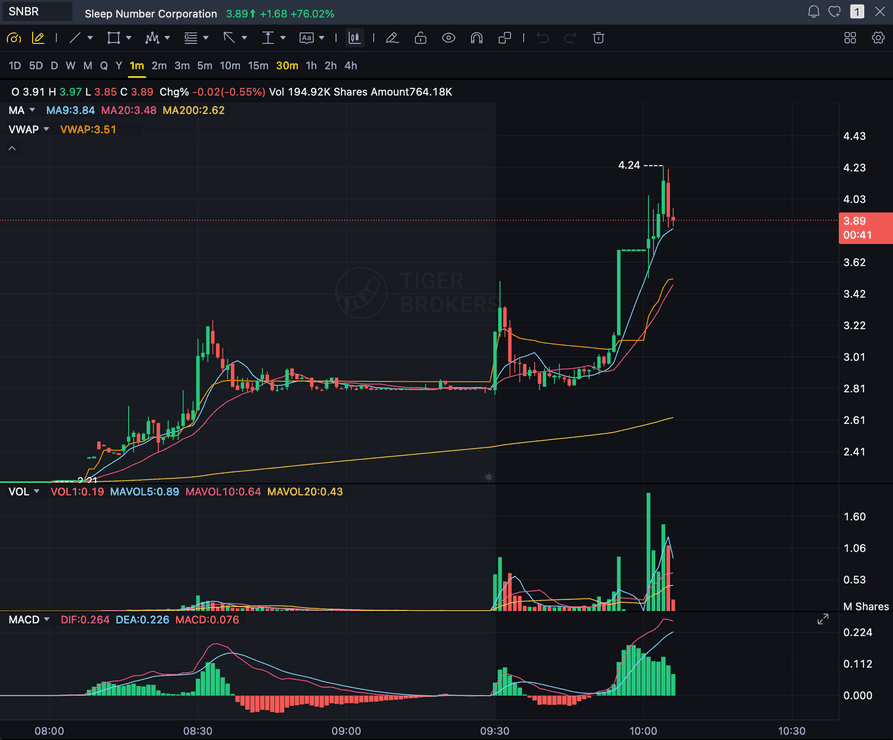
SNBR 1m bull flag pullback: strong opening momentum, lighter-volume consolidation, and a late breakout attempt near 3.89. Forex, crypto and futures screenshots get the same structure: a grade, entry, structural stop and targets.
1M
Ultra-short momentum and micro pullbacks
5M
Cleaner intraday continuation and VWAP setups
VWAP
Intraday support, reclaim, and rejection context
VOLUME
Participation check before chasing a fast move
Quick answer
What is AI scalp trading?
AI scalp trading means using a chart-reading model to grade a 1-minute, 2-minute, or 5-minute setup before you take it. An AI scalping tool reads the screenshot directly, checks structure, VWAP, EMA context, and relative volume, then returns a setup grade, entry zone, structural stop, and multi-target exits within the minute.
SnapPChart is built specifically for that pre-entry moment: you upload the intraday chart from TradingView, Webull, ThinkOrSwim, or your broker, and the AI scalp trading analyzer returns the same structured fields every time so your scalp decisions stay comparable across the trading day. On a fast 1-minute chart the grade lands before the next candle closes, so the read fits inside the entry window instead of slowing you down.
Before you upload
Scalp trading AI, answered straight
The four things scalpers ask before they trust a grade on a 1-minute chart.
Analyzer
A scalp trading AI analyzer for the chart you already found
You bring the 1-minute or 5-minute chart and the analyzer grades it. It does not scan for tickers or stream a feed. Screenshot the setup in TradingView, Webull, thinkorswim, or your broker, upload it, and the grade, entry, stop, and targets come back as prices.
Chart analysis
What scalp trading chart analysis AI checks
The pattern, where price sits against VWAP and the 9 EMA, whether volume is backing the move, how far the entry is from a structural stop, how much room there is to the next level, and whether the candle is already too extended to chase. Each one moves the grade.
Bot
Is it a scalp trading AI bot?
No. It does not place orders, connect to your broker, or push signals. It grades the setup you are looking at and shows where the trade is wrong and where it pays. You still decide whether to click buy, and how much to size.
Markets
AI scalping on stocks, futures, forex, gold, and crypto
Stocks get the full A+ to F scale. Futures, forex, gold, crypto, and index charts are graded on a scale that tops out at B, so a B on a 1-minute NQ or XAUUSD scalp is the best mark it gives. The entry, stop, and targets come back either way.
What the AI Returns From a Screenshot
Use the output as a repeatable pre-trade checkpoint, not a prediction.
A-F Setup Grade
See whether the setup has enough pattern clarity, momentum, volume, and reward to justify the risk.
Entry, Stop, Targets
Get a structured trade plan with entry zone, invalidation level, targets, and risk/reward.
Screenshot-Based Read
Use charts from TradingView, Webull, ThinkOrSwim, MetaTrader, Robinhood, or any broker.
Risk Notes First
The analysis flags extension, messy chop, weak retests, thin reward, and conflicting indicators.
Workflow
Use it as a fast pre-entry filter
Scalp setups disappear quickly, but a bad entry still costs real money. SnapPChart gives you a quick quality gate before you chase a candle.
- Grade a 1-minute bull flag before the breakout
- Check VWAP and 9 EMA context before a quick long
- Review whether volume supports the move
- Use it as an AI scalping tool during the first 15 minutes of the session
- Re-grade the same ticker after a pullback to see if the setup is cleaner
- Skip C-grade scalps where the risk/reward is not there
Market pulse
What's moving the tape right now
Headlines on the symbols SnapPChart traders are scalping today. News flow shapes which setups break out and which fade, so pair the read with your chart grade.
CZ Shares 2026 Crypto Security Guide: Prevent Theft, Prevent Loss, Plan for Inheritance
CZ Shares 2026 Crypto Security Guide: Prevent Theft, Prevent Loss, Plan for Inheritance Binance
Solana Confirms a Transaction in 200 Milliseconds and Bitcoin Takes 10 Minutes. Does Speed Make a Coin Worth More?
Solana just became 3,000 times faster than Bitcoin at producing blocks, yet its coin lost nearly 8% of its value the same week. The relationship between blockchain speed and price…
Whales Bought 15,000 Bitcoin in Three Days While MARA Sold $81 Million. Who Has It Right?
Bitcoin whales poured over a billion dollars into the market right after a sharp decline, while one of the biggest mining companies quietly cashed out. Their opposing moves point to…
Veridian Shares Tokenized on Cardano: ADA Up 7.3 Percent
Veridian Shares Tokenized on Cardano: ADA Up 7.3 Percent CryptoTicker
The Stock Market Will Look Completely Different by 2030. This Is the Stock I'm Buying Before It Does.
The Stock Market Will Look Completely Different by 2030. This Is the Stock I'm Buying Before It Does. AOL.com
Eight Altcoins Have Surged Three Times More Than Bitcoin in 30 Days. Is Altcoin Season Here, or Is This Just a Momentary Uptick?
Eight altcoins are trouncing Bitcoin's returns over the past month, sparking talk of a long-awaited altcoin season. But a closer look at the weekly numbers and a key market index…
Head to head
SnapPChart vs a general AI chat assistant for scalp setups
A general AI chat tool can describe a 1-minute chart, but it does not return the same structured fields every time. SnapPChart grades every scalp setup to the same standard so your process stays consistent across sessions.
| Feature | SnapPChart | General AI chat assistant |
|---|---|---|
| Grades 1-5 minute chart screenshots | Yes, every upload | Inconsistent |
| VWAP and EMA context in grade | When visible on chart | Varies by prompt |
| Flags chase risk / over-extension | Every bear case | Rarely flagged |
| Entry, stop, targets in seconds | Yes | Prompting required |
| Same criteria on every scalp | Fixed methodology | Varies by session |
| Grade history to review | Yes | No |
Keep Learning the Setup
Use these guides to understand how SnapPChart grades the trade instead of taking the output blindly.
What do traders ask about AI Scalp Trading?
How to use SnapPChart on short intraday charts.
What should a scalp trading AI screenshot include?
A scalp trading AI screenshot should show the ticker, the 1-minute or 5-minute timeframe, at least 30-60 recent candles, volume bars, VWAP, the 9 EMA or 20 EMA, the prior high or nearest resistance, and full candle bodies and wicks. Cropping the price scale is the most common mistake: without it the model has to estimate levels instead of measuring them, and the stop and target come back vaguer than they should.
What is the best scalp trading AI analyzer for traders?
The best AI scalping tool returns the same structured fields on every 1-5 minute chart so your decisions stay comparable across sessions. Look for a setup grade, entry zone, structural stop, multi-target exits, and an explicit bear case that flags chase risk and over-extension. SnapPChart is built specifically for the scalp grading workflow and returns the same structured read on every chart you upload, so the comparison across setups is apples-to-apples instead of one-off readings from a general AI tool.
Is scalp trading AI fast enough for 1-minute charts?
Yes. SnapPChart returns a setup grade, entry, stop, and targets within the minute, which is well inside the window between a 1-minute candle close and the next entry decision. The slow part of scalping is not the grading; it is waiting for confirmation before chasing a candle.
How does the AI handle VWAP and 9 EMA scalp setups?
When VWAP and the 9 EMA are visible on the chart, the AI factors price relationship to those levels into the grade. Reclaim, first bounce, and break-and-hold setups around VWAP are common high-grade scalp patterns. If the chart is too far extended above the EMA or rejected at VWAP, the grade drops.
Can SnapPChart tell me when a scalp is already too extended?
Yes. Over-extension is one of the explicit reasons in the bear case. If the chart shows a vertical candle without a healthy pullback or volume confirmation, the grade reflects that and the trade plan flags the chase risk.
What timeframes work best for scalp grading?
1-minute, 2-minute, and 5-minute charts are the sweet spot for scalping. Upload the chart you would actually trade from, with VWAP, EMAs, and volume visible, so the AI has the context that matters for the setup.
Does the AI account for low-float momentum scalps?
Yes. Low-float momentum names ($2 to $20, gap-and-go and bull flag setups) are part of the trader profile SnapPChart was built around. Volume relative to recent activity is part of the confluence count that drives the grade.
Can I scalp short setups with SnapPChart?
SnapPChart grades long and short momentum-continuation setups from chart screenshots. Choose Long only, Short only, or Both sides in your trading profile. Both sides picks one direction from the chart.
Does it work for scalping gold (XAUUSD)?
Yes, and gold is the most commonly scalped instrument among SnapPChart users. Gold rewards scalping because it moves enough intraday to pay a tight stop, but that same volatility is what stops people out early. On a 1-5 minute XAUUSD chart the grade reads the same fields it reads anywhere (structure, VWAP and EMA alignment, relative volume, risk/reward) and flags when a move looks news-driven or already extended rather than structurally clean, which matters more on gold than on a slower pair. Stop distances that work on EURUSD are usually too tight on gold, so the risk/reward read is the part worth checking before you size. See the gold chart analysis page for the full breakdown.
Is there a free trial for scalp traders?
Yes. New users get 2 lifetime chart analyses to try the grading workflow. The first analysis shows the full output; the second is gated so you can see exactly what the paid product adds. No credit card required.
Grade the scalp before you click buy.
Upload the chart from the homepage and get a quick, structured read on the setup.
Grade a Scalp Chart Free