Swing trading AI that grades your setup before you enter the trade.
Upload the daily or 4-hour chart you are about to trade and get a read on trend structure, base and pullback quality, momentum, volume, entry, stop, targets, and whether the reward is worth holding the position for days.
Drag and drop your chart screenshot
or click to browse. PNG, JPG, or WebP.
Your first analysis is free. No credit card.
Make sure both the time axis (X) and price axis (Y) are visible in your screenshot for accurate results.
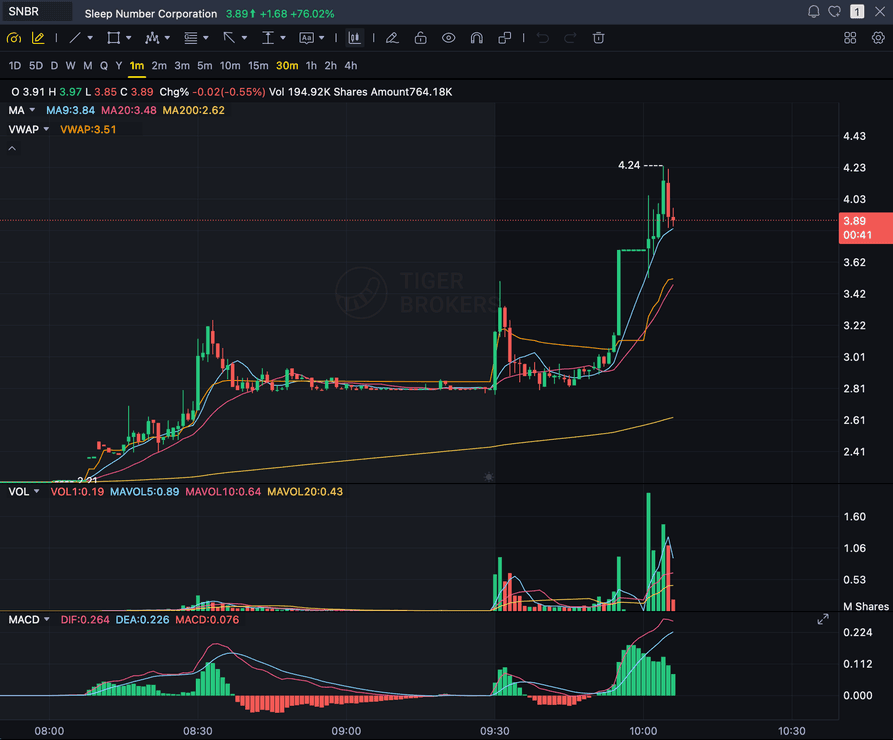
Grade
B+
Entry
$3.87
Stop
$3.75
Target
$4.24
Sample swing readout
Sample readout: SnapPChart checks the trend, the base and pullback quality, volume, and whether the reward justifies holding the position, then returns a grade with an entry zone, a structural stop, and targets.
DAILY
Trend, base structure, and where the swing sits
4H
Pullback quality and entry timing into the move
WEEKLY
Higher-timeframe context behind the setup
R:R
Reward measured against the overnight risk you hold
Quick answer
What is AI swing trading?
AI swing trading means using a chart-reading model to grade a multi-day setup before you take it. You bring the daily or 4-hour chart you already like, upload the screenshot, and the AI reads it directly: trend structure, base or pullback quality, momentum, volume, and whether the reward justifies the overnight risk.
It returns a setup grade from A+ to F, an entry zone, a structural stop, multi-target exits, and the bear case in one structured read. SnapPChart is built for that pre-entry moment. You choose the setup; the AI tells you whether the swing is actually worth holding, using the same criteria every time so your decisions stay comparable from one week to the next. A swing ties up your capital for days, so the value is less about speed and more about refusing to hold a setup the chart never earned.
What you get back on every swing chart
Upload the chart you are watching and get the same structured read every time, so one swing setup is comparable to the next instead of a fresh opinion.
A-F Setup Grade
See whether the setup has enough pattern clarity, momentum, volume, and reward to justify the risk.
Entry, Stop, Targets
Get a structured trade plan with entry zone, invalidation level, targets, and risk/reward.
Screenshot-Based Read
Use charts from TradingView, Webull, ThinkOrSwim, MetaTrader, Robinhood, or any broker.
Risk Notes First
The analysis flags extension, messy chop, weak retests, thin reward, and conflicting indicators.
Workflow
Use it as a pre-entry gate on every swing
A swing trade ties up your capital for days and makes you sit through every overnight gap. A bad entry here does not cost you fifteen minutes, it costs you a week and the drawdown that comes with it. There is no clock forcing the trade, so there is no excuse to skip the grade before you commit.
- Grade a daily breakout or base before you size in
- Check the 4-hour pullback quality before timing the entry
- Confirm the reward justifies holding through the overnight risk
- Read the bear case and invalidation before you commit capital for days
- Re-grade the setup after a pullback to see if the entry got cleaner
- Skip C-grade swings and keep your capital free for an A setup
Head to head
SnapPChart vs a general AI chat assistant for swing setups
A general AI tool can describe a daily chart, but it will not return the same structured fields on every setup. SnapPChart grades every swing to the same standard, so the trade you take this week is comparable to the one you passed on last week.
| Feature | SnapPChart | General AI chat assistant |
|---|---|---|
| Grades daily and 4-hour chart screenshots | Yes, every upload | Inconsistent |
| Reward measured against overnight risk | Every trade plan | Varies by prompt |
| Flags a setup that already ran | Every bear case | Rarely flagged |
| Entry, stop, targets for the swing | Yes | Prompting required |
| Same criteria on every swing | Fixed methodology | Varies by session |
| Grade history to review your swings | Yes | No |
Learn the swing grading workflow
Short reads on how to grade a multi-day setup and what separates an A swing from one worth passing on.
What do traders ask about AI Swing Trading?
How to use SnapPChart on daily and 4-hour swing charts.
What is the best AI tool for swing trading?
The best AI tool for swing trading grades every setup to the same standard so the swing you take is comparable to the one you passed on. Look for a setup grade, an entry zone, a structural stop, multi-target exits, and an explicit bear case that flags a move that already ran. SnapPChart is built around that grading workflow and returns the same structured read on every daily or 4-hour chart you upload, instead of a one-off description that changes with how you phrase the question.
Does SnapPChart find swing setups for me?
No. You bring the chart you are already interested in, and SnapPChart grades it. You upload the daily or 4-hour screenshot of the setup you are considering, and the AI returns a grade, an entry, a stop, targets, and the bear case. It is the decision step right before you enter, not the watchlist step. You pick the swing; the AI tells you whether it is worth holding.
What timeframes work best for swing grading?
Daily and 4-hour charts are the core of swing grading, with the weekly chart as higher-timeframe context. Upload the chart you would actually trade from, with your moving averages, volume, and key levels visible, so the AI grades the setup the way you see it.
How does the AI grade a multi-day setup?
It reads trend structure, the quality of the base or pullback, momentum, and volume from the screenshot, then weighs the reward against the risk you would carry overnight. A clean base with room to the target grades higher than a setup that has already extended. The grade comes with an entry zone, a structural stop, multi-target exits, and the reasons the trade could fail.
Can it tell me if my swing entry is already too extended?
Yes. Chasing a move that has already run is one of the explicit reasons in the bear case. If the chart shows the swing is extended away from its base or moving average without a healthy pullback, the grade reflects that and the trade plan flags the chase risk before you size in.
Does the grade account for earnings, gaps, and macro events?
SnapPChart grades the chart in front of it: the setup structure, the levels, and the reward against the risk. It does not know your ticker's earnings date or the macro calendar, so you bring that context. Grade the setup for what the chart shows, then decide whether an upcoming event makes holding it overnight worth the risk.
Is there a free trial for swing traders?
Yes. New users get 2 lifetime chart analyses to try the grading workflow. The first analysis shows the full output; the second is gated so you can see exactly what the paid product adds. No credit card required.
Grade the swing before you commit your capital.
Upload the chart from the homepage and get a structured read on the setup before you hold it for days.
Grade a Swing Setup Free