AI short trade analyzer that grades the short setup before you enter.
Set your trading style to Short Only and SnapPChart grades every chart you upload through a dedicated short-side read: breakdown structure, resistance rejection, volume, entry, a stop above resistance, multi-target exits, and the bear case.
Drag and drop your chart screenshot
or click to browse. PNG, JPG, or WebP.
Your first grade is free, no card: it shows the setup's grade and the general read. Entry, stop, targets and the trade plan come with a paid plan.
Make sure both the time axis (X) and price axis (Y) are visible in your screenshot for accurate results.
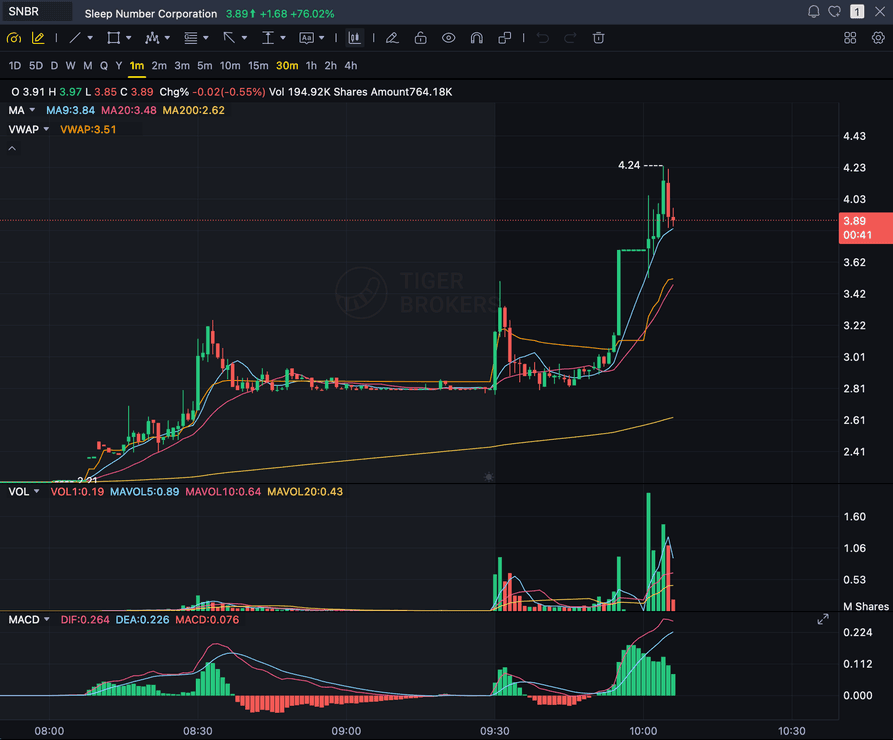
Grade
B+
Entry
$3.87
Stop
$3.75
Target
$4.24
Format example (stock chart)
SNBR 1m bull flag pullback: strong opening momentum, lighter-volume consolidation, and a late breakout attempt near 3.89. Forex, crypto and futures screenshots get the same structure: a grade, entry, structural stop and targets.
SHORT ONLY
Forces the dedicated short-side grading lens
BREAKDOWN
Lower highs, lower lows, and failed support
REJECTION
Rejection at resistance before a move down
BEAR CASE
Written invalidation before you enter the short
Quick answer
What is an AI short trade analyzer?
An AI short trade analyzer grades a bearish setup before you enter it, the same way an AI chart tool grades a long. Set your SnapPChart trading style to Short Only and every chart you upload runs through a dedicated short-side read: a setup grade, an entry, a stop above resistance, multi-target exits, and the bear case for the trade.
The honesty check matters more here than on a long setup: if the chart is still making higher highs and higher lows, the grader will not force a bearish call just because you asked for one. It scores the setup down, often an F, and explains why it doesn't qualify as a short rather than inventing a breakdown that isn't on the chart. The read is screenshot-only: it does not pull live short-interest data, borrow rates, or margin availability, so confirm your broker can actually locate and lend the shares before you size the position.
What the AI Returns From a Screenshot
Use the output as a repeatable pre-trade checkpoint, not a prediction.
A+ to F Setup Grade
See whether the setup has enough pattern clarity, momentum, volume, and reward to justify the risk.
Entry, Stop, Targets
Get a structured trade plan with entry zone, invalidation level, targets, and risk/reward.
Screenshot-Based Read
Use charts from TradingView, Webull, ThinkOrSwim, MetaTrader, Robinhood, or any broker.
Risk Notes First
The analysis flags extension, messy chop, weak retests, thin reward, and conflicting indicators.
Workflow
Use it as a pre-entry check on the short side
Shorting carries the same entry risk as a long trade, plus the cost of being wrong on the wrong side of momentum. SnapPChart's Short Only trading style runs the same honesty check either way, so a setup that doesn't qualify gets marked down instead of talked into looking better than it is.
- Set your trading style to Short Only before you upload a chart
- Grade a breakdown below support before you enter
- Check a rejection at resistance for a fade short
- Read the bear case for the short before you commit size
- See a chart honestly graded down when it doesn't qualify as a short
- Compare short setups across stocks, forex, crypto, and futures on the same scale
Head to head
SnapPChart vs a general AI chat assistant for short setups
A general AI chat tool can describe a breakdown, but it runs one generic prompt regardless of direction and rarely admits when a chart doesn't actually qualify as a short. SnapPChart's Short Only trading style forces a dedicated short-side read and grades a non-qualifying chart down honestly instead of manufacturing a bearish case.
| Feature | SnapPChart | General AI chat assistant |
|---|---|---|
| Dedicated short-side grading lens | Yes, via the Short Only trading style | One generic prompt for both directions |
| Honestly grades a non-qualifying chart down instead of forcing a bearish call | Yes, explicit low-grade warning | Often invents a bearish case anyway |
| Setup grade (A+ to F) | Yes | No |
| Entry, stop above resistance, and multi-target exits | Yes, on paid plans | Varies by prompt |
| Bear case written before you enter the short | Every paid grade | Rarely written down |
| Same short-grading criteria across stocks, forex, crypto, and futures | Fixed methodology | Varies by session |
Keep learning the short-side workflow
Guides on trading both directions and grading a setup before you take it.
What do traders ask about AI short-trade analysis?
How to use SnapPChart's Short Only trading style to grade short setups.
How does SnapPChart grade a short setup?
Set your trading style to Short Only in your profile and every chart you upload runs through a dedicated short-side read. It checks for a breakdown below support, a rejection at resistance, lower highs and lower lows, and volume, then returns a setup grade, an entry, a stop above resistance, multi-target exits, and the bear case for the short.
What happens if my chart doesn't actually qualify as a short?
The grader says so instead of inventing a bearish case. If the chart is still making higher highs and higher lows, or just chopping sideways, SnapPChart scores it down, often an F, and explains why it doesn't qualify as a short rather than forcing a breakdown that isn't there. Forcing the short-side lens changes which criteria the AI checks; it never changes whether the chart actually earns the grade.
Does the AI track short interest, borrow rate, or margin availability?
No. SnapPChart reads the chart screenshot you upload: structure, levels, volume, and indicators visible in the image. It does not connect to a live short-interest feed, your broker's borrow rate, or margin and share-availability data, so confirm your broker can actually locate and lend the shares before you size a short position.
How do I set SnapPChart to grade only short setups?
Open your trading profile and set the directional bias to Short Only. Every analysis after that runs through the short-side prompt regardless of what the chart looks like, so you get a consistent bearish-setup read across every ticker you upload. Switch back to Long Only or Both Sides at any time.
Can I grade both long and short setups with the same account?
Yes. The trading-style setting has three options: Long Only, Short Only, and Both Sides, where the chart itself decides the direction. Switching styles doesn't require a new account or plan; it changes which prompt runs on your next upload.
What should a short-setup screenshot include?
Show the ticker, the timeframe, enough candles to see the trend (at least 30-50), volume, and the resistance level or broken support you're using for the trade. Cropping the price scale forces the model to estimate levels instead of measuring them, so the stop and target come back vaguer than they should, the same issue as on a long setup.
Does this work across stocks, forex, crypto, and futures?
Yes. Stocks, forex, crypto, and futures each have their own dedicated short-side grading logic, tuned to how a breakdown looks on that asset class. Upload the chart from whichever market you trade and the Short Only setting routes it to the matching short-side read.
Is there a free trial for short-side traders?
Yes. New accounts get one free grade. You see the setup's grade and the general read on your chart. Entry, stop, targets and the trade plan come with a paid plan. No card needed to try it. Run it on a short setup through the Short Only style to see how it grades.
Grade the short before you enter, not after it moves against you.
Set your trading style to Short Only from the homepage and upload the chart for a structured short-side read before you commit.
Grade a Short Setup Free