Grade your SPX setup before you take the trade.
Upload an SPX (S&P 500 / US 500) chart screenshot and SnapPChart reads the structure, the key levels the broad-market benchmark respects, and the EMA pullback context, then returns a setup grade, entry, stop, targets, and the reward against the risk. Built for index-CFD and prop-firm scalpers.
Drag and drop your chart screenshot
or click to browse. PNG, JPG, or WebP.
Your first analysis is free. No credit card.
Make sure both the time axis (X) and price axis (Y) are visible in your screenshot for accurate results.
Market
SPX
Chart
5m
Read
Range
Risk
Whipsaw
SPX readout
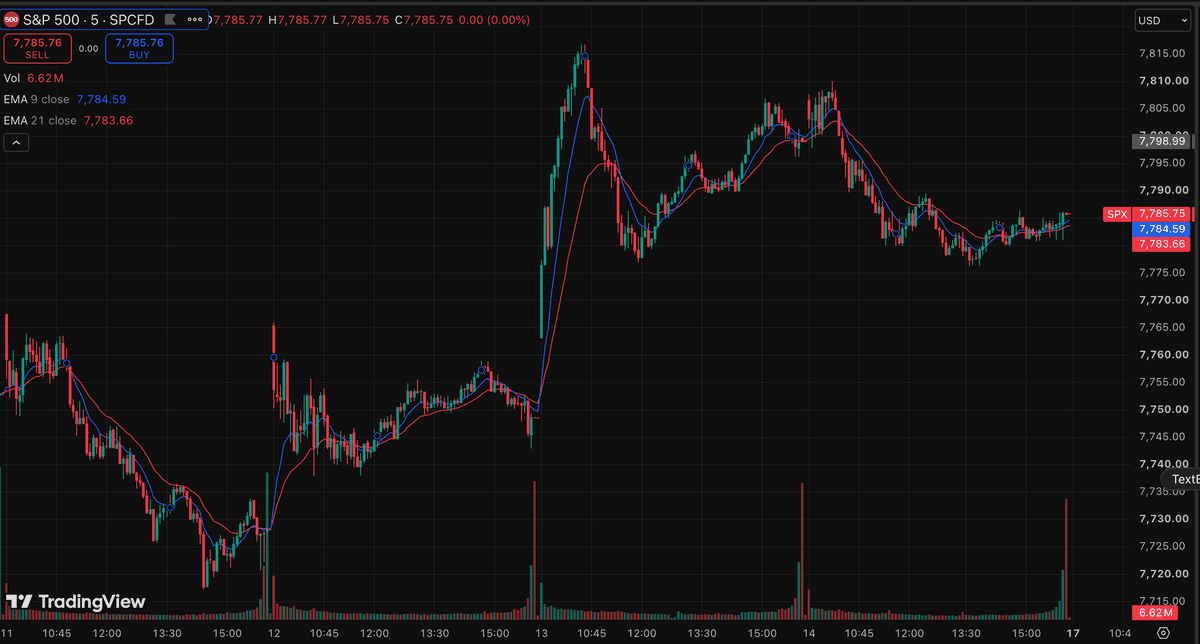
SPX sample readout: the 13th opens on a volume spike and expands off 7,748 to a high near 7,817. The following session tops near 7,810, a lower high, and price has since retraced to 7,785.75. The 9 and 21 EMAs have compressed to 7,784.59 and 7,783.66, under a point apart, with price crossing back and forth across both. Concern: a lower high with flat, intertwined moving averages is range behavior rather than trend, so this screenshot offers no directional edge.
SPX
S&P 500 / US 500 broad-market index CFD setups
LEVELS
Well-watched levels the benchmark respects
EMA
Pullback and reclaim context on the index chart
R:R
Reward measured against a structural stop
Quick answer
How do you analyze an SPX chart with AI?
You screenshot the SPX chart from your platform and upload the image. SnapPChart reads it directly, the market structure, the key levels the index respects, the EMA pullback context, and the visible volume, then grades the setup A+ to F with an entry, a structural stop, multi-target exits, and the reward against the risk. SPX is the index CFD that tracks the S&P 500, the basket of 500 large-cap US companies and the broad-market benchmark most traders watch as the overall risk read. Because it is so widely traded, it tends to respect clean structure and well-watched levels, which is exactly what the grader checks. It does not read live index data, does not pull the economic calendar, and does not see futures order flow. It grades what is visible on the chart you upload, using the same criteria every time, so an index-CFD or prop-firm scalper can compare one SPX setup to the next instead of trading on feel. One wrinkle specific to this market: SPX is quoted several different ways depending on where you trade it. SPX or SPX500 is the cash index itself, tracked only during the NYSE session (9:30am-4pm ET); SPCFD is the CFD wrapper most retail brokers actually list, which typically runs a near-24-hour session with its own overnight price action the cash index never sees; the E-mini ES and Micro E-mini MES are the futures contracts, also trading near round-the-clock; and SPY is the ETF wrapper that trades on the stock exchange during regular hours plus a limited pre/post-market window. Because the session hours differ, the same clock time can show very different structure on a cash-index chart versus a CFD or futures chart. SnapPChart does not know which wrapper your screenshot came from and does not reconcile it against another wrapper's price; it grades the structure, levels, and EMA context visible in the exact image you upload, so screenshot the chart from the instrument you actually trade.
What the AI Returns From a Screenshot
Use the output as a repeatable pre-trade checkpoint, not a prediction.
A-F Setup Grade
See whether the setup has enough pattern clarity, momentum, volume, and reward to justify the risk.
Entry, Stop, Targets
Get a structured trade plan with entry zone, invalidation level, targets, and risk/reward.
Screenshot-Based Read
Use charts from TradingView, Webull, ThinkOrSwim, MetaTrader, Robinhood, or any broker.
Risk Notes First
The analysis flags extension, messy chop, weak retests, thin reward, and conflicting indicators.
Workflow
Use it as a pre-entry gate on every SPX setup
SPX is the broad-market read, and a late or sloppy entry still costs real money on a funded account. SnapPChart gives you a consistent quality check on the index chart before you commit.
- Grade an SPX breakout or pullback before the entry
- Check the well-watched level the benchmark is reacting to
- Confirm the EMA pullback context supports the long
- Read the bear case and invalidation before you size on a funded account
- Re-grade the chart after a pullback to see if the setup got cleaner
- Skip C-grade index setups where the reward is not there
Head to head
SnapPChart vs a general AI chat assistant for chart screenshots
Most traders land here after pasting a chart into a general AI tool and getting a vague description. Here is how a purpose-built screenshot grader compares for the last decision before you risk money.
| Feature | SnapPChart | General AI chat assistant |
|---|---|---|
| Reads any chart screenshot | Every upload | Inconsistent |
| Setup grade (A+ to F) | Yes | No |
| Entry, stop, and targets | Every upload | Varies by prompt |
| Same criteria every time | Fixed methodology | Varies by prompt |
| Multi-target exit plan (T1 / T2) | Yes | Rarely consistent |
| Risk/reward + invalidation | Yes | Inconsistent |
| Speed to a decision | Seconds | Prompting required |
| Grade history to review | Yes | No |
Keep Learning the Setup
Use these guides to understand how SnapPChart grades the trade instead of taking the output blindly.
What do traders ask about SPX Chart Analysis?
How SnapPChart grades an SPX S&P 500 index chart from a screenshot.
How do I analyze an SPX chart with AI?
Screenshot the SPX chart from your platform and upload the image to SnapPChart. A multimodal vision model reads the structure, the key levels, the EMA pullback context, and visible volume directly from the picture, then returns a setup grade, an entry, a structural stop, targets, and the reward against the risk. You do not type out what the chart shows or connect a data feed. Platforms may label the same underlying market SPX, SPX500, or US500, list the CFD wrapper as SPCFD, and quote the futures as the E-mini ES or the Micro E-mini MES; the ETF wrapper is SPY.
Does it read live SPX data or the economic calendar?
No. SnapPChart grades the SPX chart screenshot you upload, not a live index feed. It does not pull the economic calendar, does not see futures order flow, does not predict the next candle, and does not reconcile the chart against a different SPX wrapper's price (SPY, ES, MES, or SPCFD). It reads the structure, the key levels, and the EMA context that are visible in the image and returns the trade plan and the bear case. You stay the decision-maker.
Is SPX the same as SPY, the ES futures, or an SPCFD?
Not exactly, though all four track the same underlying S&P 500. SPX (or SPX500) is the cash index itself, and it only exists during the NYSE trading session. SPCFD is the CFD wrapper most retail brokers actually quote you, which usually runs close to a 24-hour session with overnight price action the cash index never prints. The E-mini ES and its smaller Micro E-mini MES sibling are the futures contracts, also trading near round-the-clock and carrying their own expiry and rollover mechanics the cash index does not have. SPY is the ETF wrapper, trading on the stock exchange during regular hours plus a limited pre/post-market window. SnapPChart grades whichever screenshot you upload; it does not know or verify which wrapper the chart came from, so the read is only as accurate as matching your screenshot to the instrument you are actually trading.
Is it useful for index-CFD and prop-firm scalpers?
Yes. SPX is a core index CFD on funded accounts, and the value of the grader is consistency: it returns the same structured fields on every chart, so you can compare one SPX setup to the next and skip the C-grade trades that eat into prop-firm drawdown limits. It grades the long setup in front of you rather than scanning for new ones.
Can it grade an SPX short setup?
SnapPChart grades long and short momentum-continuation setups from chart screenshots. Choose Long only, Short only, or Both sides in your trading profile. Both sides picks one direction from the chart.
Is SPX chart analysis free to try?
Yes. New users get two lifetime chart analyses, no credit card required. The first analysis shows the full depth so you can see exactly what the AI returns from an SPX chart; the second is gated to show what the paid product adds.
Grade your next SPX setup before you enter.
Upload the S&P 500 chart from the homepage and get a structured read on the SPX setup in seconds. No credit card required.
Grade an SPX Chart Free