Price action trading AI that grades every structure setup before you take it.
Price action trading means reading the chart directly: swing structure, the break of the last high or low, and how price reacts at a level, instead of leaning on a lagging indicator stack. You read your own chart. Upload the screenshot and SnapPChart reads the swing structure, whether the last break was a continuation or an early change of character, the candle reaction at the key level, and the liquidity context (a swept high or low, an order block, a fair value gap) when it's genuinely visible, then returns a setup grade, entry, stop, targets, and the bear case.
Drag and drop your chart screenshot
or click to browse. PNG, JPG, or WebP.
Your first analysis is free. No credit card.
Make sure both the time axis (X) and price axis (Y) are visible in your screenshot for accurate results.
Grade
B+
Entry
$3.87
Stop
$3.75
Target
$4.24
Format example (stock chart)
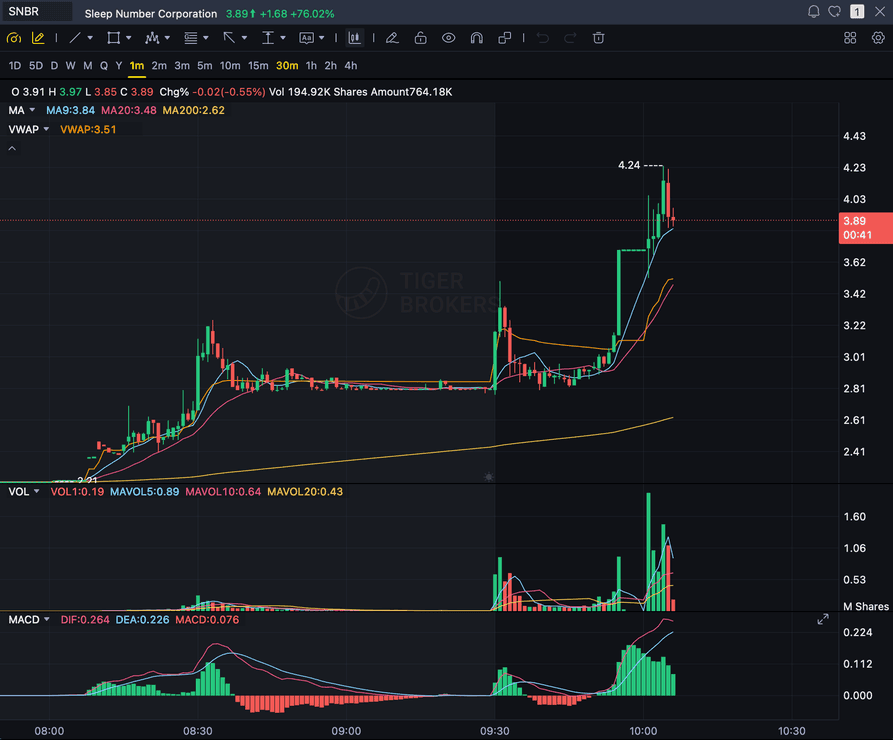
SNBR 1m bull flag pullback: strong opening momentum, lighter-volume consolidation, and a late breakout attempt near 3.89. Forex, crypto and futures screenshots get the same structure: a grade, entry, structural stop and targets.
STRUCTURE
Swing highs/lows and break of structure vs change of character
CANDLES
Rejection wicks, engulfing candles, and break-and-retest at the level
LIQUIDITY
Swept highs/lows, order blocks, and fair value gaps when visible
CONTINUATION
Graded for trend continuation, not counter-trend reversals
Quick answer
What is AI price action trading analysis?
AI price action trading analysis means using a chart-reading model to grade a setup off the raw structure and candles, instead of a lagging indicator stack. Price action trading means reading swing highs and lows, the break of the most recent high or low, and how price reacts at a level, directly off the chart. You bring the chart you're already reading; SnapPChart reads it the same way: the swing structure, whether the last break was a break of structure (trend continuation) or a change of character (an early shift against the prevailing structure), the candle reaction at the nearest key level (a rejection wick, an engulfing candle, an inside bar, a clean break-and-retest), and, when genuinely visible, the ICT-flavored context underneath it: a swept liquidity level, an order block, an unfilled fair value gap. It does not invent a swing or a zone that isn't there; if the chart is genuinely range-bound or the structure is unreadable, it says so instead of manufacturing a read. It returns a setup grade from A+ to F, an entry zone, a structural stop, multi-target exits, and the main reasons the trade could fail, applying the same criteria to every chart so a clean break-and-retest and a messy, unreadable structure get judged on the same checklist instead of on how confident the chart looks.
What the AI Returns From a Screenshot
Use the output as a repeatable pre-trade checkpoint, not a prediction.
A-F Setup Grade
See whether the setup has enough pattern clarity, momentum, volume, and reward to justify the risk.
Entry, Stop, Targets
Get a structured trade plan with entry zone, invalidation level, targets, and risk/reward.
Screenshot-Based Read
Use charts from TradingView, Webull, ThinkOrSwim, MetaTrader, Robinhood, or any broker.
Risk Notes First
The analysis flags extension, messy chop, weak retests, thin reward, and conflicting indicators.
Workflow
Use it as a structure check on the setups you already read
Price action trading lives or dies on reading the structure right. SnapPChart gives you a second, consistent read on the same chart before you commit to the trade.
- Grade a break-and-retest entry before you take it
- Check whether the last break was structure continuation or an early change of character
- Confirm a liquidity sweep or order block is genuinely on the chart, not assumed
- Re-grade the same chart after the retest to see if the setup got cleaner
- Compare two price-action setups on the same checklist before you pick one
- Skip C-grade setups where the structure is messy or unreadable
Head to head
Grading price action with SnapPChart vs reading structure by hand
Price action traders already read structure by hand, and most read it well. The gap is consistency: a sweep you want to see starts appearing on charts where it is not there. SnapPChart reads a clean, indicator-free chart on structure alone and names only what is visible.
| Feature | SnapPChart | Reading the chart by hand |
|---|---|---|
| Grades a naked, indicator-free chart on structure alone | Yes, every upload | Yes, if focused |
| Names the last break as BOS or CHoCH, with its price | Every read | Usually implicit |
| Calls a sweep, order block, or FVG only when it is on the chart | Never invented | Seen when wanted |
| Says plainly when the structure is unreadable or ranging | Grade reflects it | Forces a read |
| Grades the break-and-retest entry with a structural stop | Every upload | Stop often arbitrary |
| Judgement on an unusual structure | Fixed criteria only | Experience wins |
Keep Learning the Setup
Use these guides to understand how SnapPChart grades the trade instead of taking the output blindly.
What do traders ask about AI Price Action Trading?
How SnapPChart grades a price-action setup from a screenshot.
What does AI for price action trading actually do?
It grades the price-action setup you are about to take. Upload the chart screenshot and SnapPChart reads the swing structure, the break of structure or change of character, the candle reaction at the key level, and the liquidity context when it's genuinely visible, then returns a setup grade from A+ to F, an entry zone, a structural stop, multi-target exits, and the bear case. It reads the chart the way a price-action trader already does, structure and candles first, instead of leaning on a lagging indicator stack.
Does it read live order flow or the DOM?
No. SnapPChart reads the chart screenshot you upload, not a live feed, the DOM, or order flow. It does not invent a swing, a liquidity sweep, or a zone that isn't visible on the chart; if the structure is genuinely unreadable or the chart is range-bound, it says so plainly instead of forcing a read. You stay the decision-maker on the setup in front of you.
What's the difference between a break of structure and a change of character?
A break of structure (BOS) is price breaking the most recent swing high in an uptrend or swing low in a downtrend, a continuation of the existing trend. A change of character (CHoCH) is the first break against the prevailing structure, price taking out the last higher low in an uptrend, for example, an early signal the character of the move is shifting. SnapPChart names the most recent one it sees and the price it happened at, the same distinction a price-action trader already makes.
Does it grade ICT concepts like order blocks and liquidity sweeps?
When they're genuinely visible on the chart, yes: a swept liquidity level, an order block, or an unfilled fair value gap. Each one is filled in only when it can actually be read off the image, never invented to sound complete. For a deeper explainer on how the ICT vocabulary maps to a chart, see the smart money concepts guide.
Does it trade reversals or counter-trend setups?
No. SnapPChart grades momentum-continuation setups only. A change of character or a liquidity sweep is described as structure and context, not treated as a standalone reversal signal to trade. A chart that just topped and is rolling over is not graded as a short; it's read as a long that's stopping out. If the chart is genuinely range-bound or no continuation read is plausible, the grade reflects that instead of forcing a direction.
Does it work on long setups only?
SnapPChart grades long and short momentum-continuation setups from chart screenshots. Choose Long only, Short only, or Both sides in your trading profile. Both sides picks one direction from the chart.
Is there a free trial for price-action traders?
Yes. New users get two lifetime chart analyses to try the grading workflow on real setups. The first analysis shows the full depth so you can see exactly what it returns; the second is gated to show what the paid product adds. No credit card required.
Grade the price-action setup before you click buy.
Read the structure yourself, upload the chart from the homepage, and get a second, consistent read before you commit. No credit card required.
Grade a Price Action Chart Free