Grade your META setup before you take the trade.
Upload a META (Meta Platforms, Inc.) chart screenshot and SnapPChart reads the structure, key levels, EMA/VWAP pullback context, and visible volume, then returns a setup grade, entry, stop, targets, and the reward against the risk. Built for the traders who actually watch this chart every session: day traders, swing traders, and weekly or monthly options traders using Meta's stock chart to time an entry around one of the most heavily traded, most heavily followed mega-cap social-media and advertising names on the market.
Drag and drop your chart screenshot
or click to browse. PNG, JPG, or WebP.
Your first analysis is free. No credit card.
Make sure both the time axis (X) and price axis (Y) are visible in your screenshot for accurate results.
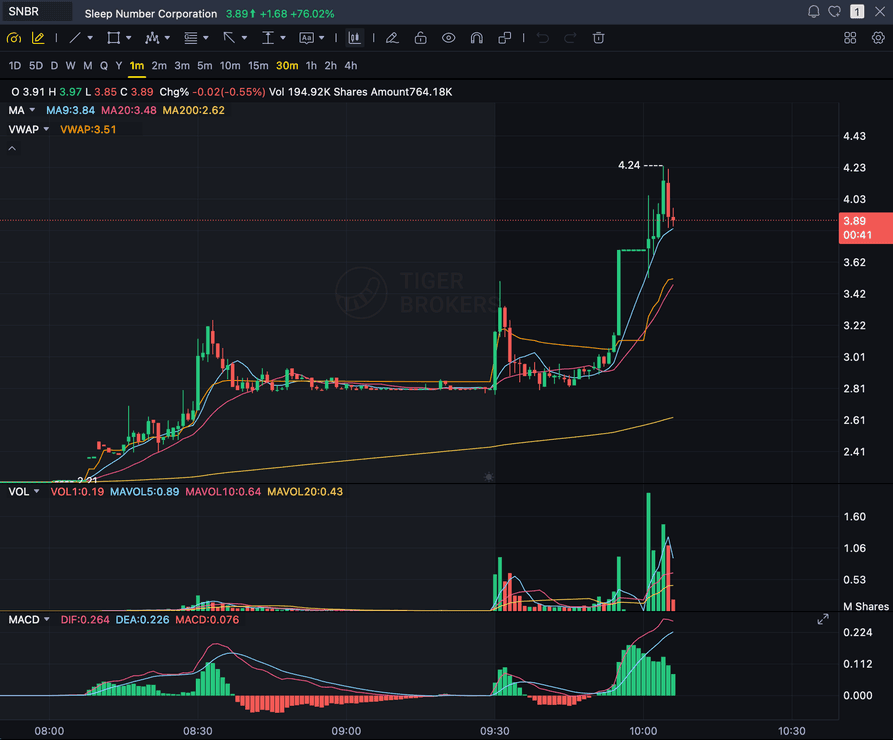
Grade
B+
Entry
$3.87
Stop
$3.75
Target
$4.24
Format example (stock chart)
SNBR 1m bull flag pullback: strong opening momentum, lighter-volume consolidation, and a late breakout attempt near 3.89. Forex, crypto and futures screenshots get the same structure: a grade, entry, structural stop and targets.
META
Meta Platforms, Inc. chart setups on Nasdaq
WEEKLY / MONTHLY OPTIONS
The underlying chart setup options traders time entries on
MEGA-CAP TECH
One of the most heavily traded 'Magnificent Seven' social-media and advertising names
ENTRY / STOP / TARGETS
Structured trade plan with the reward measured against the risk
Quick answer
How do you analyze a META chart with AI?
You screenshot the META chart from your broker or TradingView and upload the image. SnapPChart reads it directly, the market structure, the key levels, the EMA or VWAP pullback context, and the visible volume, then grades the setup A+ to F with an entry, a structural stop, multi-target exits, and the reward against the risk. META is Meta Platforms, Inc. (formerly Facebook, Inc.), listed on the Nasdaq, one of the most heavily traded and most heavily followed individual stocks on the market and part of the mega-cap 'Magnificent Seven' tech group, with an active weekly and monthly listed options chain that day and swing traders lean on for short-dated plays. Unlike a diversified index ETF, a single-company chart like META carries single-stock risk: an earnings print, a shift in digital-advertising demand, or a headline out of the company's Reality Labs division can move it independently of the broader tech tape. SnapPChart does not read a live META price feed, does not know Meta's earnings dates or EPS actuals, does not read the options chain, open interest, implied volatility, or greeks, does not pull analyst ratings or price targets, does not track insider trading data, and does not read daily or monthly active user (DAU/MAU) figures, ad-revenue or ad-pricing metrics, or Reality Labs spending or loss figures. It grades what is visible on the chart you upload, using the same criteria every time, so a day trader or swing trader can compare one META setup to the next instead of trading on feel.
What the AI Returns From a Screenshot
Use the output as a repeatable pre-trade checkpoint, not a prediction.
A-F Setup Grade
See whether the setup has enough pattern clarity, momentum, volume, and reward to justify the risk.
Entry, Stop, Targets
Get a structured trade plan with entry zone, invalidation level, targets, and risk/reward.
Screenshot-Based Read
Use charts from TradingView, Webull, ThinkOrSwim, MetaTrader, Robinhood, or any broker.
Risk Notes First
The analysis flags extension, messy chop, weak retests, thin reward, and conflicting indicators.
When to use it
Use it as a pre-entry gate on every META setup
META is one of the most heavily traded stocks on the market, and an earnings print or a product-event headline can turn a clean-looking chart choppy fast. SnapPChart gives you a consistent quality check on the stock chart before you commit.
- Grade a META breakout or pullback before the entry
- Check the key level and prior high or low Meta's chart is reacting to
- Confirm the EMA/VWAP pullback context supports the setup before you size in
- Cross-check a META setup against QQQ or the broader mega-cap tech tape
- Re-grade the chart after an earnings print or a major product-event headline before trusting an older read
- Skip C-grade META setups where the reward is not there
Meta Platforms (META) headlines
Latest Meta Platforms (META) news
Recent META stories from Yahoo Finance and Google News. Use the news read alongside your chart grade before sizing into a position.
1 Reason the Meta Muse AI Agent Has the Upper Hand
Investors should be thinking about monetization strategies.
Here’s Why Meta (META) Is A Cheap Stock To Buy
Suncoast Equity Management, an SEC-registered Investment Advisory (RIA), released its Q3 2026 investor letter for “U.S. Equity Large Cap Select Growth Strategy.” The letter can be downloaded here. The strategy…
Like Meta's Muse AI Agents? 4 AI Semiconductor Stocks Set to Benefit From the Rise of AI Agents.
The data center CPU market looks set to explode.
Consumer AI agents could upend online shopping - but who really wins?
Bernstein sees payments as a potential winner - more online transactions, including smaller purchases, could benefit Visa, Mastercard and processors Stripe, Adyen and Checkout.
Meta’s Second New Mexico Loss This Year: What It Means for Meta Stock
A New Mexico jury has found Meta Platforms, Inc. (NASDAQ:META) liable for more than 43 million privacy-law violations. The theoretical maximum exceeds $219 billion, although state attorneys requested $35 billion…
The Next Wave of AI Demand Could Send Broadcom, Marvell, and AMD Soaring
Broadcom management called Q3 demand simply hot, and Marvell and AMD have already tripled in 2026 alone. The question now is whether three bold price targets for 2027 are ambitious…
Head to head
SnapPChart vs a general AI chat assistant for META chart analysis
General AI tools can describe a META chart, but they will not return the same structured fields twice, and they are not built for the pullback and continuation reads that mega-cap tech day and swing traders lean on before timing an entry. SnapPChart grades every META setup, the stock itself or a related fund, to the same standard so you can compare a breakout, a dip buy, and a retest on equal footing.
| Feature | SnapPChart | General AI chat assistant |
|---|---|---|
| Reads META chart screenshots from any broker or platform | Yes, every upload | Inconsistent |
| Grades the momentum-continuation setup social-media and advertising mega-cap day and swing traders time entries on | Every setup | Not built for that decision |
| Setup grade (A+ to F) | Yes | No |
| Entry, stop, and multi-target exits | Every upload | Varies by prompt |
| Flags an already-extended META move before you chase it | Every bear case | Rarely surfaced |
| Uses the same fixed grading criteria whether META is trending on earnings or a product-event headline or quiet | Fixed methodology | Varies by prompt |
| Grade history to review | Yes | No |
Keep Learning the Setup
Use these guides to understand how SnapPChart grades the trade instead of taking the output blindly.
What do traders ask about META Chart Analysis?
How SnapPChart grades a META chart from a screenshot.
Can AI grade a META chart screenshot?
Yes. Screenshot the META chart from your broker or TradingView and upload the image to SnapPChart. A multimodal vision model reads the structure, key levels, EMA/VWAP pullback context, and visible volume directly from the picture, then returns a setup grade, an entry, a structural stop, targets, and the reward against the risk. You do not type out what the chart shows or connect a data feed.
Does SnapPChart read META's live price, earnings dates, or options chain?
No. The grade is built entirely from what is visible in the screenshot you upload. SnapPChart does not pull a live META price feed, does not know Meta's earnings dates or EPS actuals, does not read the options chain, open interest, implied volatility, or greeks, does not pull analyst ratings, price targets, or insider trading data, and does not read daily or monthly active user (DAU/MAU) figures, ad-revenue or ad-pricing metrics, or Reality Labs spending or loss figures. The live Meta headlines shown further down this page are a separate real news feed for you to read alongside the grade; the AI does not read those headlines or factor them into the grade itself. If a level or indicator is not on the chart, it is not part of the grade.
Does it work around Meta earnings or Reality Labs product news?
SnapPChart does not know Meta's earnings calendar or product-event schedule, and it does not read analyst estimates, EPS actuals, guidance, DAU/MAU figures, ad-revenue or ad-pricing metrics, or Reality Labs spending or loss figures. It grades whatever is visible on the chart screenshot you upload at the moment you upload it. An earnings print, an ad-market headline, or a Reality Labs hardware or product-event announcement can gap or whipsaw META sharply, so a grade run the day before can look very different from a grade on the same chart the morning after. Re-upload a fresh screenshot once the news has printed rather than trusting an older read through a gap.
What does it look at on a META chart?
When they are visible on the chart, it reads market structure, prior highs and lows, key support and resistance levels, EMA and VWAP pullback or reclaim context, and relative volume, then folds them into the grade. Show the levels and moving averages you trade with before you screenshot so the AI has the context that matters.
How is grading a META chart different from grading QQQ or NAS100?
QQQ and NAS100 are baskets of the largest Nasdaq companies, so a grade on either chart reflects diversified index behavior. META is a single company with two business lines of very different maturity, the advertising-driven Family of Apps (Facebook, Instagram, WhatsApp, and Messenger) and the historically loss-making Reality Labs division (VR/AR/metaverse hardware and software), so the same technical read carries single-stock risk: an advertising-demand slowdown, a Reality Labs spending update, or company-specific news can move Meta's chart independently of the broader mega-cap tech tape. SnapPChart grades whichever chart you upload the same way structurally, candles, levels, volume, entry, stop, targets, bear case, but if you actually hold META shares or options, upload the META chart itself rather than a basket proxy so the price scale and single-stock risk match what you trade.
Can it grade a META short setup?
SnapPChart grades momentum-continuation setups in both directions, long and short. What it does not do is call a reversal or a counter-trend turn: if a chart just topped and is rolling over, that is not a short setup for the grader, it is a long that is stopping out, and the same logic applies in reverse for a bottom. If you are trading a continuation move in an established META downtrend, that is in scope; if you are trying to catch the exact top or bottom, that is not.
Is META chart analysis free to try?
Yes. New users get two lifetime chart analyses, no credit card required. The first analysis shows the full depth so you can see exactly what the AI returns from a META chart; the second is gated to show what the paid product adds.
Grade your next META setup before you enter.
Upload the stock chart from the homepage and get a structured read on the META setup in seconds. No credit card required.
Grade a META Chart Free