Grade your TAIEX setup before you take the trade.
Upload a TAIEX (Taiwan Weighted Index) chart screenshot and SnapPChart reads the structure, key levels, round numbers, and EMA pullback context, then returns a setup grade, entry, stop, targets, and the reward against the risk. Built for traders of Taiwan's benchmark index, where TSMC's roughly 30% weight makes it a global semiconductor-sentiment proxy.
Drag and drop your chart screenshot
or click to browse. PNG, JPG, or WebP.
Your first analysis is free. No credit card.
Make sure both the time axis (X) and price axis (Y) are visible in your screenshot for accurate results.
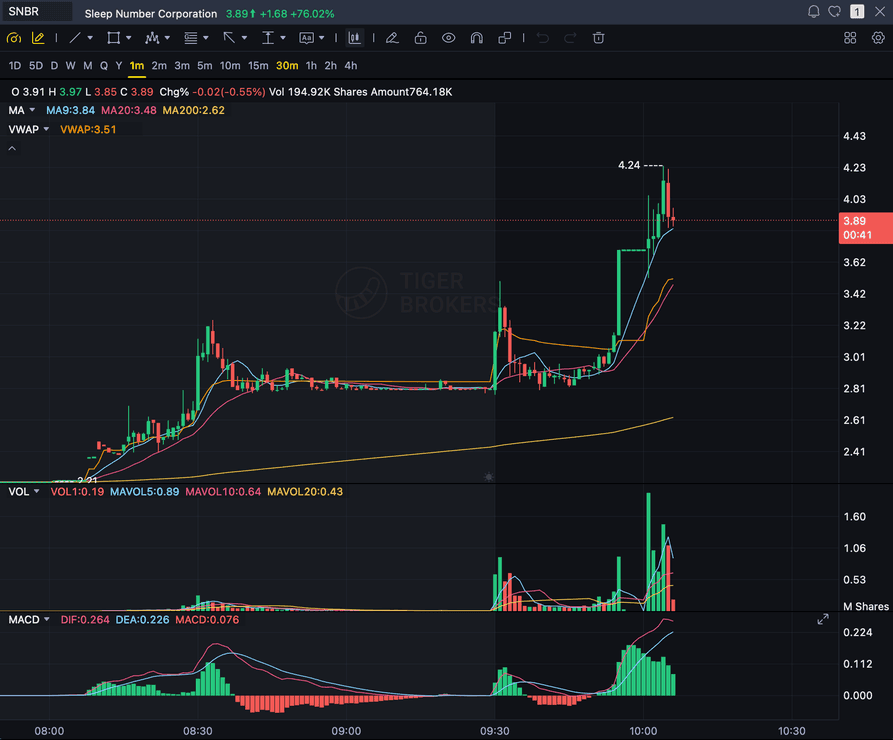
Grade
B+
Entry
$3.87
Stop
$3.75
Target
$4.24
Format example (stock chart)
SNBR 1m bull flag pullback: strong opening momentum, lighter-volume consolidation, and a late breakout attempt near 3.89. Forex, crypto and futures screenshots get the same structure: a grade, entry, structural stop and targets.
TAIEX / TWII
Taiwan's benchmark index, Taiwan Stock Exchange
LEVELS
Whole-number magnets like 47,000 the index respects
EMA
Pullback and reclaim context on the index chart
R:R
Reward measured against a structural stop
Quick answer
How do you analyze a TAIEX chart with AI?
You screenshot the TAIEX (Taiwan Weighted Index) chart from your platform and upload the image. SnapPChart reads it directly, the market structure, the key levels, the round-number magnets the index respects, the EMA pullback context, and the visible volume, then grades the setup A+ to F with an entry, a structural stop, multi-target exits, and the reward against the risk. TAIEX, officially the Taiwan Capitalization Weighted Stock Index, is Taiwan's main stock market benchmark, tracked on the Taiwan Stock Exchange (TWSE), and it is currently trading in the 46,000 to 48,000 range after hitting record highs in 2026, so it respects clean whole-number levels like 46,000, 47,000, and 48,000, which is exactly what the grader checks. TSMC (Taiwan Semiconductor Manufacturing Company) makes up roughly 30% of the index weight, which makes TAIEX a real proxy for global semiconductor-sector sentiment, not just a domestic Taiwan play, and that is why it draws international trader interest beyond Taiwan itself. TAIEX is a distinct market from the other Asian indices SnapPChart covers, the Nikkei tracks Japan on the Tokyo Stock Exchange, China A50 tracks mainland-China A-shares, the Hang Seng tracks Hong Kong, and Bank Nifty tracks India's banking sector, each on a different exchange, in a different currency, with a different constituent set, while TAIEX trades on the TWSE in New Taiwan Dollars with its weight concentrated in semiconductors and tech. It does not read live index data, does not pull the economic calendar, does not read Taiwan central bank, interest-rate, or macro news, does not read TSMC-specific corporate news, does not see index-futures order flow, does not read the index constituents or any other index, and does not predict the next candle. It grades what is visible on the chart you upload, using the same criteria every time, so a TAIEX trader can compare one setup to the next instead of trading on feel.
What the AI Returns From a Screenshot
Use the output as a repeatable pre-trade checkpoint, not a prediction.
A-F Setup Grade
See whether the setup has enough pattern clarity, momentum, volume, and reward to justify the risk.
Entry, Stop, Targets
Get a structured trade plan with entry zone, invalidation level, targets, and risk/reward.
Screenshot-Based Read
Use charts from TradingView, Webull, ThinkOrSwim, MetaTrader, Robinhood, or any broker.
Risk Notes First
The analysis flags extension, messy chop, weak retests, thin reward, and conflicting indicators.
Workflow
Use it as a pre-entry gate on every TAIEX setup
TAIEX carries TSMC's roughly 30% weight, so it often moves on global semiconductor-sector sentiment as much as on domestic Taiwan flows. SnapPChart gives you a consistent quality check on the index chart before you commit.
- Grade a TAIEX breakout or pullback before the entry
- Check the round-number level and prior high the index is reacting to
- Confirm the EMA pullback context supports the long
- Read the bear case and invalidation before you size the position
- Re-grade the chart after a pullback to see if the setup got cleaner
- Skip C-grade index setups where the reward is not there
Head to head
Grading a TAIEX chart with SnapPChart vs reading it by hand
TAIEX is heavy in semiconductors and has been trading near record highs, which makes it easy to read every pullback as a buy. The cash index also closes overnight, so the open can gap. A fixed checklist grades the chart in front of you instead of the story in your head.
| Feature | SnapPChart | Reading the chart by hand |
|---|---|---|
| Grades a TAIEX pullback near record highs without the trend talking you in | Fixed criteria | Trend bias likely |
| Folds a visible TWSE opening gap into the stop placement | When the gap shows | Often skipped |
| Names the 46,000 to 48,000 round levels in play | When visible on chart | Usually spotted |
| Entry, stop, and T1/T2 in TAIEX points with R:R | Every upload | Rough estimate |
| Bear case written down before a semiconductor-led long or short | Every read | Rarely written |
| TSMC news and the global chip mood | Not in a screenshot | You follow it |
Keep Learning the Setup
Use these guides to understand how SnapPChart grades the trade instead of taking the output blindly.
What do traders ask about TAIEX Chart Analysis?
How SnapPChart grades a TAIEX (Taiwan Weighted Index) chart from a screenshot.
How do I analyze a TAIEX chart with AI?
Screenshot the TAIEX (Taiwan Weighted Index) chart from your platform and upload the image to SnapPChart. A multimodal vision model reads the structure, key levels, round numbers, EMA pullback context, and visible volume directly from the picture, then returns a setup grade, an entry, a structural stop, targets, and the reward against the risk. You do not type out what the chart shows or connect a data feed.
Does it read live TAIEX data or the economic calendar?
No. SnapPChart grades the TAIEX chart screenshot you upload, not a live index feed. It does not pull the economic calendar, does not read Taiwan central bank, interest-rate, or macro news, does not read TSMC-specific corporate news, does not see index-futures order flow, does not read the index constituents or any other index, and does not predict the next candle. It reads the structure, levels, round numbers, and EMA context that are visible in the image and returns the trade plan and the bear case. You stay the decision-maker.
How is TAIEX different from other Asian indices SnapPChart covers?
TAIEX is Taiwan's main stock market benchmark, tracked on the Taiwan Stock Exchange and quoted in New Taiwan Dollars, and it is a distinct market from the other Asian indices SnapPChart covers. Nikkei tracks Japan, China A50 tracks mainland-China A-shares, Hang Seng tracks Hong Kong, and Bank Nifty tracks India's banking sector, each on its own exchange, in its own currency, with its own constituent set. TAIEX stands apart further because TSMC alone makes up roughly 30% of its weight, concentrating the index in semiconductors and tech rather than the banks, industrials, or broad-market names that dominate its siblings. SnapPChart treats them as separate markets and does not reference any other index while grading a TAIEX chart, it only reads the TAIEX screenshot you upload.
What does it look at on a TAIEX chart?
When they are visible on the chart, it reads market structure, prior highs and lows, the whole-number levels the index respects like 46,000, 47,000, and 48,000, EMA pullback and reclaim context, VWAP, and relative volume, then folds them into the grade. Show the levels and moving averages you trade with before you screenshot so the AI has the context that matters for the index.
Can it grade a TAIEX short setup?
SnapPChart grades long and short momentum-continuation setups from chart screenshots. Choose Long only, Short only, or Both sides in your trading profile. Both sides picks one direction from the chart.
Is TAIEX chart analysis free to try?
Yes. New users get two lifetime chart analyses, no credit card required. The first analysis shows the full depth so you can see exactly what the AI returns from a TAIEX chart; the second is gated to show what the paid product adds.
Grade your next TAIEX setup before you enter.
Upload the index chart from the homepage and get a structured read on the TAIEX setup in seconds. No credit card required.
Grade a TAIEX Chart Free