Grade your USD/MXN setup before the New York session moves it.
Upload a USD/MXN chart screenshot and SnapPChart reads the structure, the pullback into the 9 and 20 EMA, the whole-peso and half-peso round numbers the pair respects, and the visible tick volume, then returns a setup grade, entry, stop, targets, and the reward against the risk. Built for the higher-beta Latin American major that trades roughly 17 to 19 pesos per dollar and moves harder than a G7 pair on the same news.
Drag and drop your chart screenshot
or click to browse. PNG, JPG, or WebP.
Your first analysis is free. No credit card.
Make sure both the time axis (X) and price axis (Y) are visible in your screenshot for accurate results.
Grade
B+
Entry
$3.87
Stop
$3.75
Target
$4.24
Sample readout
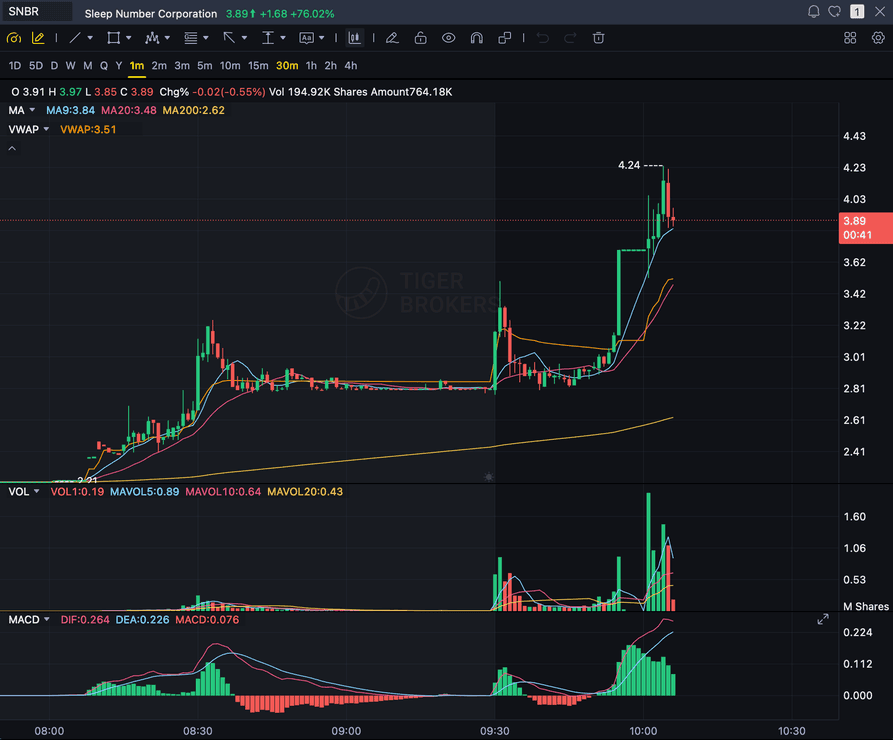
SNBR 1m bull flag pullback: strong opening momentum, lighter-volume consolidation, and a late breakout attempt with the 3.89 price marker near the current candle.
USD/MXN
The peso, a higher-beta Latin American major
ROUND NUMBERS
Whole-peso levels like 17.00 / 18.00 / 19.00
EMA
Pullback into the 9 and 20 EMA on a clean trend
NY SESSION
Heavily traded in New York; Banxico moves the pair
Quick answer
How do you analyze a USD/MXN chart with AI?
You screenshot the USD/MXN chart from your platform and upload the image. SnapPChart reads it directly, the market structure, the pullback into the 9 EMA or 20 EMA, the round-number levels the peso tends to respect, and the visible tick volume, then grades the setup A+ to F with an entry, a structural stop, multi-target exits, and the reward against the risk. USD/MXN, the Mexican peso, is a free-floating and liquid major, not a pegged or thinly-traded currency, but it is a Latin American major and a genuinely higher-beta pair than a G7 cross like USD/CAD, it moves more per session and reacts more sharply to global risk sentiment, selling off harder in risk-off and rallying harder in risk-on. It trades roughly 17 to 19 pesos per dollar and is quoted to 2 decimals, not the 4-decimal pip convention of a G7 major, so the round numbers that matter are whole-peso levels like 17.00, 18.00, and 19.00, plus half-peso levels like 17.50 and 18.50. It is heavily traded during the New York session, when both the US and Mexican economic calendars matter, and Banco de Mexico, Banxico, is the central bank whose rate decisions move the pair the way the Bank of Canada moves USD/CAD. The pair also carries a nearshoring and trade-flow narrative, Mexico-US manufacturing and trade ties under USMCA, that traders track as background context. The grader checks structure, not any of that. It does not read live USD/MXN prices, does not read Banxico's calendar, does not read risk-sentiment or emerging-market flow data, and does not cross-reference other pairs. It grades what is visible on the chart you upload, using the same criteria every time, so you can compare one peso setup to the next instead of trading on feel.
What the AI Returns From a Screenshot
Use the output as a repeatable pre-trade checkpoint, not a prediction.
A-F Setup Grade
See whether the setup has enough pattern clarity, momentum, volume, and reward to justify the risk.
Entry, Stop, Targets
Get a structured trade plan with entry zone, invalidation level, targets, and risk/reward.
Screenshot-Based Read
Use charts from TradingView, Webull, ThinkOrSwim, MetaTrader, Robinhood, or any broker.
Risk Notes First
The analysis flags extension, messy chop, weak retests, thin reward, and conflicting indicators.
Workflow
Use it as a pre-entry gate on every USD/MXN setup
The peso is a higher-beta major that can move further and faster than a G7 pair on the same catalyst, and a clean-looking pullback into a risk-off spike is a classic trap. SnapPChart gives you a consistent quality check on the USD/MXN chart before you commit.
- Grade a USD/MXN pullback into the 9 or 20 EMA before the entry
- Check the whole-peso or half-peso level (17.00, 17.50, 18.00) the pair is reacting to
- Confirm the chart is trending, not a risk-sentiment-driven spike
- Confirm the tick volume on the pullback is light, not heavy selling
- Read the bear case and invalidation before you size the position
- Skip C-grade peso setups where the reward is not there
Head to head
SnapPChart vs a general AI chat assistant for chart screenshots
Most traders land here after pasting a chart into a general AI tool and getting a vague description. Here is how a purpose-built screenshot grader compares for the last decision before you risk money.
| Feature | SnapPChart | General AI chat assistant |
|---|---|---|
| Reads any chart screenshot | Every upload | Inconsistent |
| Setup grade (A+ to F) | Yes | No |
| Entry, stop, and targets | Every upload | Varies by prompt |
| Same criteria every time | Fixed methodology | Varies by prompt |
| Multi-target exit plan (T1 / T2) | Yes | Rarely consistent |
| Risk/reward + invalidation | Yes | Inconsistent |
| Speed to a decision | Seconds | Prompting required |
| Grade history to review | Yes | No |
Keep Learning the Setup
Use these guides to understand how SnapPChart grades the trade instead of taking the output blindly.
What do traders ask about USD/MXN Chart Analysis?
How SnapPChart grades a USD/MXN chart from a screenshot.
How do I analyze a USD/MXN chart with AI?
Screenshot the USD/MXN chart from your platform and upload the image to SnapPChart. A multimodal vision model reads the structure, the pullback into the 9 and 20 EMA, the round-number levels, and visible tick volume directly from the picture, then returns a setup grade, an entry, a structural stop, targets, and the reward against the risk. You do not type out what the chart shows or connect a data feed.
Does it read live USD/MXN prices, Banxico, or risk-sentiment data?
No. SnapPChart grades the USD/MXN chart screenshot you upload, not a live feed. It does not read live USD/MXN prices, does not read Banco de Mexico's (Banxico) rate-decision calendar, does not read risk-sentiment or emerging-market flow data, and does not cross-reference other pairs. The nearshoring and USMCA trade-flow narrative, and the pair's higher-beta reaction to global risk sentiment, are trader background context, not something the grader reads. It reads the structure, the EMA pullback, the round numbers, and the tick volume that are visible in the image and returns the trade plan and the bear case. You stay the decision-maker.
Why does session and volatility character matter for grading USD/MXN?
USD/MXN is heavily traded during the New York session, when both the US and Mexican economic calendars are in play, and it is a genuinely higher-beta pair than a G7 major like USD/CAD, moving more per session and reacting more sharply to risk-on and risk-off swings. Reading a clean trending pullback versus a risk-sentiment spike off the chart is half the job, and the grader rewards the former and marks down the latter. The consistency of the same structured fields on every chart lets you compare one peso setup to the next.
Are the entry, stop, and targets in pips or peso terms?
Peso terms. USD/MXN is quoted to 2 decimals, roughly 17 to 19 pesos per dollar, not the 4-decimal pip convention of a G7 major like USD/CAD or EUR/USD. The entry, structural stop, and targets are returned as peso prices such as 17.85, and the reward is measured against the risk on that same 2-decimal scale. The grader looks for a minimum reward-to-risk that holds up after spread on a higher-beta major like the peso.
Can it grade a USD/MXN short setup?
SnapPChart is optimized for long (buy) momentum setups. Short setups, options, and hedging are out of scope by design. On a higher-beta pair that swings both ways, the honest answer is that the grader is tuned for the long side, so use it for the long pullback setups it understands well.
Is USD/MXN a free-floating, liquid pair?
Yes. USD/MXN is a genuinely free-floating, exchange-traded major with deep liquidity, not a pegged or thinly-traded currency, so there is no intervention or peg risk to caveat the way there would be on a managed currency. It carries the same confidence level as any other major FX pair on SnapPChart, with the caveat that it is higher-beta and moves harder than a G7 cross on the same catalyst.
Is USD/MXN chart analysis free to try?
Yes. New users get two lifetime chart analyses, no credit card required. The first analysis shows the full depth so you can see exactly what the AI returns from a USD/MXN chart; the second is gated to show what the paid product adds.
Grade your next USD/MXN setup before you enter.
Upload the peso chart from the homepage and get a structured read on the USD/MXN setup in seconds. No credit card required.
Grade a USD/MXN Chart Free