Screenshot your Bybit chart, get a graded trade plan back.
SnapPChart reads a Bybit chart screenshot the way you do, the candles, the levels, and whatever indicators you have on the chart, then returns a setup grade, entry, stop, targets, and the main reason it could fail. No account link, no API, no plugin or add-on. It reads the picture you upload, so it grades the actual setup on your Bybit chart instead of touching your account.
Drag and drop your chart screenshot
or click to browse. PNG, JPG, or WebP.
Your first analysis is free. No credit card.
Make sure both the time axis (X) and price axis (Y) are visible in your screenshot for accurate results.
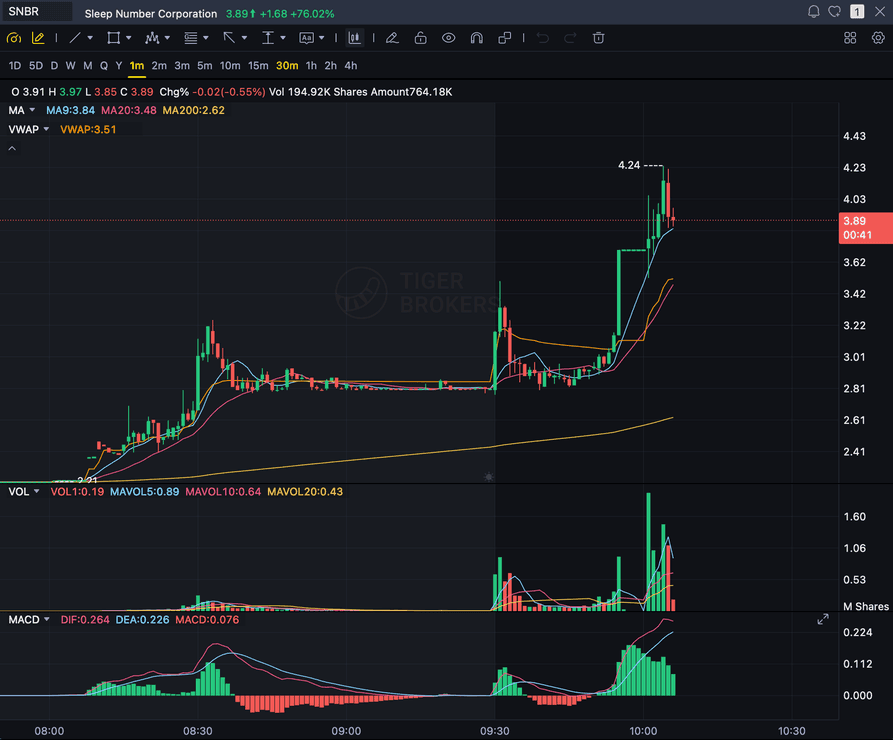
Grade
B+
Entry
$3.87
Stop
$3.75
Target
$4.24
Format example (stock chart)
SNBR 1m bull flag pullback: strong opening momentum, lighter-volume consolidation, and a late breakout attempt near 3.89. Forex, crypto and futures screenshots get the same structure: a grade, entry, structural stop and targets.
STOCKS
Momentum, breakout, pullback, and reversal setups
FOREX
Major pairs, crosses, XAUUSD, and session context
CRYPTO
Bitcoin, Ethereum, and high-beta altcoin charts
FUTURES
Index, commodity, and intraday futures screenshots
Quick answer
How do you analyze a Bybit chart with AI?
You screenshot the chart in Bybit and upload the image. SnapPChart reads the screenshot directly, the candles, trend, support and resistance, volume, and any indicators you have on the chart, then grades the setup A+ to F with an entry, a structural stop, multi-target exits, and a bear case. Bybit is a top-tier global cryptocurrency exchange especially known for perpetual-futures and derivatives trading, with a full charting stack across spot, futures, web, and mobile, so this is the fastest honest answer to which AI can read a Bybit screenshot: you do not link your Bybit account, you do not connect an API, there is no plugin or add-on, and it does not route or place orders, read your live Bybit feed or order book, scan the market, or predict the next candle, because the analyzer reads the picture, not your platform or a data feed. That also means it is platform-agnostic. The same upload works whether you chart on Bybit, another exchange, or TradingView, and the same grading checklist runs on every screenshot so a strong setup and a weak one get judged the same way.
What the AI Returns From a Screenshot
Use the output as a repeatable pre-trade checkpoint, not a prediction.
A-F Setup Grade
See whether the setup has enough pattern clarity, momentum, volume, and reward to justify the risk.
Entry, Stop, Targets
Get a structured trade plan with entry zone, invalidation level, targets, and risk/reward.
Screenshot-Based Read
Use charts from TradingView, Webull, ThinkOrSwim, MetaTrader, Robinhood, or any broker.
Risk Notes First
The analysis flags extension, messy chop, weak retests, thin reward, and conflicting indicators.
Workflow
How do you turn a Bybit screenshot into a graded setup?
You do not connect your account or rebuild the chart. Screenshot it in Bybit, drop the image in, and read the grade.
- Screenshot any pair on any timeframe in Bybit (spot, futures, web, or the mobile app)
- Upload the image, with no account link, no API, and no plugin or add-on
- The analyzer reads candles, levels, volume, and the indicators visible on your chart
- Read the A+ to F grade, entry, stop, targets, and the bear case
- Pass on the C and F setups, then screenshot the next chart
Head to head
SnapPChart vs reading a Bybit perpetual chart by hand
Bybit is where a lot of traders run perpetual futures, frequently on lower timeframes and around the clock. Fast charts and leverage leave little room for a sloppy read. Here is a fixed grade on your Bybit screenshot next to calling the same setup by eye, row by row.
| Feature | SnapPChart | Bybit charts read by hand |
|---|---|---|
| Grades a 5-minute perp chart in seconds | Seconds per read | Rushed by the move |
| Reads a USDT perpetual chart with your indicators on | Uses visible indicators | Clutter adds noise |
| Invalidation level before you set leverage | In every plan | Often skipped |
| Short continuation setups on perps | Graded like longs | Underused |
| Partial exit at T1 on a leveraged position | Every plan | Usually one exit |
| Funding and open interest on the contract | Not in the read | You can check them |
| Graded trades to look back on | Saved history | Gone after close |
Keep Learning the Setup
Use these guides to understand how SnapPChart grades the trade instead of taking the output blindly.
What do traders ask about Bybit Chart Analysis?
How the AI reads a Bybit screenshot and what it returns.
How do I analyze a Bybit chart with AI?
Screenshot the chart in Bybit, then upload the image to SnapPChart. A multimodal vision model reads the candles, trend, support and resistance, volume, and any visible indicators directly from the picture, then returns a setup grade, an entry, a structural stop, targets, and the main reason the trade could fail. You do not type out what the chart shows or connect your Bybit account.
Is SnapPChart a Bybit plugin or account integration?
No. There is nothing to install, no API to connect, and no exchange account to link. SnapPChart reads the screenshot you upload, so it works with Bybit without being part of it. That is on purpose: reading the image instead of your platform or a data feed is what lets the same tool grade a chart from Bybit, another exchange, TradingView, or any other platform.
Does it work with Bybit spot and perpetual futures charts?
Yes. Bybit is especially known for its perpetual-futures and derivatives markets, alongside spot trading, and it carries full candlestick charting with indicators and drawing tools across both. Which market sits behind the screenshot does not matter, because the analyzer reads the chart image, not the charting software. Capture the chart on Bybit web, the mobile app, or Bybit futures, upload the screenshot, and the same grading checklist runs on it.
What can I analyze from a Bybit chart?
Bybit lists a wide range of spot pairs and perpetual futures contracts, so the price chart for whichever coin or contract you are trading is in scope as long as the candles, timeframe, and price scale are visible. The grader reads the price chart you are basing the trade on, not a coin list, so screenshot the actual setup you want graded.
Does it read the indicators on my Bybit chart?
It reads the indicators that are visible in the screenshot. If you have moving averages, VWAP, MACD, RSI, or volume showing on the chart, the analyzer factors what it can see into the grade. It cannot read an indicator you have hidden or a setting that is not shown, because it only has the picture. Show the levels you care about before you screenshot.
Is Bybit chart analysis free to try?
Yes. New users get two lifetime chart analyses, no credit card required. The first analysis shows the full depth so you can see exactly what the AI returns from a Bybit screenshot; the second is gated to show what the paid product adds.
Does it place trades or predict where price goes next?
No. It is a pre-trade decision layer, not an autonomous trader and not a price predictor. It grades the setup in the screenshot so your process stays repeatable. It does not connect to Bybit, does not route or place orders, does not read your live Bybit feed or order book, does not scan the market, and does not call the next candle. You stay the decision-maker.
Grade your next Bybit chart.
Screenshot a chart in Bybit, upload it from the homepage, and get a graded trade plan in seconds. No account link and no credit card required.
Analyze a Bybit Chart Free