Run your setup through a pre-trade check before you click buy.
Upload the chart of the setup you already decided to take, entry, stop, and size already picked. SnapPChart runs it through the same fixed pre-trade check every time and hands back a grade, entry zone, stop, targets, and the bear case to line up against your own plan, an independent second opinion in the seconds before you click buy, not a system built to construct the trade for you or talk you into the one you already want.
Drag and drop your chart screenshot
or click to browse. PNG, JPG, or WebP.
Your first analysis is free. No credit card.
Make sure both the time axis (X) and price axis (Y) are visible in your screenshot for accurate results.
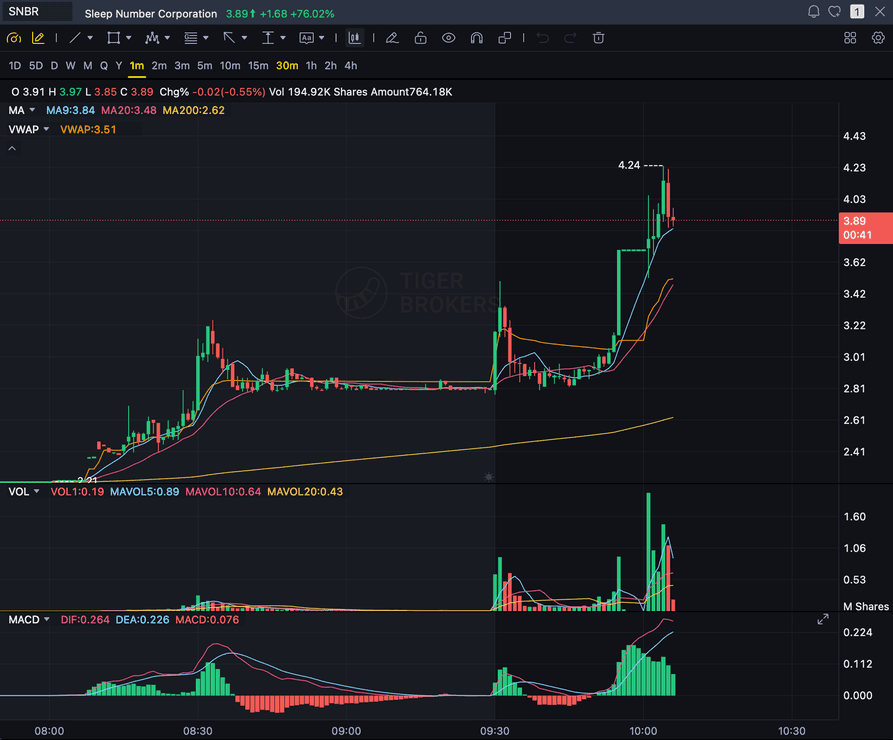
Grade
B+
Entry
$3.87
Stop
$3.75
Target
$4.24
Sample pre-trade check
Sample pre-trade check: before clicking buy, this setup was run through the same fixed check every time, entry, stop, target, and the bear case, so the call to take it or wait was based on the chart, not the moment.
CHECK
One fixed pre-trade check, every setup
SPEED
Seconds, right before you click buy
BIAS
An independent read against your own excitement
ANY CHART
Stocks, forex, crypto, and futures screenshots
Quick answer
What is a pre-trade analyzer?
A pre-trade analyzer is a check you run in the seconds between deciding on a setup and clicking buy, not a tool for finding the setup in the first place. Traders search for it as a pre trade analyzer, a pre-trade check, or an AI second opinion before entering. SnapPChart's version reads the chart screenshot you upload and returns the same fixed fields every time: a setup grade, entry zone, stop, targets, and the bear case. It uses the same grading engine as the AI trade analyzer, built for a narrower moment: you already have the entry, stop, and size in mind, and you want one more independent read before you commit capital, not a tool that builds the plan for you from scratch. The value is in the timing. Confirmation bias and FOMO are strongest right when your finger is over the buy button, and that is exactly when a fixed, repeatable check matters most, because the criteria do not move just because you are excited about the trade.
What the Pre-Trade Check Returns
The same structured checkpoint on every setup, so the trade you take today is checked the same way as the one you take next week.
Grade For The Plan You Already Made
The check reads the same screenshot you were about to trade off and grades it, A+ to F, without seeing the entry or stop you already picked, so the score is not flattered by how sure you feel about the trade.
Entry, Stop, Targets To Check Against Your Own
Compare the AI's read against the entry, stop, and size you already had in mind before you click buy.
Agreement Or Conflict, Not Just A Score
Line the AI's entry, stop, and targets up next to the ones you already picked. When they agree, that is your green light. When they conflict, that disagreement is worth pausing on before you size in.
The Bear Case On Demand
Every check returns the reason the trade could fail, so confirmation bias does not get the last word in the seconds before you enter.
The moment it's for
Use it in the seconds before you click buy, not to find the trade
This is not where you go looking for a setup, and it is not where the AI builds a trade plan from a blank chart. It is the checkpoint you run after you already picked the entry, the stop, and the size, when the cursor is already sitting on the buy button and the chart still looks exactly the way it did when you found it.
- You already picked the entry, stop, and size, screenshot the chart as it sits right now
- Upload it and see whether the AI's grade, entry, stop, and targets agree with what you already picked
- Read the bear case before you second-guess the trade after the fill instead of before it
- Use it as a circuit breaker on FOMO entries and chasing a move that already ran
- Skip the trade when the grade and your own plan disagree, take it when they line up
- Run the same check on every entry so one good week does not turn into a habit of skipping it
Not a new read, a checkpoint
This is not where you find the setup. It's the checkpoint right before you buy it.
By the time you open this page you have usually already done the work: you found the chart, picked an entry, set a stop, and decided on a size. Confirmation bias and FOMO are strongest in exactly this window, the seconds between deciding and clicking buy, which is also the moment a trader is least likely to slow down and re-check anything. Running the same fixed check every time, regardless of how confident the setup feels, is the point.
If you have not landed on a setup yet, this page is not the one you want: start with the AI chart analysis tool for a first read on any chart screenshot. If you want to understand the grading criteria behind the check before you trust it, read how to grade a trade before entering.
One moment, one check
You run this in the seconds before you click buy, off the exact screenshot you were about to trade from. It is not a scanner and it does not go looking for candidates.
What it does not do
It reads the screenshot you upload, at the moment you upload it, nothing more. It does not track your open positions, does not connect to your broker or account, does not watch the market live, and does not alert you before you enter on its own. You decide when to run the check and you stay the decision-maker.
Head to head
A pre-trade check vs entering on gut feel
The real alternative to a pre-trade check is not a different tool, it is skipping the check because the setup feels obvious in the moment. Here is what that costs you compared to running the same fixed check every time.
| Feature | SnapPChart | No pre-trade check (gut feel entry) |
|---|---|---|
| An independent read before you click buy | Every upload | Whatever you already believe |
| Same criteria on every single trade | Fixed methodology | Shifts with mood and conviction |
| Forces the bear case before you size | Every check | Easy to skip when you're excited |
| Entry, stop, targets to check against your own | Yes | Whatever you eyeballed |
| Takes seconds, no extra steps | Yes | The check never happens |
| A record to look back on | Yes, every graded chart | Nothing to review |
Know What You're Checking Against
This page is the checkpoint. These are the tools and guides behind what it checks.
What do traders ask about Pre-Trade Analyzer?
What a pre-trade check is, when to run it, and what it does not do.
What is a pre-trade analyzer?
A pre-trade analyzer is an AI check you run right before you enter a trade, after you already found the setup and decided you want to take it. Upload the chart screenshot and SnapPChart returns a setup grade, an entry zone, a stop, targets, and the bear case, an independent read to weigh against your own plan in the moment you are most likely to skip the check: right before you click buy.
Is a pre-trade analyzer different from the AI trade analyzer?
They share the same grading engine and return the same fields. The AI trade analyzer page is built for when you want the AI to work out the read on a setup for you. This page is built for a narrower moment: you already decided to take the trade, entry and stop already picked, and you want one more independent check before you commit capital. If you have not landed on a setup yet, start with the AI chart analysis tool instead.
Does it track my open positions or watch the market for me?
No. It is a pre-trade decision layer, not an autonomous trader and not a live monitor. It grades the screenshot you upload, at the moment you choose to upload it, nothing more. It does not track your open positions, does not connect to your broker or account, does not watch the market live, and does not alert you before you enter on its own. You stay the decision-maker and you decide when to run the check.
Does it replace my own analysis before I enter?
No, and it is not trying to. The check gives you a second, unemotional read to compare against the plan you already built. If your entry, stop, and the AI's read line up, that is a cleaner signal to take the trade. If they conflict, that disagreement is worth pausing on before you size in, but the decision stays yours.
Why check every trade instead of just the ones I'm unsure about?
Because the setups that feel most obvious are exactly where confirmation bias and FOMO are strongest, and those are the trades a trader is least likely to double-check on their own. Running the same fixed check on every entry, not just the uncertain ones, is what keeps the process from quietly eroding on the good weeks.
What does the pre-trade check actually return?
The same structured fields on every upload: an A+ to F setup grade, an entry zone, a stop, multi-target exits, the risk/reward, and the bear case explaining how the trade could fail. It is the same output as a full chart analysis, framed for the specific moment right before you click buy rather than for finding a new setup.
Do I need to connect a broker or log the trade first?
No. There is nothing to connect and nothing to log beforehand. Screenshot the chart from TradingView, your broker, or any charting app, upload it, and the check runs off that image alone.
Is there a free trial?
Yes. New users get two lifetime chart analyses to try the pre-trade check on a real setup, no credit card required. The first check shows the full output; the second is gated so you can see what the paid product adds.
Is this a pre-trade checklist or a trade validation tool?
It works like both, with one difference from each. Like a checklist, it runs the same fixed set of checks on every chart you upload: structure, indicator alignment, volume, risk/reward, entry zone, stop, and targets, so nothing gets skipped because you are excited about the trade. There are no boxes to tick, no saved progress, and nothing to print; it is a single AI read, not an interactive checklist app. Like a validation tool, it gives you an independent read to hold your own plan up against, but it does not take your entry, stop, and target as input and mark them right or wrong. It generates its own levels from the chart, and you compare those to the plan you already picked, not submit your plan for review.
Run the check before you click buy.
Upload the chart of the setup you already decided to take and get the grade, entry, stop, targets, and bear case in seconds. No credit card required.
Run the Pre-Trade Check Free