Grade the bull flag before you chase the breakout.
Upload a chart with a bull flag forming and get a read on the flagpole, how deep the flag pulled back, the breakout level, the volume behind the move, and a full trade plan, so a clean flag and a sloppy one do not get the same benefit of the doubt.
Drag and drop your chart screenshot
or click to browse. PNG, JPG, or WebP.
Your first analysis is free. No credit card.
Make sure both the time axis (X) and price axis (Y) are visible in your screenshot for accurate results.
Grade
B+
Entry
$3.87
Stop
$3.75
Target
$4.24
Sample readout
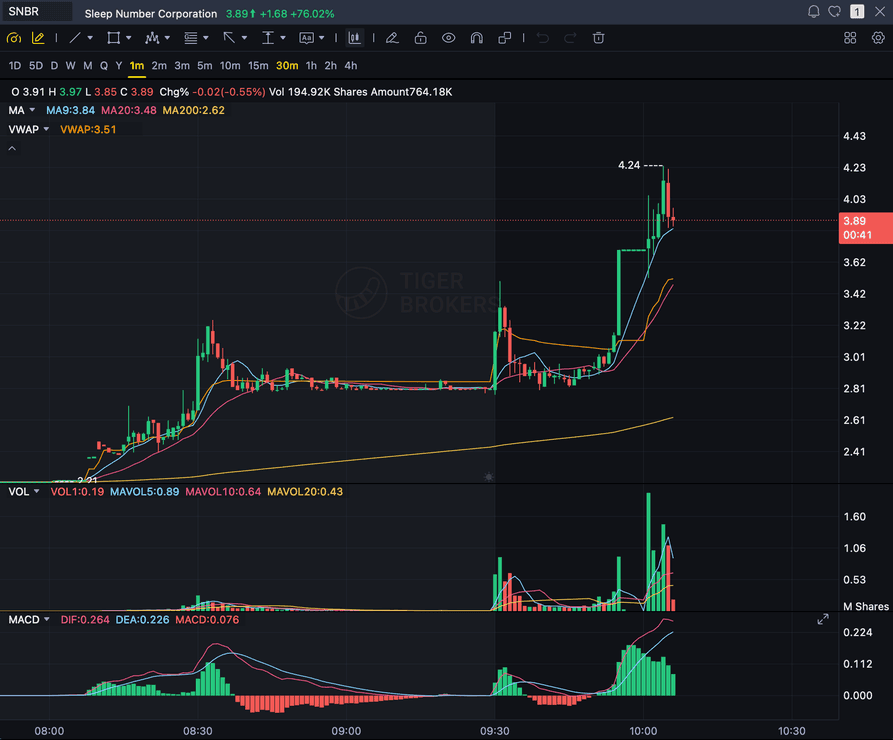
SNBR 1m bull flag pullback: strong opening momentum, lighter-volume consolidation, and a late breakout attempt with the 3.89 price marker near the current candle.
FLAGPOLE
The sharp impulse leg up, as drawn on your chart
FLAG
How deep and tidy the consolidation pulled back
VOLUME
Whether volume dried up in the flag and returned on the break
9 EMA
Trend context the flag is riding above
Quick answer
What is a bull flag, and can AI grade it?
A bull flag is a continuation pattern: a sharp impulse move up (the flagpole), followed by a small downward or sideways consolidation on lighter volume (the flag), then a breakout that continues the trend. It is one of the more popular momentum setups because the flag gives the trend a pause to reload before the next leg.
SnapPChart grades that exact structure from the chart you upload: it reads the flagpole, the depth and shape of the flag consolidation, the breakout level, the 9 and 20 EMA context, and the volume behind the move, then returns a setup grade, an entry zone, a structural stop below the flag, multi-target exits, and the bear case. It reads the image you upload, not a live feed, and it does not watch the tape or predict the next candle. You mark the flag, screenshot the chart, and upload it, and the same checklist runs every time so a tight flag and a deep, messy one get judged the same way.
What the AI Returns From a Screenshot
Use the output as a repeatable pre-trade checkpoint, not a prediction.
A-F Setup Grade
See whether the setup has enough pattern clarity, momentum, volume, and reward to justify the risk.
Entry, Stop, Targets
Get a structured trade plan with entry zone, invalidation level, targets, and risk/reward.
Screenshot-Based Read
Use charts from TradingView, Webull, ThinkOrSwim, MetaTrader, Robinhood, or any broker.
Risk Notes First
The analysis flags extension, messy chop, weak retests, thin reward, and conflicting indicators.
Workflow
Use it as a quality check on the flag
Plenty of bull flags fail on a low-volume breakout or when the flag pulled back too deep. SnapPChart gives you a consistent read on whether this one is tight and ready before you chase the break.
- Mark the flagpole and the flag, then screenshot the chart as it nears the breakout
- Check whether the flag pulled back shallow and tidy instead of deep and sloppy
- Confirm volume dried up in the flag and is returning on the breakout
- Read the 9 EMA and 20 EMA context the flag is riding above
- Re-grade after the breakout to see if the base held or it was a fakeout
- Skip the flag when the grade flags a deep pullback or thin breakout volume
Head to head
SnapPChart vs a general AI chat assistant for bull flag setups
A general AI tool can tell you a chart looks like a bull flag, but it will not judge the quality of the flag to the same standard twice. SnapPChart checks the flagpole, how deep the flag pulled back, the breakout level, and the volume the same way on every screenshot you upload.
| Feature | SnapPChart | General AI chat assistant |
|---|---|---|
| Grades the bull flag you marked on the screenshot | Yes, every upload | Inconsistent |
| Reads the flagpole and the flag consolidation | From the image | Varies by prompt |
| Checks volume on the flag vs the breakout | Every grade | Rarely |
| Flags a flag that pulled back too deep | Every bear case | Rarely flagged |
| Entry, stop, targets off the breakout level | Yes | Prompting required |
| Same criteria on every flag | Fixed methodology | Varies by session |
Learn the bull flag setup
Use these guides to understand what makes a flag grade well, so you take the read instead of the output blindly.
What do traders ask about Bull Flag AI?
How SnapPChart grades a bull flag from your screenshot.
How does the AI grade a bull flag?
It reads the flagpole you marked, the depth and shape of the flag consolidation, the breakout level, and whether price is breaking out or still chopping inside the flag. It factors the 9 and 20 EMA position and the volume behind the move into the grade, then returns a setup grade, an entry, a structural stop below the flag, and targets. A tight, shallow flag on drying-up volume grades higher than a deep, sloppy flag that gave back most of the pole.
Does SnapPChart auto-detect or scan for bull flags, or read live price?
No. It does not scan a feed for flags, watch the tape, or predict the next candle. You identify and mark the bull flag, then screenshot and upload that chart, and the AI grades the structure it can see in the image: the flagpole, the flag, the breakout level, the EMAs, and the volume. The grade reflects the picture you give it.
Can it tell a clean flag from one that pulled back too deep?
It flags the deep-pullback risk in the bear case. If the flag retraced most of the flagpole or broke its lower trendline before the breakout, the grade drops and the trade plan calls out that the continuation thesis is weaker. A shallow flag that held its structure on lighter volume grades better.
What should be on the chart before I screenshot it?
Make sure the flagpole and the flag consolidation are both visible, with the candles, timeframe, price scale, and volume showing. The 9 EMA and 20 EMA help, since the grade factors their position. The more of the flag and breakout context that is visible in the image, the more complete the read.
What timeframes work best for a bull flag?
Bull flags show up on everything from 1-minute scalps to daily swings. Upload the timeframe you would actually trade from, with the flagpole, the flag, and volume visible, so the AI has the context that matters for the setup. There is no clock pressure on the grade, so you can take the read on any timeframe you trade.
Is there a free trial for bull flag grading?
Yes. New users get two lifetime chart analyses. The first shows the full output so you can see exactly what the flag grade returns; the second is gated to show what the paid product adds. No credit card required.
Grade the flag before you chase the break.
Mark the flag, screenshot the chart, and upload it from the homepage for a structured read on the setup.
Grade a Bull Flag Free