Grade the anchored VWAP setup before you trust the level.
Upload a chart with the anchored VWAP plotted from the swing high, swing low, or event you chose, and get a read on whether price is holding the line, the volume behind the hold or reclaim, and a full trade plan, so a genuine continuation and a random touch of the line do not get the same benefit of the doubt.
Drag and drop your chart screenshot
or click to browse. PNG, JPG, or WebP.
Your first analysis is free. No credit card.
Make sure both the time axis (X) and price axis (Y) are visible in your screenshot for accurate results.
Grade
B+
Entry
$3.87
Stop
$3.75
Target
$4.24
Format example (stock chart)
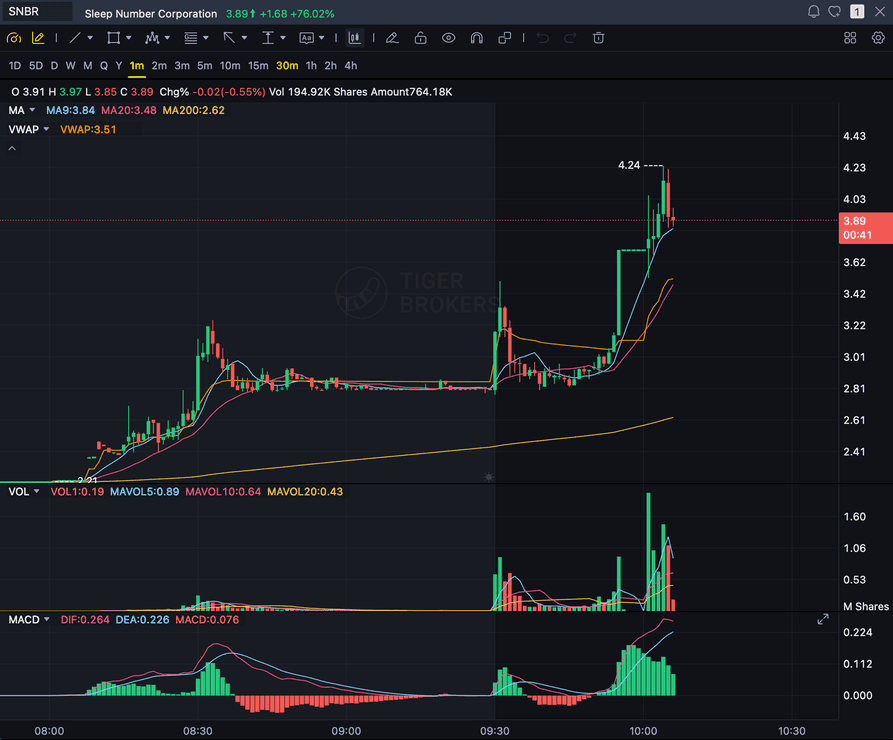
SNBR 1m bull flag pullback: strong opening momentum, lighter-volume consolidation, and a late breakout attempt near 3.89. Forex, crypto and futures screenshots get the same structure: a grade, entry, structural stop and targets.
AVWAP
The anchored line itself, as drawn on your chart
ANCHOR
The swing high/low or event you chose as the start
VOLUME
Whether the hold or reclaim came with participation
MULTI-DAY
Runs continuously from the anchor, never resets
Quick answer
What is anchored VWAP, and can AI grade it?
Anchored VWAP (AVWAP) uses the same volume-weighted-average-price math as standard VWAP, but instead of resetting at the start of every trading session, it starts from a single bar or event you choose, a significant swing high or low, an earnings gap, an unusually high-volume day, or the start of a new trend, and runs continuously forward from that anchor without ever resetting.
Brian Shannon (Alphatrends), author of Technical Analysis Using Multiple Timeframes and later Maximum Trading Gains With Anchored VWAP (2022), is the trader most associated with popularizing AVWAP as a distinct tool, though he is far from the only source discussing it. The trading thesis is that AVWAP shows who has been in control since the anchor point: price holding above a rising AVWAP suggests buyers have been in control from that reference forward, and the line can flip roles over time, acting as resistance, then later becoming support, or the other way around. A reclaim, price closing back above an AVWAP it had been trading under, or a bounce and hold at the AVWAP on a pullback within an uptrend, reads as bullish continuation, the same honest continuation framing used across every strategy this site grades. SnapPChart grades that exact setup from the chart you upload: it reads the AVWAP line exactly as you plotted it, whether price is holding above the line or slicing through it, the volume behind the hold or reclaim, and the broader trend context, then returns a setup grade, an entry, a structural stop placed just below the AVWAP line or the most recent swing low, multi-target exits, and the bear case. It does not calculate AVWAP itself, does not know or infer which anchor point you chose, and cannot grade the setup at all if no AVWAP line is visible in the screenshot. You pick the anchor, plot the line on your charting platform, screenshot the setup, and upload it, and the same checklist runs every time so a genuine hold and a random touch of the line get judged the same way.
What the AI Returns From a Screenshot
Use the output as a repeatable pre-trade checkpoint, not a prediction.
A-F Setup Grade
See whether the setup has enough pattern clarity, momentum, volume, and reward to justify the risk.
Entry, Stop, Targets
Get a structured trade plan with entry zone, invalidation level, targets, and risk/reward.
Screenshot-Based Read
Use charts from TradingView, Webull, ThinkOrSwim, MetaTrader, Robinhood, or any broker.
Risk Notes First
The analysis flags extension, messy chop, weak retests, thin reward, and conflicting indicators.
Workflow
Use it as a quality check on the anchored level
Plenty of touches on an AVWAP line fail to hold. SnapPChart gives you a consistent read on whether this hold or reclaim came with real volume before you commit to the trade.
- Choose the anchor: a significant swing high or low, an earnings gap, an unusually high-volume day, or the start of a new trend
- Plot the AVWAP from that anchor point and screenshot the chart as price tests the line
- Check whether the hold or reclaim candle closed and stayed on the right side of the AVWAP line
- Confirm volume supported the move instead of fading into it
- Read the broader trend context above and below the anchored level
- Skip the setup when the grade flags a wick-through, thin volume, or a missing AVWAP line
Head to head
SnapPChart vs a general AI chat assistant for anchored VWAP setups
A general AI tool can describe where price sits relative to a line you plotted, but it will not grade the anchor, the hold, and the volume behind it the same way on every chart you upload. SnapPChart checks the anchored VWAP line, the hold or reclaim, and the volume behind it the same way every time, no matter which anchor point you chose.
| Feature | SnapPChart | General AI chat assistant |
|---|---|---|
| Grades the anchored VWAP setup on your screenshot | Yes, every upload | Inconsistent |
| Reads the AVWAP line exactly as you plotted it | From the image | Varies by prompt |
| Checks volume behind the hold or reclaim | Every grade | Rarely |
| Flags a broken hold or failed reclaim | Every bear case | Rarely flagged |
| Entry, stop, targets off the AVWAP level | Yes | Prompting required |
| Same criteria no matter which anchor you chose | Fixed methodology | Varies by session |
Learn the anchored VWAP setup
Use these guides to understand what makes an anchored VWAP setup grade well, so you take the read instead of the output blindly.
What do traders ask about Anchored VWAP AI?
How SnapPChart grades an anchored VWAP setup from your screenshot.
How does the AI grade an anchored VWAP setup?
It reads the AVWAP line exactly as you plotted it on the chart, whether price is holding above the line or slicing back under it, and the volume behind the hold or reclaim. It factors the broader trend context into the grade, then returns a setup grade, an entry, a structural stop placed just below the AVWAP line or the most recent swing low, and targets. A clean hold or reclaim with volume grades higher than a single touch that immediately fails.
What is the difference between anchored VWAP and the VWAP reclaim strategy?
They use the same VWAP math but a different starting point, and that difference matters. The VWAP reclaim page grades session VWAP, which resets at the start of every trading day and is purely an intraday, same-day signal. Anchored VWAP is anchored to a specific past event or swing point you choose, not the start of today's session, and it runs continuously without resetting, so it can span multiple days or weeks. Use the VWAP reclaim page for a same-day intraday read; use this page when you are tracking a level that has held, or failed, since a specific swing high, swing low, earnings gap, or trend start further back than today's open.
What needs to be on the chart before I screenshot it?
The AVWAP line has to be plotted on the chart before you screenshot it. SnapPChart reads the anchored VWAP line exactly as it is drawn in the image, it does not calculate AVWAP itself, and it does not know or infer what anchor point you chose. If no AVWAP line is visible in the screenshot, it cannot grade the setup at all. Pick your anchor, plot the AVWAP on your charting platform from that point, then screenshot the chart with the candles, timeframe, price scale, and volume visible.
How do I choose an anchor point for AVWAP?
Common choices are a significant swing high or swing low, an earnings gap, an unusually high-volume day, or the start of a new trend. SnapPChart does not pick the anchor for you and does not know what event the anchor corresponds to. It only reads where the AVWAP line sits relative to price in the screenshot you upload, so choose the anchor point yourself and plot it before grading.
Who came up with anchored VWAP?
Brian Shannon (Alphatrends) is the trader most associated with popularizing anchored VWAP as a distinct tool, in his books Technical Analysis Using Multiple Timeframes and Maximum Trading Gains With Anchored VWAP (2022). He is a well-documented source on the concept, but not the only one discussing it, and the underlying VWAP math itself predates his work.
Can it tell a real hold from a failed reclaim?
It flags the failed-reclaim risk in the bear case. If the chart shows price pushing through the AVWAP line on thin volume or with a long wick back to the other side, the grade drops and the trade plan calls out the risk. A hold or reclaim that closed and stayed on the right side of the AVWAP with supporting volume grades better.
What timeframes work for anchored VWAP?
Anchored VWAP works across timeframes, since the anchor point, not the chart interval, is what defines it. Swing traders commonly anchor from a daily or 4-hour swing point and read the line on a daily or 4-hour chart; intraday traders can anchor from an earlier session's high-volume bar and read it on a lower timeframe. Upload whichever timeframe matches how you plotted the anchor, with the AVWAP line and volume visible.
Is there a free trial for anchored VWAP grading?
Yes. New users get two lifetime chart analyses. The first shows the full output so you can see exactly what the anchored VWAP grade returns; the second is gated to show what the paid product adds. No credit card required.
Grade the level before you trust the hold.
Choose the anchor, plot the AVWAP, screenshot the chart, and upload it from the homepage for a structured read on the setup.
Grade an Anchored VWAP Setup Free