Grade the setup you found on your 投資先生 chart before you place it.
SnapPChart reads a screenshot from Yuanta Securities' 投資先生 app the same way a second pair of eyes would, the candles, the levels, and whichever RSI, KD, MACD, or PSY overlays you already have switched on, then hands back a setup grade, an entry, a stop, targets, and the single biggest reason the trade could go wrong. There is no login to Yuanta, no API key, and no browser extension involved. The image you upload is the only thing the model ever sees, which is also why the same grading pass works on a Taiwan equities chart, an overseas position, or a chart from an entirely different broker.
Drag and drop your chart screenshot
or click to browse. PNG, JPG, or WebP.
Your first grade is free, no card: a summarized analysis of your chart and a graded second opinion on whether to take it, wait or pass. Entry, stop, targets and the trade plan come with a paid plan.
Make sure both the time axis (X) and price axis (Y) are visible in your screenshot for accurate results.
Grade
B+
Entry
$3.87
Stop
$3.75
Target
$4.24
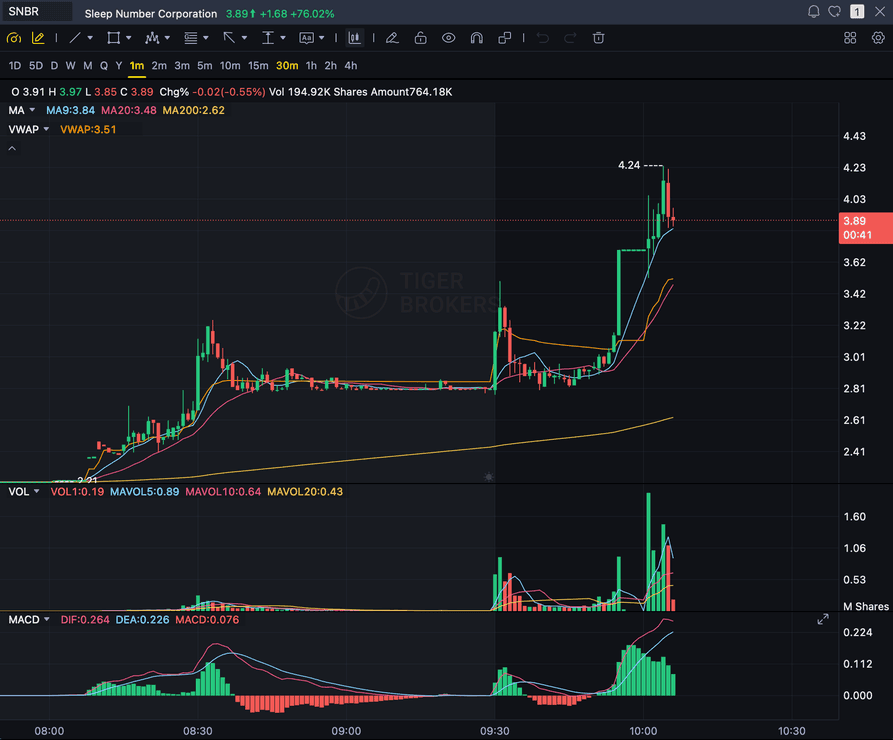
Format example (stock chart)
SNBR 1m bull flag pullback: strong opening momentum, lighter-volume consolidation, and a late breakout attempt near 3.89. Forex, crypto and futures screenshots get the same structure: a grade, entry, structural stop and targets.
STOCKS
Momentum, breakout, pullback, and reversal setups
FOREX
Major pairs, crosses, XAUUSD, and session context
CRYPTO
Bitcoin, Ethereum, and high-beta altcoin charts
FUTURES
Index, commodity, and intraday futures screenshots
Quick answer
How do you get an AI read on a Yuanta Securities chart?
Take a screenshot of the chart inside Yuanta Securities' 投資先生 app or its desktop trading terminal and drop the image into SnapPChart. The model reads exactly what is in the picture, the candle structure, the trend, support and resistance, volume, and whichever of RSI, KD, MACD, or PSY you have switched on, then hands back a setup grade from A+ to F along with an entry, a structural stop, staged exit targets, and the strongest argument against the trade. Yuanta Securities is Taiwan's largest retail brokerage by trading value, commanding roughly 12% of the domestic stock market and tracing its lineage through a 1961 predecessor and a 1996 merger to its current life as the flagship brokerage of Yuanta Financial Holdings. 投資先生 itself carries 8,958 App Store ratings at a 3.6-star average, and beyond charting it bundles a cross-market Smart Stock Selection (智能選股) screener for bull and bear picks, theme, indicator, candlestick, and popularity-based scans, plus a separate quant-screening module (計量嚴選), neither of which reads or grades the single chart you already have open. None of that changes how SnapPChart works: no Yuanta account is ever linked, no API key changes hands, nothing gets installed inside the app, and the analysis never pulls a live Taiwan market feed, a same-day netting (當沖) position, or an order book. It just reads the screenshot you hand it, which is exactly why the identical process also grades a chart from a different Taiwan broker, a US broker, or a manual TradingView layout.
What the AI Returns From a Screenshot
Use the output as a repeatable pre-trade checkpoint, not a prediction.
A+ to F Setup Grade
See whether the setup has enough pattern clarity, momentum, volume, and reward to justify the risk.
Entry, Stop, Targets
Get a structured trade plan with entry zone, invalidation level, targets, and risk/reward.
Screenshot-Based Read
Use charts from TradingView, Webull, ThinkOrSwim, MetaTrader, Robinhood, or any broker.
Risk Notes First
The analysis flags extension, messy chop, weak retests, thin reward, and conflicting indicators.
Workflow
From a 投資先生 screenshot to a graded setup
You don't connect an account or rebuild anything. Screenshot the chart inside 投資先生 or the desktop terminal, upload it, and read the grade.
- Pull up any market on any timeframe inside 投資先生 or the Yuanta desktop terminal and take the screenshot
- Upload it straight to SnapPChart, no Yuanta login, no API key, and nothing to install
- The model reads the candles, the levels, the volume, and whatever RSI, KD, MACD, or PSY you left visible
- Get back the A+ to F grade, the entry, the stop, the targets, and the bear case
- Act on the A and B+ reads, pass on the rest, and screenshot the next one when it shows up
Head to head
SnapPChart vs a general AI chat assistant for a Yuanta screenshot
Paste a chart from 投資先生 into a general AI chat tool and you get a paragraph describing the candles, worded a little differently every time. Here is the side-by-side for the moment right before you risk money on the trade.
| Feature | SnapPChart | General AI chat assistant |
|---|---|---|
| Grades a Taiwan brokerage chart screenshot | Yes, every upload | Inconsistent |
| Reads RSI, KD, MACD, and PSY overlays | When visible on chart | Varies by prompt |
| Same A+ to F scale on every setup | Fixed methodology | No fixed scale |
| Entry, stop, and staged targets in seconds | Yes, on paid plans | Prompting required |
| Flags the bear case before you size in | Every paid grade | Rarely flagged |
| Grade history to compare setups over time | Yes, on paid plans | No |
Keep Learning the Setup
Use these guides to understand how SnapPChart grades the trade instead of taking the output blindly.
Questions traders ask about Yuanta Securities chart analysis
What the AI reads from a 投資先生 or Yuanta desktop screenshot, and what it hands back.
How do I run a Yuanta Securities chart through the AI grader?
Screenshot the chart from 投資先生 or the Yuanta desktop terminal and upload the image to SnapPChart. A vision model reads the candles, structure, support and resistance, volume, and any visible indicators straight from the picture, then hands back a setup grade, an entry, a structural stop, targets, and the main risk to the trade. Nothing about your Yuanta account gets typed in or connected, only the picture.
Does SnapPChart plug into my Yuanta account or the 投資先生 app?
No. There is no login, no API key, and nothing to install inside 投資先生 or on the desktop terminal. SnapPChart only ever sees the screenshot you choose to upload, which is deliberate: reading a picture instead of a live account connection is what lets the exact same grading pass work on a Yuanta chart, a chart from a different Taiwan broker, or a chart from anywhere else entirely.
Does 投資先生's Smart Stock Selection (智能選股) replace SnapPChart's chart grading?
No, they solve different problems. Smart Stock Selection is a market-wide screener: it scans across Taiwan-listed names and hands you a list of bull or bear candidates sorted by theme, indicator, candlestick pattern, or popularity, and the separate quant-screening module does something similar with a quant lens. Neither one looks at the specific chart you are already staring at and tells you whether that particular setup is worth the risk. SnapPChart does the opposite job: you screenshot the one setup the screener, or your own scan, already surfaced, and get back a grade, an entry, a stop, targets, and the bear case for that trade alone. A screener tells you where to look; SnapPChart grades what you found once you got there.
What can I screenshot from Yuanta and have it graded?
Yuanta Securities' core business is Taiwan-listed equities on the Taiwan Stock Exchange and the over-the-counter Taipei Exchange, and 投資先生 also charts overseas positions and other instruments Yuanta offers access to. Any of those charts are fair game as long as the candles, the timeframe, and the price scale are legible in the screenshot. The grader reads the price chart behind the trade, not a stock screener result or a research report, so screenshot the actual setup, not a list of tickers.
Does it understand RSI, KD, MACD, and PSY the way 投資先生 draws them?
It reads whatever is visible on the chart. If you have RSI, KD (the stochastic pair common on Taiwan charting platforms), MACD, PSY, moving averages, or volume switched on inside 投資先生, the grader factors what it can see into the read. An indicator you have hidden, or a setting that never made it into the screenshot, is simply not part of the grade, so turn on whatever you actually trade off before you capture the image.
Does the grade account for 當沖 same-day netting day trading?
Not directly. Same-day netting lets Taiwan traders offset a long and short in the same name on the same day without holding shares overnight, and it is a big part of why Taiwan's retail turnover runs so high, but it is a settlement mechanic, not something visible on a price chart. SnapPChart grades the structure, levels, and risk/reward on the screenshot you upload the same way regardless of whether you plan to hold overnight or close the position intraday under same-day netting rules.
Is Yuanta Securities chart analysis free to try?
Yes. New accounts get one free grade. You get a summarized analysis of your chart and a graded second opinion on whether to take it, wait or pass. Entry, stop, targets and the trade plan come with a paid plan. No card needed to try it. Upload a 投資先生 screenshot to see how it reads your chart.
Does it place the trade or predict where the chart goes next?
No. It is a check you run before you risk money, not an autonomous trader and not a forecast. It grades the setup that is already in the screenshot so the same standard applies every time you use it. It never touches your Yuanta account, never routes an order, never reads a live Taiwan market feed, and never calls the next candle. The decision, and the trade, stay yours.
Get the next 投資先生 setup graded before you take it.
Screenshot the chart, upload it from the homepage, and read the grade in seconds. No Yuanta login and no card required.
Analyze a Yuanta Chart Free