Grade the order block retest before you trade the bounce.
Upload a chart where price broke structure out of a bullish order block and has pulled back to retest that candle's zone, and get a read on whether the break of structure held, whether the retest reacted at the zone, the uptrend leading in, and a full trade plan, so a clean first retest of a fresh order block and a zone that has already been traded through do not get judged the same way.
Drag and drop your chart screenshot
or click to browse. PNG, JPG, or WebP.
Your first analysis is free. No credit card.
Make sure both the time axis (X) and price axis (Y) are visible in your screenshot for accurate results.
Grade
B+
Entry
$3.87
Stop
$3.75
Target
$4.24
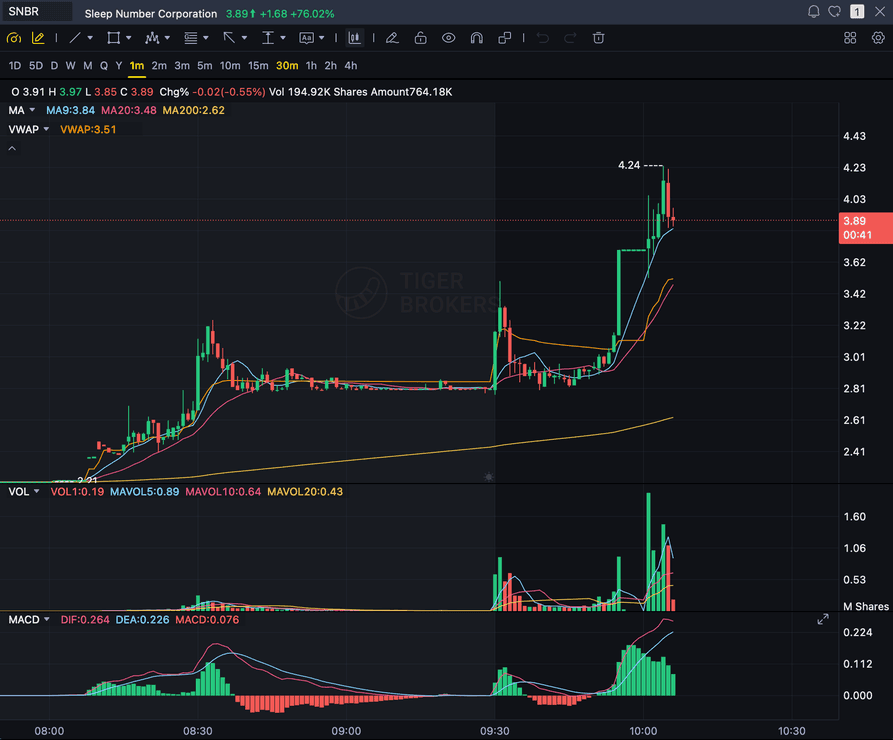
Format example (stock chart)
SNBR 1m bull flag pullback: strong opening momentum, lighter-volume consolidation, and a late breakout attempt near 3.89. Forex, crypto and futures screenshots get the same structure: a grade, entry, structural stop and targets.
OB CANDLE
The last bearish candle before the impulsive move up, as marked
BOS
The break of structure move that followed the order block
RETEST
Price returning to tap the order block zone
REJECTION
The rejection or bounce candle reacting at the zone
Quick answer
What is an order block, and can AI grade it?
An order block is a Smart Money Concepts (SMC/ICT) idea: the last opposite-direction candle before an impulsive move that breaks market structure. A bullish order block is the last bearish, down-close candle before an explosive rally that clears a prior swing high.
The premise is that large institutional buy orders were placed at that candle and only partially filled before price ran, so the zone is expected to get tapped again, often around the 50% mark of that candle's range, so the rest of the orders can fill before the original uptrend resumes. That makes it a forward-looking demand zone based on where the orders were placed, not a level that has proven itself with repeated bounces the way a classic support zone has. SnapPChart grades that exact setup from the chart you upload: it reads the order block candle you marked, the break of structure move that followed it, the retest back into the zone, the rejection or bounce reacting at it, and the uptrend the setup sits inside, then returns a setup grade, an entry off the retest, a structural stop just below the order block candle's low, multi-target exits, and the bear case. It grades only the bullish order block used as a long continuation entry within an existing uptrend, never the bearish order block or a short. It reads the order block and the break of structure exactly as marked on your screenshot, not a live feed, and it does not scan a chart for order blocks, auto-identify the candle or the break of structure for you, watch the tape, or predict the next candle. You mark the order block candle and the break of structure, screenshot the chart, and upload it, and the same checklist runs every time so a clean first tap of a fresh order block and a zone that has already been traded through without reacting get judged the same way.
What the AI Returns From a Screenshot
Use the output as a repeatable pre-trade checkpoint, not a prediction.
A-F Setup Grade
See whether the setup has enough pattern clarity, momentum, volume, and reward to justify the risk.
Entry, Stop, Targets
Get a structured trade plan with entry zone, invalidation level, targets, and risk/reward.
Screenshot-Based Read
Use charts from TradingView, Webull, ThinkOrSwim, MetaTrader, Robinhood, or any broker.
Risk Notes First
The analysis flags extension, messy chop, weak retests, thin reward, and conflicting indicators.
Workflow
Use it as a quality check on the retest
Plenty of order block retests fail when there was no real break of structure behind them, the zone has already been traded through and mitigated, or the reaction at the retest is weak. SnapPChart gives you a consistent read on whether this retest is a clean continuation entry before you trade the zone.
- Mark the order block candle and the break of structure move after it, then screenshot the chart as price retests the zone
- Check that the break of structure actually cleared a prior swing high, not just a minor wiggle
- Confirm the setup sits inside an existing uptrend, a long continuation, not a fresh reversal call
- Read whether the retest produced a clean rejection or bounce at the zone, not a straight break through it
- Note whether this is the first tap of the order block or a later, weaker retest
- Skip the trade when the grade flags a missing break of structure, a mitigated zone, or a weak reaction
Head to head
SnapPChart vs a general AI chat assistant for order block setups
A general AI tool can tell you a candle might be an order block, but it will not consistently check whether the break of structure that followed it actually cleared a prior swing high, whether the retest into the zone produced a clean reaction, or whether the zone has already been traded through, to the same standard twice. SnapPChart reads the order block candle you marked, the break of structure, and the retest reaction the same way on every screenshot you upload, and it grades only the bullish, long-continuation setup.
| Feature | SnapPChart | General AI chat assistant |
|---|---|---|
| Grades the order block retest you marked on the screenshot | Yes, every upload | Inconsistent |
| Reads whether the break of structure actually cleared a prior swing high | From the image | Varies by prompt |
| Judges the rejection or bounce candle at the retest | Every grade | Rarely |
| Confirms the retest sits inside an existing uptrend, a continuation, not a fresh call | Every grade | Rarely |
| Flags a weak setup: no real break of structure, a mitigated zone, a weak reaction | Every bear case | Rarely flagged |
| Entry, stop, targets off the order block retest | Yes | Prompting required |
| Same criteria on every order block | Fixed methodology | Varies by session |
Learn the order block setup
Use these guides to understand what makes an order block retest grade well, so you take the read instead of the output blindly.
What do traders ask about Order Block AI?
How SnapPChart grades a bullish order block retest from your screenshot.
How does the AI grade an order block retest?
It reads the order block candle you marked, the last bearish candle before the break of structure move, whether that move actually cleared a prior swing high, and the retest back into the zone. It factors in whether the reaction at the retest is a clean rejection or bounce, and whether the setup sits inside an existing uptrend, then returns a setup grade, an entry off the retest, a structural stop just below the order block candle's low, and targets. A fresh order block tapped for the first time, with a confirmed break of structure and a sharp rejection at the zone, grades higher than a retest with no real break of structure behind it or a zone that has been tapped repeatedly already.
Does SnapPChart grade the bearish order block or short setups?
No. Order blocks are symmetrical in the ICT methodology: a bearish order block is the last up-close candle before a sharp impulsive drop, used as a short entry on the retest into that zone. SnapPChart's engine grades long, trend-continuation setups only, so this page grades only the bullish order block used as a long entry within an existing uptrend. The bearish order block, the short mirror of this setup, is out of scope for this page.
How is an order block different from a support level?
They can sit at the same price, but they are defined differently, and the support and resistance bounce page grades a different thing. A support or resistance level is reaction-based: it is a horizontal zone that earns its place on the chart because price has visibly bounced there more than once over time. An order block is origin-based: it is a single candle, specifically the last bearish candle before the impulsive break-of-structure move, marking where large orders are believed to have been placed. An order block is valid as a zone to watch the first time price approaches it, whether or not price has ever reacted there before, because the thesis is about where the orders sat, not a track record of bounces. Use the support and resistance bounce page for a level that has already proven itself with repeated reactions; use this page for a single order block candle tied to a specific break of structure.
Does SnapPChart auto-detect order blocks, scan the market, or read live price?
No. It does not scan a feed or a symbol list for order blocks, auto-identify the order block candle or the break of structure for you, watch the tape, or predict the next candle. You identify and mark the order block candle and the break of structure that followed it, then screenshot and upload that chart, and the AI grades the structure it can see in the image: the order block candle, the break of structure, the retest, and the reaction at the zone. The grade reflects the picture you give it.
Does the grade rely on volume at the order block?
No. An order block is a structure-based concept, not a volume-based one, so this page does not read or require volume as a confirmation input, unlike setups such as the support and resistance bounce page, which do read volume. What the grade weighs instead is whether the break of structure genuinely cleared a prior swing high, and whether the retest into the zone produced a clean rejection or bounce.
What is the difference between a fresh order block and a mitigated one?
The first clean retest of an order block is generally considered the highest-probability tap. The zone can be retested more than once, but each additional tap is considered progressively weaker, and once price has fully traded through the zone without a reaction, it is considered mitigated, a failed order block. Mark on your chart whether this is the first tap or a later one, since that context matters for how much weight to put on the zone holding again.
What should be on the chart before I screenshot it?
Mark the order block candle and the break of structure move that followed it so both are visible, along with the candles, timeframe, and price scale, inside the uptrend the setup sits within. The retest and the reaction candle at the zone should be visible so the AI can judge whether the zone held. The more of the prior swing high that the break of structure cleared is in frame, the more complete the read.
Is there a free trial for order block grading?
Yes. New users get two lifetime chart analyses. The first shows the full output so you can see exactly what the order block grade returns; the second is gated to show what the paid product adds. No credit card required.
Grade the order block retest before you trade the bounce.
Mark the order block candle and the break of structure, screenshot the chart with the retest visible, and upload it from the homepage for a structured read on the setup.
Grade an Order Block Setup Free