Screenshot the gap, grade the go.
Upload a chart with the gap and the pre-market high visible and get a read on whether the gap is holding or fading, the break of the pre-market high, the volume behind it, and the EMA and VWAP context, plus a full trade plan, so a clean gap-and-go and a chase into a fading gap do not get judged the same way.
Drag and drop your chart screenshot
or click to browse. PNG, JPG, or WebP.
Your first analysis is free. No credit card.
Make sure both the time axis (X) and price axis (Y) are visible in your screenshot for accurate results.
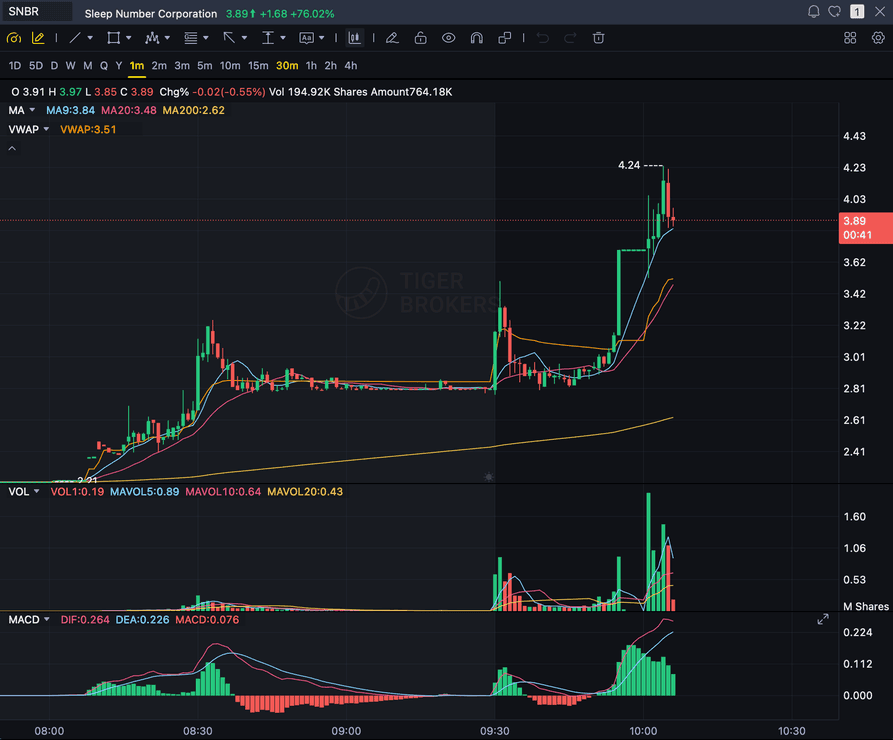
Grade
B+
Entry
$3.87
Stop
$3.75
Target
$4.24
Format example (stock chart)
SNBR 1m bull flag pullback: strong opening momentum, lighter-volume consolidation, and a late breakout attempt near 3.89. Forex, crypto and futures screenshots get the same structure: a grade, entry, structural stop and targets.
GAP
The gap level you screenshot at the open
PMH
Pre-market high the setup needs to break
HOLD
Gap holding vs fading back into the range
VOLUME
Relative volume behind the continuation
Quick answer
What is a gap-and-go setup, and can AI grade it?
A gap-and-go is a first-hour momentum long: a stock gaps up at the open on a catalyst with high relative volume, holds the gap instead of fading back into it, breaks above the pre-market high, and continues higher.
SnapPChart grades that setup from the chart you upload: it reads the gap level, the pre-market high, whether the gap is holding or already fading, the EMA and VWAP context, and the volume visible in the screenshot, then returns a setup grade, an entry, a structural stop, multi-target exits, and the bear case. It does not scan the market for gappers, does not read the catalyst or the news, and does not pull float or short-interest data. You find the gapper with your own pre-market scan and mark or screenshot the chart with the gap and the pre-market high visible, and the same checklist runs every time so a clean break-and-hold and a low-volume fade get judged on the same standard.
What the AI Returns From a Screenshot
Use the output as a repeatable pre-trade checkpoint, not a prediction.
A-F Setup Grade
See whether the setup has enough pattern clarity, momentum, volume, and reward to justify the risk.
Entry, Stop, Targets
Get a structured trade plan with entry zone, invalidation level, targets, and risk/reward.
Screenshot-Based Read
Use charts from TradingView, Webull, ThinkOrSwim, MetaTrader, Robinhood, or any broker.
Risk Notes First
The analysis flags extension, messy chop, weak retests, thin reward, and conflicting indicators.
Workflow
Use it as a quality check on the gap-and-go
Plenty of gap-and-go setups fail when the gap slips back into the range or the break of the pre-market high comes on thin volume. SnapPChart gives you a consistent read on whether the continuation earned the trade before you commit.
- Screenshot the chart with the gap and the pre-market high visible
- Check whether the gap is holding above the open or already fading back in
- Confirm the break of the pre-market high came with volume
- Read the 9 EMA, 20 EMA, and VWAP context around the gap
- Re-grade after the first pullback to see if the continuation got cleaner
- Skip the setup when the grade flags thin volume or an already-extended chase
Head to head
SnapPChart vs a general AI chat assistant for gap-and-go setups
A general AI tool can describe a gap-and-go setup, but it will not grade whether the gap is holding to a fixed standard. SnapPChart checks the gap level, the pre-market high break, the volume, and the hold-vs-fade the same way on every screenshot you upload.
| Feature | SnapPChart | General AI chat assistant |
|---|---|---|
| Grades the gap-and-go setup you screenshot | Yes, every upload | Inconsistent |
| Checks volume behind the pre-market high break | Every grade | Rarely |
| Reads whether the gap is holding or fading | From the image | Varies by prompt |
| Flags a chase into an already-extended gap | Every bear case | Rarely flagged |
| Entry, stop, targets off the gap structure | Yes | Prompting required |
| Same criteria on every gapper | Fixed methodology | Varies by session |
Learn the gap-and-go setup
Use these guides to understand what makes a gap-and-go grade well, so you take the read instead of the output blindly.
What do traders ask about Gap-and-Go AI?
How SnapPChart grades a gap-and-go setup from your screenshot.
How does the AI grade a gap-and-go setup?
It reads the gap level and the pre-market high on the chart you upload, whether the gap is holding or fading back into the range, and whether price has broken and is holding above the pre-market high. It factors the 9 EMA, 20 EMA, and VWAP context into the grade, then returns a setup grade, an entry, a structural stop, and targets. A gap that is holding with a decisive break of the pre-market high grades higher than a gap that is already slipping back into its range.
Does SnapPChart scan for gappers or read the market open?
No. It does not scan the market for gappers, does not build a gap list, does not read the catalyst or the news, and does not know what time the session opened. You find the gapper with your own pre-market scan and screenshot the chart with the gap and the pre-market high visible. The grade reflects the structure in the picture you give it, not a live session or a scanner feed.
Do I need to mark the gap and the pre-market high before I upload?
It helps. Because the AI reads the image, the clearer the gap level and the pre-market high are on the chart, the better the read. Mark the pre-market high with a line, or screenshot a timeframe where the gap and the break are both obvious, then upload that.
Can it tell a real gap-and-go from a chase or a fading gap?
It flags the chase risk in the bear case. If price is already extended, the breakout candle came on thin volume, or the gap is slipping back into its range with no hold, the grade drops and the trade plan calls out the failed-continuation risk. A gap that is holding and breaking the pre-market high with volume grades better.
What timeframes work best for a gap-and-go?
1-minute and 5-minute charts are where the gap, the pre-market high, and the break are clearest. Upload the timeframe you would actually trade the continuation from, with volume and your key moving averages visible, so the AI has the context that matters.
Is there a free trial for gap-and-go grading?
Yes. New users get two lifetime chart analyses. The first shows the full output so you can see exactly what the gap-and-go grade returns; the second is gated to show what the paid product adds. No credit card required.
Grade the gap before you chase the go.
Screenshot the chart with the gap and the pre-market high visible, and upload it from the homepage for a structured read.
Grade a Gap-and-Go Setup Free