Trading AI that grades your setup instead of trading for you.
"AI trading" covers three very different things: bots that execute, services that signal, and tools that grade. SnapPChart is the third. Upload the chart you are about to trade and get a grade, entry, stop, targets, and the case against it.
Drag and drop your chart screenshot
or click to browse. PNG, JPG, or WebP.
Your first grade is free, no card: it shows the setup's grade and the general read. Entry, stop, targets and the trade plan come with a paid plan.
Make sure both the time axis (X) and price axis (Y) are visible in your screenshot for accurate results.
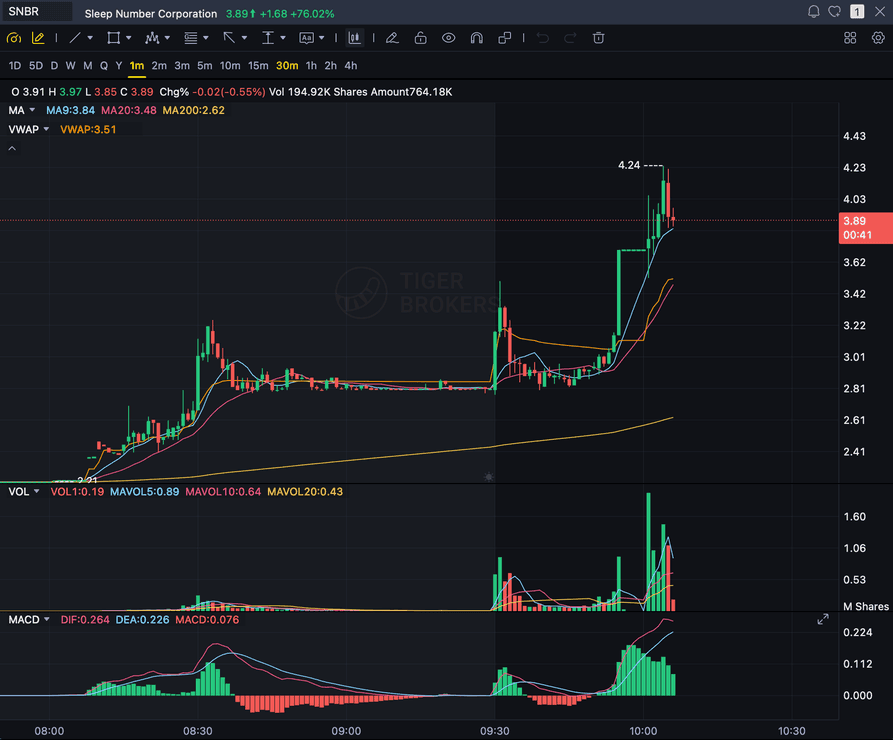
Grade
B+
Entry
$3.87
Stop
$3.75
Target
$4.24
Format example (stock chart)
SNBR 1m bull flag pullback: strong opening momentum, lighter-volume consolidation, and a late breakout attempt near 3.89. Forex, crypto and futures screenshots get the same structure: a grade, entry, structural stop and targets.
BOTS
Execute automatically. You give up the decision.
SIGNALS
Tell you what to buy. You give up the reasoning.
GRADERS
Score the setup you brought. You keep both.
SNAPP
A grader, on purpose
Quick answer
What is AI trading?
AI trading covers three distinct categories: bots that place orders automatically, signal services that tell you what to buy, and setup graders that assess a chart you bring yourself. They fail differently, so the category you pick matters more than the model behind it.
SnapPChart is a setup grader. It does not scan the market, screen for candidates, place orders, or predict the next candle. You find the trade; it reads the screenshot and returns a grade, entry zone, structural stop, multi-target exits, and an explicit bear case. The reason to prefer that boundary is accountability: a bot's losses are opaque and a signal service's losses are somebody else's fault, whereas a grader leaves the decision with you and gives you a consistent record of which setups you were told were weak before you took them anyway. That record is the thing that changes behaviour.
What the AI Returns From a Screenshot
Use the output as a repeatable pre-trade checkpoint, not a prediction.
A-F Setup Grade
See whether the setup has enough pattern clarity, momentum, volume, and reward to justify the risk.
Entry, Stop, Targets
Get a structured trade plan with entry zone, invalidation level, targets, and risk/reward.
Screenshot-Based Read
Use charts from TradingView, Webull, ThinkOrSwim, MetaTrader, Robinhood, or any broker.
Risk Notes First
The analysis flags extension, messy chop, weak retests, thin reward, and conflicting indicators.
Workflow
What an AI trading grader is genuinely good for
The honest answer is narrow, and narrow is the point. These are the moments where a second, consistent read changes what you do.
- Check a setup you already like before you commit size to it
- Get a stop and target that come from structure rather than from a round number
- See the bear case written down before you are emotionally in the trade
- Compare this week's setups against last week's on one fixed scale
- Find out whether your losing trades were graded weak before you took them
- Decide not to trade, which is the outcome the grade most often supports
Market pulse
What's moving across the markets
Recent stories across stocks, forex, crypto, metals, and futures. A setup grade assesses the chart in front of it and knows nothing about the news, so the two reads are meant to be used together.
Skydance Rebounds 5% as Warrant Adjustment Selloff Fades; Netflix Rises 3%, Disney Advances 2%
A warrant adjustment sent Skydance shares into freefall, but buyers are already stepping back in while Netflix and Disney post quieter gains. What the split between the common stock and…
Opendoor and Zillow Surge 7% as Long-Term Rates Retreat; Compass Climbs 6%
Falling Treasury yields are sending housing stocks sharply higher, but one company stands apart because rate moves hit its balance sheet and its inventory at the same time. Whether that…
Quantum Computing Stocks Rebound After Dilution Scare: IonQ and Rigetti Climb 3%, D-Wave Advances 2%
A dilution scare sent quantum computing stocks into a tailspin, but IonQ, Rigetti, and D-Wave are clawing back gains while a key ETF moves in the opposite direction, raising questions…
Netflix's KPop Demon Hunters Is Coming to Toca Boca World™ This October
Spin Master's digital studio Toca Boca® is bringing Netflix's most popular film, KPop Demon Hunters, into the Toca Boca World app, giving its close to 60 million players access to…
Official exchange rates on selected date | Bank of Russia
Official exchange rates on selected date | Bank of Russia Центральный Банк России
IT, private banks lift Nifty 1.7% as Asian AI stocks tumble; smallcaps fall
IT, private banks lift Nifty 1.7% as Asian AI stocks tumble; smallcaps fall Business Standard
Head to head
A setup grader is not a trading bot
Most tools filed under "AI trading" are execution tools: they place orders, run strategies, or push alerts. SnapPChart deliberately sits one step earlier, at the decision you make before any order exists. The distinction matters because the two categories fail in completely different ways.
| Feature | SnapPChart | Automated trading bot |
|---|---|---|
| Decides what to trade | No, you bring the chart | Yes, it screens or signals |
| Places or manages orders | Never | Yes |
| Grades your own idea before entry | Yes, that is the product | Not typically |
| Same structured output every time | Grade, entry, stop, targets, bear case | Varies |
| Leaves the trader accountable for the trade | Yes, by design | Often not |
AI trading by style and market
The grading workflow is the same everywhere, but what counts as a good setup is not. These pages cover what changes per style and per asset.
What people ask about AI trading
Scope, limits, and what this category can honestly do.
What is the difference between AI trading and a trading bot?
A trading bot executes: it places and manages orders under rules you configure, and it keeps trading whether or not you are watching. AI trading is the broader label, and it also covers tools that never touch your broker. SnapPChart is in that second group. It reads a chart screenshot and grades the setup; it has no connection to your account and cannot place a trade.
Does AI trading actually work?
It depends entirely on which category you mean. Fully automated systems live or die on whether their edge survives changing conditions, which is why most retail results are poor. A grader is a narrower claim: it is not predicting the market, it is applying one consistent standard to a chart. The measurable benefit is fewer low-quality entries, not a higher win rate on the trades you were always going to take.
Can AI predict the next candle?
No, and any tool claiming otherwise is selling something. SnapPChart reads what is already on the chart: structure, moving averages, VWAP, and volume. It assesses whether the setup in front of it is well formed. It does not forecast price.
What can SnapPChart actually read from a chart?
Price structure, candles, MACD, RSI, EMAs, VWAP, and volume, as long as they are visible in the screenshot. It cannot read Level 2, order flow, the depth of market, footprint charts, or anything you did not include in the image. If an indicator is not on the chart you upload, it plays no part in the grade.
Is it free to try AI trading analysis?
Yes. New accounts get one free grade. You see the setup's grade and the general read on your chart. Entry, stop, targets and the trade plan come with a paid plan. No card needed to try it. Upload a chart you are watching to see how it grades.
Which markets does it cover?
Stocks, forex, crypto, metals, indices, and futures. The grading fields are the same across all of them; what changes is what counts as a reasonable stop distance and how much weight volume carries, since volume means something different on a centralised equity venue than it does on spot forex.
Does it replace learning to read charts?
No. It is most useful to traders who already have a strategy and want a consistent second read before committing. If you cannot yet say why you like a setup, the grade will not supply that reasoning, and you will not know when to disagree with it.
Does it grade both long and short setups?
SnapPChart grades long and short momentum-continuation setups from chart screenshots. Choose Long only, Short only, or Both sides in your trading profile. Both sides picks one direction from the chart.
Grade the setup. Keep the decision.
Upload the chart from the homepage and get a structured read before you commit.
Grade a Chart Free