Your AI trading coach for the setups you keep getting wrong.
SnapPChart reads every chart you graded, groups the concerns that keep coming back, and names the one setup habit costing you the most. Every pattern it reports cites the exact analyses it came from.
Drag and drop your chart screenshot
or click to browse. PNG, JPG, or WebP.
Your first analysis is free. No credit card.
Make sure both the time axis (X) and price axis (Y) are visible in your screenshot for accurate results.
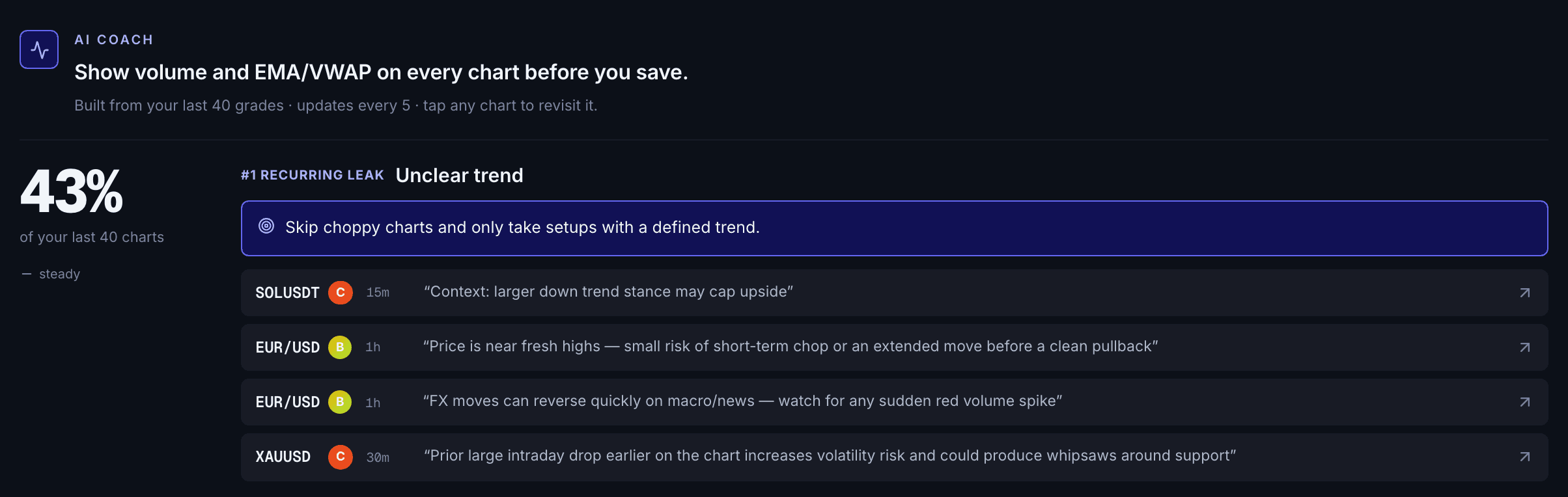
When the coach turns on
Grade 5 charts and the coach names your first focus. There is nothing to log and no broker to connect: the charts you grade before entry are the only input, and every percentage opens the charts it came from.
CHARTS
Coaches off setups you graded, not just fills
CITED
Every pattern links back to a real analysis
TREND
Improving, flat, or worsening per category
FOCUS
One habit at a time until it moves
Quick answer
What is an AI trading coach?
An AI trading coach is software that reviews your own trading decisions, finds the mistakes you repeat, and tells you which one to fix first. Most AI coaches work on closed trades imported from a broker or journal, so the feedback arrives after the money is gone. SnapPChart coaches off the charts you graded before entry, including setups you looked at and skipped, and sorts every concern the AI raised into a fixed set of setup problems: overextended entries, entering into resistance, thin risk/reward, weak volume, no clean pullback, and four more. After five graded charts it names your primary focus, cites the exact analyses behind it, and tracks whether that category is improving, flat, or getting worse. The point is not a score on your personality, it is a specific, evidenced answer to which setup you should stop taking.
What the AI Returns From a Screenshot
Every grade feeds the coach, so the review gets sharper the more charts you run.
A-F Setup Grade
See whether the setup has enough pattern clarity, momentum, volume, and reward to justify the risk.
Entry, Stop, Targets
Get a structured trade plan with entry zone, invalidation level, targets, and risk/reward.
Screenshot-Based Read
Use charts from TradingView, Webull, ThinkOrSwim, MetaTrader, Robinhood, or any broker.
Risk Notes First
The analysis flags extension, messy chop, weak retests, thin reward, and conflicting indicators.
Workflow
How the coaching builds up
You do not journal anything extra. Grade charts the way you already would, and the coach assembles the pattern from the concerns the AI raised on each one.
- Grade charts normally, before you enter
- The AI sorts each concern into a fixed setup category
- After five graded charts the coach names your primary focus
- Read the cited analyses behind the pattern, not just the claim
- Watch the category trend as improving, flat, or worsening
- Keep the same focus until it moves, then take the next one
What you actually see
Everything else it caught.
The leak at the top of the page is the one to fix first, but it is not the only thing the coach is counting. This is the rest of the same live profile, 40 graded charts in. The percentages, the flagged charts, and the fixes are the product's own output.
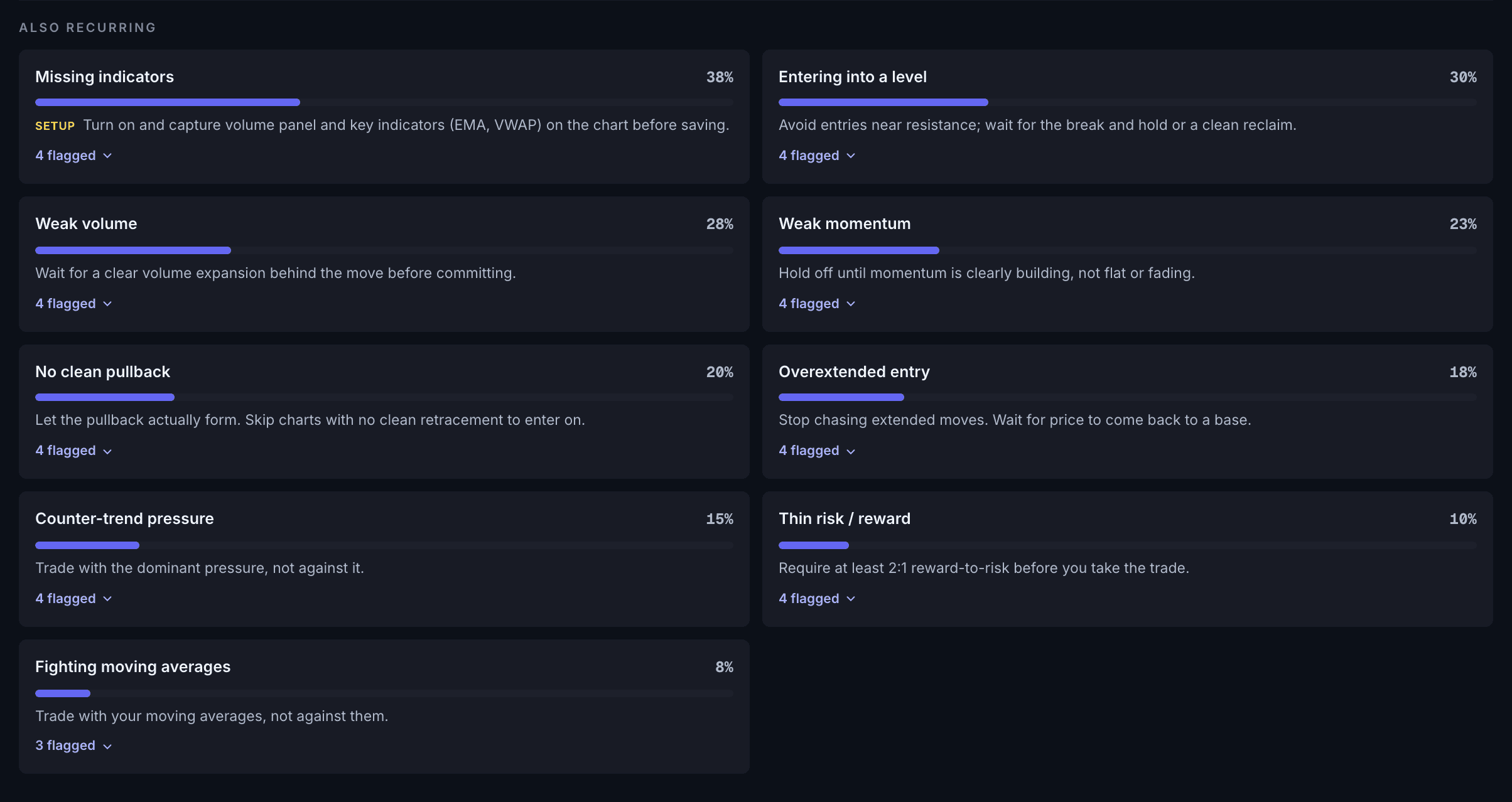
The taxonomy
What your AI trading coach actually tracks.
Every concern the AI raises on a chart is sorted into one of nine setup problems. The list is fixed, so the same mistake is counted the same way on every chart and the tally means something across months. These categories came out of the real concern vocabulary across roughly 3,000 graded charts, not a generic list of trading sins.
| Flagged as | What it means on the chart |
|---|---|
| Weak volume | volume was weak, mixed, or lacked a breakout signature behind the move |
| No clean pullback | no clear pullback or healthy retracement to enter on |
| Weak momentum | momentum was muted, mixed, fading, or MACD was flat |
| Unclear trend | price was choppy, rangebound, sideways, or had no defined trend or structure |
| Entering into a level | price was sitting into resistance or support, or in a tight range with trap risk |
| Overextended entry | price was extended from its base, chasing, parabolic, or overbought/oversold |
| Fighting moving averages | price was on the wrong side of the moving averages, or EMAs sloped against the trade |
| Thin risk / reward | no clean 2:1 reward-to-risk, or limited room to the target |
| Counter-trend pressure | selling or buying pressure, or bias, working against the intended direction |
The fix type is locked per category. A chart that was too blurry to read gets told to fix the screenshot, never to change the trade. Read how to grade trades before entering for the grading criteria these concerns come from.
Before, not after
Coaching before the entry, not after the loss.
A journal-based coach can only review trades you filled. That leaves out the most useful decisions you make all week: the setups you looked at and passed on. Because the coach reads charts you graded rather than trades you closed, a chart you graded and skipped still counts, and skipping a weak one reads as a good decision instead of a blank row.
It also means there is nothing to log and no broker to connect. After 5 graded charts the coach has enough to name a focus. If you are still deciding whether AI coaching is worth the time, the honest write-up on whether AI coaching actually helps covers where it works and where it does not. If the habit you are fighting is chasing after a stop-out, the revenge trading and overtrading breakdown is the better starting point.
Cited, not asserted
Each category carries the verbatim concern the AI wrote and the analysis it came from, so you can reopen the chart and check the call yourself.
One focus at a time
The coach names a single primary focus and stays on it across refreshes until the category moves, instead of handing you ten things to fix at once.
Trend, not a snapshot
Every category reads improving, flat, or worsening by comparing your recent charts against the ones before them, so you can tell whether the fix is working.
Your rules
It grades against your strategy, not a generic one.
Set your trading style, your direction bias, which reads you care about, and your own notes in your profile. Those go into every analysis, so a swing trader and a scalper looking at the same chart do not get the same grade. The coach then measures you against the rules you set rather than a house strategy you never agreed to, which is what makes a repeated concern worth acting on.
Head to head
SnapPChart vs a journal-based AI trading coach
Journal coaches read the trades you already closed. SnapPChart coaches off the setups you graded, including the ones you looked at and skipped, so the feedback lands before the entry instead of after the loss.
| Feature | SnapPChart | Journal-based AI coach |
|---|---|---|
| Sees setups you skipped | Yes, every graded chart | Only filled trades |
| Feedback arrives before entry | Yes | After the trade closes |
| Needs broker or journal import | No, just upload charts | Required |
| Cites the source analysis | Verbatim, per pattern | Usually summarised |
| Tracks whether a habit is improving | Per category, over time | Varies |
Keep Learning the Setup
Use these guides to understand what the coach is measuring before you act on it.
What do traders ask about AI Trading Coach?
How the coaching works and what it needs from you.
What does an AI trading coach actually do?
An AI trading coach reviews your own decisions and tells you which mistake to fix first. SnapPChart reads the concerns the AI raised across every chart you graded, sorts them into a fixed set of setup problems, and reports the category that keeps coming back. It does not predict price and it does not grade your personality. It answers one question: which setup should you stop taking.
How is this different from a trading journal?
A journal records trades you took and usually needs you to log them. The coach works off charts you graded before entry, so it also sees the setups you considered and skipped, and it needs no extra logging. If you skipped a chart that graded badly, that is a decision worth crediting, and a journal that only holds fills cannot see it.
How many charts before the coach works?
Five graded charts. Below that there is not enough signal to separate a habit from a bad day, so the coach stays quiet rather than inventing a pattern from two charts.
Does it work if I do not log my trades?
Yes. There is nothing to log and no broker to connect. Grading charts is the only input, so the record builds from the work you were already doing before an entry.
What kinds of mistakes does it catch?
Setup-selection mistakes, read off the chart itself: overextended entries, price sitting into resistance or support, thin risk/reward, weak volume behind the move, no clean pullback to enter on, fighting the moving averages, counter-trend pressure, unclear trend, weak momentum, and charts where the indicators were not legible enough to grade properly.
Can I trust the patterns it reports?
Every category carries citations: the verbatim concern text and the analysis it came from, so you can open the original chart and check the call yourself. The fix type is also fixed per category, which means a screenshot that was too blurry to read gets a capture fix, never trading advice.
Does it grade against my own strategy?
Yes. Set your trading style, direction bias, and your own notes in your profile, and every analysis is graded against those rules. The coach then measures you against your strategy rather than a generic one.
Is there a free trial?
New users get 2 lifetime chart analyses to try the grading workflow. The first shows the full output and the second is gated so you can see what the paid product adds. Coaching turns on at five graded charts on any paid plan. No credit card required to start.
Find the setup you keep getting wrong.
Grade a chart and start the record. The coaching builds from the charts you were already checking.
Grade a Chart Free