Grade your small-cap setup before you take it.
Small-cap and low-float stocks ($2 to $20, a thin share count, outsized moves on a catalyst) trade on bull flags, EMA and VWAP pullbacks, and volume spikes, the same momentum patterns the grading criteria are built around. You find the runner with your own scanner or watchlist. Upload the chart screenshot and SnapPChart reads the structure, the pullback, the EMA and VWAP context, and the volume, then returns a setup grade, entry, stop, targets, and the bear case.
Drag and drop your chart screenshot
or click to browse. PNG, JPG, or WebP.
Your first analysis is free. No credit card.
Make sure both the time axis (X) and price axis (Y) are visible in your screenshot for accurate results.
Grade
B+
Entry
$3.87
Stop
$3.75
Target
$4.24
Sample readout
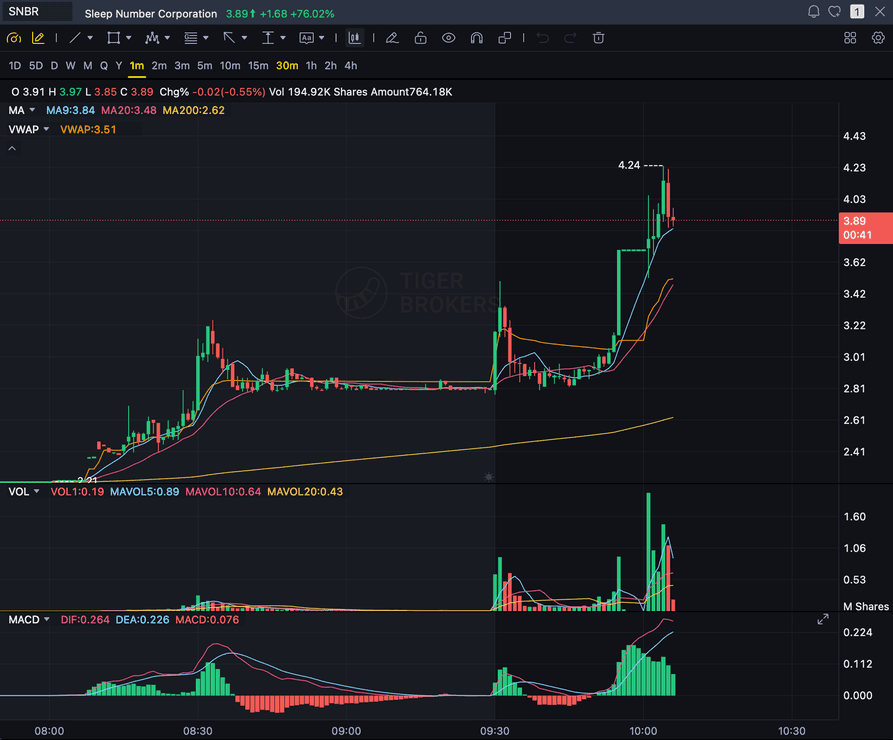
SNBR 1m bull flag pullback: strong opening momentum, lighter-volume consolidation, and a late breakout attempt with the 3.89 price marker near the current candle.
$2-$20
Classic low-float price range for small-cap momentum
BULL FLAG
Pullback and flag structure the grading criteria are built around
VWAP / EMA
Intraday support, reclaim, and rejection context
VOLUME
Relative-volume confirmation before you chase a parabolic move
Quick answer
What is AI small-cap trading analysis?
AI small-cap trading analysis means using a chart-reading model to grade a small-cap or low-float momentum setup before you enter it, instead of chasing a fast mover on feel. Small-cap and low-float stocks, generally $2 to $20 with a thin share count, are the classic momentum trading ground: a catalyst sends the stock vertical on heavy volume, and the setup lives or dies on the pullback, the flag, and whether volume actually confirms the move. You bring the runner, you found it with your own scanner or watchlist, and SnapPChart grades whether the chart earned the trade. It reads the screenshot you upload directly: the market structure, the pullback and flag quality, the EMA and VWAP context, and the visible volume, then returns a setup grade from A+ to F, an entry zone, a structural stop, multi-target exits, and the bear case. The scoring behind that grade is modeled on small-cap momentum trading in the first place, the same pullback-entry, bull-flag, volume-confirmation framework used across every stock chart on SnapPChart, so a small-cap runner is not an edge case for the grading logic. What it does not do: it does not track float, short interest, or short-borrow fees, does not detect trading halts or circuit breakers, does not read live liquidity or the bid/ask spread, and does not know a company's market cap, dilution history, or SEC filings. You bring that context from your own scanner and risk management; the AI grades the chart structure in front of it.
What the AI Returns From a Screenshot
Use the output as a repeatable pre-trade checkpoint, not a prediction.
A-F Setup Grade
See whether the setup has enough pattern clarity, momentum, volume, and reward to justify the risk.
Entry, Stop, Targets
Get a structured trade plan with entry zone, invalidation level, targets, and risk/reward.
Screenshot-Based Read
Use charts from TradingView, Webull, ThinkOrSwim, MetaTrader, Robinhood, or any broker.
Risk Notes First
The analysis flags extension, messy chop, weak retests, thin reward, and conflicting indicators.
Workflow
Use it as a pre-entry filter on the small caps you find
Small-cap runners move fast, and a chase into an already-extended parabolic move still costs real money. You bring the ticker from your own scanner or watchlist; SnapPChart gives you a quick, consistent quality gate before you commit to the trade.
- Grade a bull flag or EMA pullback before you take the entry
- Check whether volume actually confirms the move or is already fading
- Confirm the chart isn't already parabolic and extended before you chase it
- Re-grade the same runner after a pullback to see if the setup got cleaner
- Compare two small-cap setups on the same checklist before you pick one
- Skip C-grade small-cap setups where the reward doesn't justify the risk
Head to head
SnapPChart vs a general AI chat assistant for small-cap setups
A general AI chat tool can describe a small-cap chart, but it will not return the same structured fields on every runner, and it will not flag chase risk on a parabolic move by default. SnapPChart grades every small-cap setup to the same standard so your process stays consistent from one runner to the next.
| Feature | SnapPChart | General AI chat assistant |
|---|---|---|
| Grades small-cap and low-float chart screenshots | Yes, every upload | Inconsistent |
| Flags an already-parabolic, extended move | Every bear case | Rarely flagged |
| EMA and VWAP pullback context in the grade | When visible on chart | Varies by prompt |
| Entry, stop, targets in seconds | Yes | Prompting required |
| Same criteria on every small-cap runner | Fixed methodology | Varies by session |
| Grade history to review your small-cap trades | Yes | No |
Keep Learning the Setup
Use these guides to understand how SnapPChart grades the trade instead of taking the output blindly.
What do traders ask about AI Small-Cap Trading?
How SnapPChart grades a small-cap or low-float setup from a screenshot.
What does AI for small-cap trading actually do?
It grades the small-cap or low-float setup you are about to take. Upload the chart screenshot of the runner you found and SnapPChart reads the structure, the pullback, the EMA and VWAP context, and the volume, then returns a setup grade from A+ to F, an entry zone, a structural stop, multi-target exits, and the bear case. It is built for the moment right before you click buy on a fast-moving small-cap, so you can see whether the chart earned the trade instead of chasing because it is running.
Does the AI track float, short interest, or halts?
No. SnapPChart reads the chart screenshot you upload; it does not pull float, short-interest, or short-borrow data, does not detect trading halts or circuit breakers, and does not read live liquidity or the bid/ask spread. Those are exactly the numbers a small-cap trader should check on their own scanner or broker before sizing in. The AI grades the chart structure in front of it: the pattern, the pullback, the EMA and VWAP context, and the volume that are visible in the image.
Does it scan for small-cap runners or build a watchlist?
No. You find the small-cap runner with your own scanner or watchlist, then upload the chart here to grade the setup before you enter. SnapPChart does not scan the market for small caps, does not build a gap or momentum list, and does not read the catalyst or news. You bring the runner; the AI grades whether the chart earned the trade.
Why does the grading style fit small-cap and low-float setups?
The scoring behind every stock grade, including small caps, is built around pullback entries (9 EMA, 20 EMA, VWAP support), bull flag continuation, and volume confirmation on green versus red candles, the same style small-cap and low-float momentum traders already use. It is not a feature added for this page; it is the core methodology the whole product runs on for every stock chart. It is also why SnapPChart caps forex, crypto, and futures at a lower top grade: that scoring approach was built for small-cap stock dynamics and does not transfer as cleanly to those other markets.
Does it read live liquidity, dilution filings, or SEC data?
No. SnapPChart reads only the chart image you upload. It does not see live liquidity, bid/ask spread, dilution filings, share offerings, or SEC filings, and it does not know a stock's market cap or share count. Those numbers matter for small-cap risk management, and you should check them yourself before sizing a position; the AI grades the visible chart structure, not the company's balance sheet.
Does it work on penny stocks and OTC tickers?
It reads any chart screenshot you upload, including sub-$1 penny stocks and OTC tickers, but the read is only as good as the chart. Thin, choppy penny-stock charts with wide, erratic candles and unreliable indicators are harder to grade cleanly than a chart with normal volume and structure, and the AI will not manufacture a clean pattern out of a messy one. The bear case flags when the structure itself looks unreliable.
Does it work on long setups only?
SnapPChart grades long and short momentum-continuation setups from chart screenshots. Choose Long only, Short only, or Both sides in your trading profile. Both sides picks one direction from the chart.
Is there a free trial for small-cap traders?
Yes. New users get two lifetime chart analyses to try the grading workflow on real small-cap setups. The first analysis shows the full depth so you can see exactly what it returns; the second is gated to show what the paid product adds. No credit card required.
Grade the small-cap setup before you click buy.
Bring the runner from your scan, upload the chart from the homepage, and get a quick, structured read on the setup. No credit card required.
Grade a Small-Cap Chart Free