Screenshot your Barchart.com chart, get a graded trade plan back.
SnapPChart reads a Barchart.com chart screenshot the way you do, the candles, the levels, and whatever indicators you have plotted, then returns a setup grade, entry, stop, targets, and the main reason it could fail. No account connection, no API, and no Barchart Opinion or Trend Seeker data read. It reads the picture you upload, so it grades the actual setup on your Barchart.com chart instead of touching your account or its signal scores.
Drag and drop your chart screenshot
or click to browse. PNG, JPG, or WebP.
Your first analysis is free. No credit card.
Make sure both the time axis (X) and price axis (Y) are visible in your screenshot for accurate results.
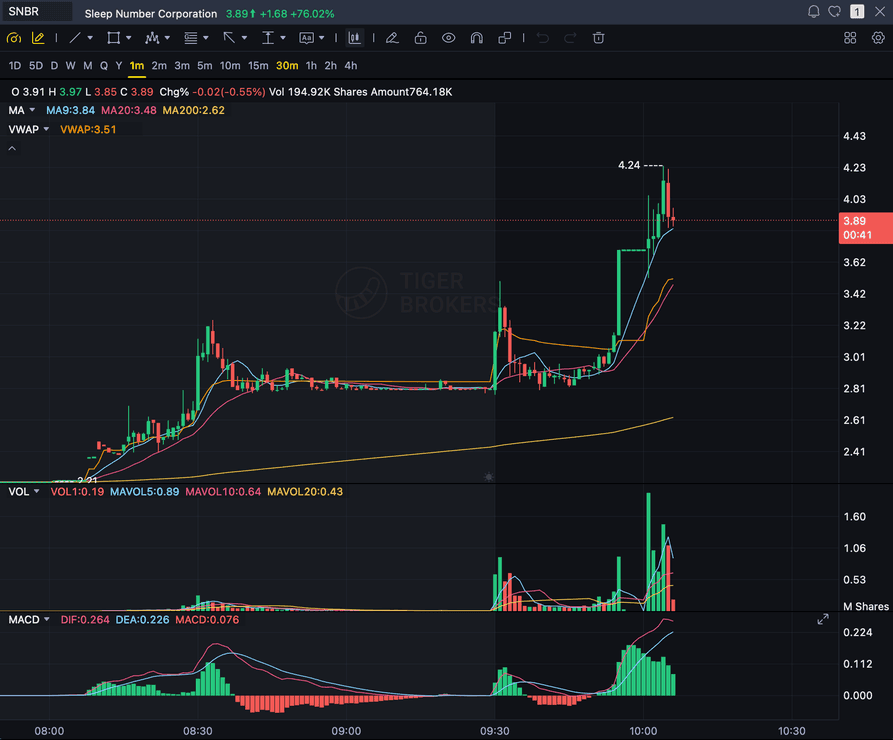
Grade
B+
Entry
$3.87
Stop
$3.75
Target
$4.24
Format example (stock chart)
SNBR 1m bull flag pullback: strong opening momentum, lighter-volume consolidation, and a late breakout attempt near 3.89. Forex, crypto and futures screenshots get the same structure: a grade, entry, structural stop and targets.
STOCKS
Momentum, breakout, pullback, and reversal setups
FOREX
Major pairs, crosses, XAUUSD, and session context
CRYPTO
Bitcoin, Ethereum, and high-beta altcoin charts
FUTURES
Index, commodity, and intraday futures screenshots
Quick answer
How do you analyze a Barchart.com chart with AI?
You screenshot the chart on Barchart.com, the web platform a lot of active technical traders use to track stocks, futures, options, and forex, and upload the image. SnapPChart reads the screenshot directly, the candles, trend, support and resistance, volume, and any indicators you have plotted, then grades the setup A+ to F with an entry, a structural stop, multi-target exits, and a bear case. Barchart.com is a proprietary charting and market-data platform, and it has long carried Barchart Opinion and Trend Seeker, its own rule-based technical signal tools that turn a stack of fixed technical rules into a score or a short-term outlook, not a machine-learning model that grades a chart setup. So this is the fastest honest answer to which AI can read a Barchart screenshot: you do not link your Barchart.com account, you do not connect an API, the analyzer does not read your Barchart Opinion or Trend Seeker scores, does not read your watchlists, and it does not scan the market, place or route orders, or predict the next candle, because it only reads the picture you upload, not your platform or a data feed. SnapPChart is also a different tool than Barchart Opinion and Trend Seeker, those are fixed-rule technical scores built into Barchart.com, SnapPChart is a separate AI model that grades the specific setup in the chart you screenshot. That also means it is platform-agnostic. The same upload works whether you chart stocks, futures, options, or forex on Barchart.com, and the same grading checklist runs on every screenshot so a strong setup and a weak one get judged the same way.
What the AI Returns From a Screenshot
Use the output as a repeatable pre-trade checkpoint, not a prediction.
A-F Setup Grade
See whether the setup has enough pattern clarity, momentum, volume, and reward to justify the risk.
Entry, Stop, Targets
Get a structured trade plan with entry zone, invalidation level, targets, and risk/reward.
Screenshot-Based Read
Use charts from TradingView, Webull, ThinkOrSwim, MetaTrader, Robinhood, or any broker.
Risk Notes First
The analysis flags extension, messy chop, weak retests, thin reward, and conflicting indicators.
Workflow
How do you turn a Barchart.com screenshot into a graded setup?
You do not connect your account or export any signal data. Screenshot the chart on Barchart.com, drop the image in, and read the grade.
- Screenshot any stock, futures, options, or forex chart on Barchart.com
- Upload the image, with no account connection, no API, and no Opinion or Trend Seeker data pulled in
- The analyzer reads candles, levels, volume, and the indicators visible on your chart
- Read the A+ to F grade, entry, stop, targets, and the bear case
- Pass on the C and F setups, then screenshot the next chart
Head to head
SnapPChart vs reading a Barchart.com chart by hand
Barchart.com users jump between stocks, futures, commodities, and forex charts, often with Barchart Opinion or Trend Seeker in another tab pointing a direction. Those are signal scores. SnapPChart grades the specific chart you screenshot: the setup quality, the entry, the stop, and where the trade is wrong.
| Feature | SnapPChart | Barchart charts read by hand |
|---|---|---|
| Grades the setup, not just the trend direction | Entry, stop, targets | Direction, not a plan |
| Same criteria on a stock, futures, or forex chart from Barchart | Same fixed scale | Market by market |
| Reads Barchart studies plotted on the chart | When visible | Interpreted one by one |
| Crude, gold, and grain futures charts graded like equity charts | Same checklist | Looser read on new markets |
| Written case against the trade, long or short | Every read | Rarely written down |
| Opinion and Trend Seeker signal scores | Not read | On your Barchart screen |
| Grade history across asset classes | Saved per analysis | Not tracked |
Keep Learning the Setup
Use these guides to understand how SnapPChart grades the trade instead of taking the output blindly.
What do traders ask about Barchart Chart Analysis?
How the AI reads a Barchart.com screenshot and what it returns.
How do I analyze a Barchart.com chart with AI?
Screenshot the chart on Barchart.com, then upload the image to SnapPChart. A multimodal vision model reads the candles, trend, support and resistance, volume, and any visible indicators directly from the picture, then returns a setup grade, an entry, a structural stop, targets, and the main reason the trade could fail. You do not type out what the chart shows or connect your Barchart.com account.
Is SnapPChart a Barchart.com add-on, or the same as Barchart Opinion and Trend Seeker?
No to both. There is nothing to install, no API to connect, and no Barchart.com account to link. SnapPChart reads the screenshot you upload, so it works alongside Barchart.com without being part of it. It is also a different tool than Barchart Opinion and Trend Seeker, Barchart's own long-standing rule-based technical signal tools built on fixed technical rules, not an AI model. SnapPChart does not read those scores, it grades the actual setup in the chart you screenshot.
Does it work with Barchart.com across stocks, futures, options, and forex?
Yes. The analyzer reads the chart image, not the platform behind it, so a stock chart, a futures chart, an options chart, or a forex chart from Barchart.com is handled the same way. Any symbol you chart on Barchart.com is in scope as long as the candles, timeframe, and price scale are visible.
Does it read the indicators on my Barchart.com chart?
It reads the indicators that are visible in the screenshot. Barchart.com carries a full charting and market-data toolset, and if you have moving averages, RSI, MACD, volume, or other studies showing on the chart, the analyzer factors what it can see into the grade. It cannot read an indicator you have hidden, a Barchart Opinion score, or a Trend Seeker signal that is not visible in the image, because it only has the picture. Show the levels you care about before you screenshot.
Is Barchart chart analysis free to try?
Yes. New users get two lifetime chart analyses, no credit card required. The first analysis shows the full depth so you can see exactly what the AI returns from a Barchart.com screenshot, the second is gated to show what the paid product adds.
Does it place trades, scan the market, or predict where price goes next?
No. It is a pre-trade decision layer, not an autonomous trader and not a price predictor. It grades the setup in the screenshot so your process stays repeatable. It does not connect to Barchart.com, does not read your Opinion or Trend Seeker scores or watchlists, does not scan the market for you, does not place or route orders, and does not call the next candle. You stay the decision-maker.
Grade your next Barchart chart.
Screenshot a chart on Barchart.com, upload it from the homepage, and get a graded trade plan in seconds. No account connection and no credit card required.
Analyze a Barchart Chart Free